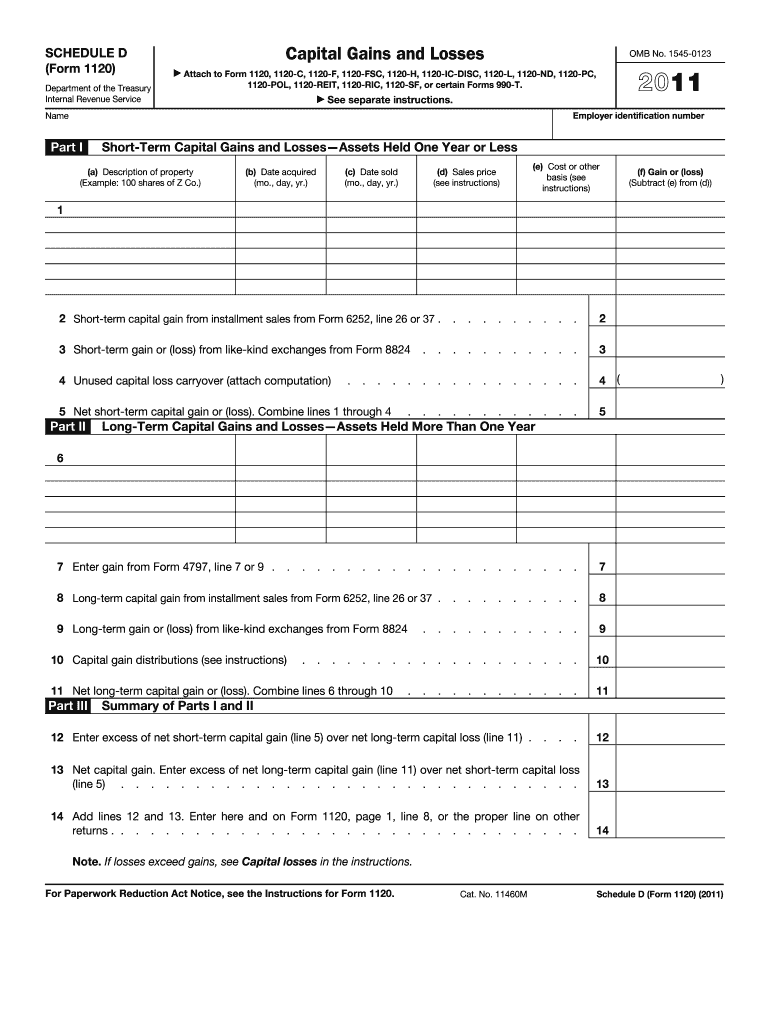
Internal Revenue Service 1120-POL, 1120-REIT, 1120-RIC, 1120-SF, or certain Forms 990-T. See separate instructions. Employer identification number Name Part I Short-Term Capital Gains and Losses Assets Held One Year or Less (a) Description of property (Example: 100 shares of Z Co.) (b) Date acquired (mo., day, yr.) (c) Date sold (mo., day, yr.) (e) Cost or other basis (see instructions) (d) Sales price (see instructions) (f) Gain or (loss) (Subtract (e) from (d)) 1 2 Short-t.

Open form follow the instructions

Easily sign the form with your finger

Send filled & signed form or save
How to fill out the IRS 1120 - Schedule D online
Filling out the IRS 1120 - Schedule D can seem challenging, but this guide is designed to make the process more accessible. By following these instructions, you can effectively report your capital gains and losses for your corporation’s tax return.
Follow the steps to complete your IRS 1120 - Schedule D online.
- Click the ‘Get Form’ button to access the IRS 1120 - Schedule D form and open it in the digital editor.
- Enter your employer identification number in the designated field to identify your corporation.
- Provide the name of your corporation as it appears on your tax documents.
- In Part I, list your short-term capital gains and losses. For each asset, fill in the description, acquisition date, sale date, sales price, cost or other basis, and calculate the gain or loss.
- Complete line 1 with your total short-term capital gains. Include amounts from installment sales, if applicable.
- If you have short-term gains from like-kind exchanges, note these on line 3.
- On line 4, enter any unused capital loss carryover and attach your computation.
- Calculate your net short-term capital gain or loss by combining lines 1 through 4, and enter the result on line 5.
- In Part II, proceed with your long-term capital gains and losses. Enter similar details for assets held over one year, following the provided structure.
- Complete lines 7 through 10 with appropriate figures from Form 4797, installment sales, like-kind exchanges, and capital gain distributions.
- Calculate your net long-term capital gain or loss by summing lines 6 through 10, and place the result on line 11.
- On line 12, enter the excess of net short-term capital gain over net long-term capital loss.
- For line 13, calculate the net capital gain, entering the excess of net long-term capital gain over net short-term capital loss.
- Finally, add lines 12 and 13, and enter the total on line 14, ready to include it on your main Form 1120 or relevant returns.
- After completing the form, save your changes, download a copy, print it for your records, or share it as needed.
Take the next step in managing your documents by completing your IRS 1120 - Schedule D online.
Experience a faster way to fill out and sign forms on the web. Access the most extensive library of templates available.
Related content
See instructions for how to figure the amounts to enter on the lines below. This form may...
Schedule D should be used by a taxpayer who files either Forms 1120, 1120-A...
Jan 31, 2012 — However, you may want to complete certain Form 1120 schedules, such as...
Get answers to your most pressing questions about US Legal Forms API.
Where can I find Schedule D TurboTax?
In TurboTax, you can find your IRS 1120 - Schedule D by entering your capital gains and losses in the corresponding section. The software will automatically generate Schedule D based on the information you provided. For more clarity, consult the TurboTax help resources or consider US Legal Forms for guidance on assembling and filing your tax documents effectively.
Who sends Schedule D?
The IRS does not send Schedule D directly to individuals; rather, it is the taxpayer's responsibility to file it along with their IRS 1120 return. Typically, corporations complete this form as part of their reporting requirements. If you're unsure how to prepare or file it, platforms like US Legal Forms can offer templates and assistance to make the process straightforward.
How do I get to Schedule D on TurboTax?
To access the IRS 1120 - Schedule D on TurboTax, start by navigating to the section that deals with investments and capital gains. TurboTax will guide you through entering your data, and it will automatically generate Schedule D as part of your tax return. If you need additional support, consider using US Legal Forms to clarify any doubts regarding Schedule D completion.
What is the Schedule D tool for taxes?
The Schedule D tool for taxes allows you to record capital gains and losses for your IRS 1120 filings. It simplifies the process of reporting these transactions by providing a structured format. Using this tool helps ensure compliance and accuracy in your reporting. For those needing assistance, platforms like US Legal Forms offer resources to help understand and utilize these tools effectively.
Where is Schedule D on the Tax Act?
In Tax Act, you can locate the IRS 1120 - Schedule D within the section dedicated to forms and schedules. It's usually part of the corporate tax return preparation process. As you work through your returns, Tax Act provides prompts that will guide you to complete Schedule D efficiently. If you have questions, consider turning to US Legal Forms for expert support.
What is the Schedule D of 1120?
The IRS 1120 - Schedule D provides information about capital gains and losses for corporations. This schedule reports the sale of capital assets and helps in determining tax obligations. Understanding how to fill it out correctly is crucial for accurate reporting. US Legal Forms also offers guidance on how to navigate and complete this essential form.
Where do I get my Schedule D?
To obtain your IRS 1120 - Schedule D, visit the IRS website where you can download the latest version of the form. If you prefer using tax software, these tools often include Schedule D within their interface. For a simplified process, consider using US Legal Forms to conveniently access and fill out your Schedule D.
Where can I find my Schedule D?
You can easily find your IRS 1120 - Schedule D in your tax filings from previous years. If you used tax software, look for the section related to forms or schedules. Additionally, the IRS website offers forms ready for download. If you're still having trouble, platforms like US Legal Forms can help you locate or complete your Schedule D.
What is a Schedule D property tax?
Schedule D property tax does not refer directly to a specific tax but rather to the idea of reporting property-related transactions on Schedule D. When you sell a property or another asset, you may incur capital gains, which must be reported to the IRS. Understanding how these transactions affect your taxes is crucial in making informed financial decisions.
Do I have to file a schedule D if I sold my house?
If you sold your primary residence and meet certain criteria, you might not need to file the IRS 1120 - Schedule D. However, if you sell the property for a profit exceeding exclusions, then reporting the gain on Schedule D is necessary. It is good practice to consult tax resources or professionals to ensure compliance.
Use professional pre-built templates to fill in and sign documents online faster. Get access to thousands of forms.
If you believe that this page should be taken down, please follow our DMCA take down process here.
This form is available in several versions. Select the version you need from the drop-down list below.