Loading
Form preview
  • US Legal Forms
  • Form Library
  • Tax Forms
  • New York Tax Forms
  • Ny Dtf Dtf-802 2015

Get Ny Dtf Dtf-802 2015-2026

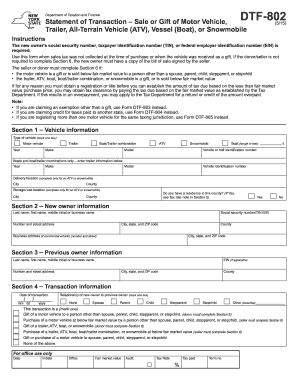
Ection 6) Gift or purchase of a motor vehicle to spouse, parent, child, stepparent, or stepchild None of the above For office use only Date Initials Office Fair market value Audit Tax Rate Tax paid % Term no. Page 2 of 2 DTF-802 (5/15) Section 5 Purchase information Value 1 Purchase price a. Amount of cash payment........................................................................................... 1a $ b. Balance of payments assumed.

How it works

  1. Open form

    Open form follow the instructions

  2. Easily sign form

    Easily sign the form with your finger

  3. Share form

    Send filled & signed form or save

How to fill out the NY DTF DTF-802 online

Filling out the NY DTF DTF-802 form is essential when a motor vehicle, trailer, ATV, vessel, or snowmobile is either purchased without sales tax being collected or received as a gift. This guide will walk you through the necessary steps to complete the form efficiently and accurately online.

Follow the steps to complete the NY DTF DTF-802 form online.

  1. Use the ‘Get Form’ button to access the DTF-802 form. This will allow you to open the document in your preferred online editor.
  2. Begin filling out Section 1 by providing the vehicle information. Select the type of vehicle you are registering (motor vehicle, trailer, ATV, or snowmobile). Enter the year, make, model, and the vehicle identification number (VIN). If applicable, add details for the trailer and delivery location.
  3. In Section 2, enter the new owner's information. This includes the last name, first name, middle initial or business name, as well as the complete address and social security number, taxpayer identification number, or federal employer identification number.
  4. Section 3 requires you to fill in the previous owner's information. Provide similar details as in Section 2, including the last name, first name, and address.
  5. Move to Section 4 to document the transaction details. Record the date of the transaction and describe the relationship of the new owner to the previous owner. Clarify whether the transaction was a gift or purchase at below fair market value.
  6. In Section 5, specify the purchase information. Fill out the purchase price, including any cash payment and details regarding any properties traded or services performed instead of cash payment. Calculate the sales tax due based on the specified tax rate.
  7. Complete the Purchaser certification included in Section 5 by signing and dating the document, ensuring that the information provided is accurate and truthful.
  8. If applicable, complete Section 6 where the seller or donor must affirm the sale or gift details. Ensure to certify that the statements are true and complete, and then provide the necessary signatures.
  9. Finally, review the entire form for any errors. Once you have confirmed all information is correct, save your changes. You may download, print, or share the completed form as needed.

Start filling out your DTF-802 form online today for a straightforward transaction process.

Get form

Experience a faster way to fill out and sign forms on the web. Access the most extensive library of templates available.
Get form

Related content

Form DTF-802:5/15: Statement of Transaction - NY...
Instructions. The new owner's social security number, taxpayer identification number...
Learn more
NYS Driver's Manual NYS DMV
Vehicle (DTF-802), which is available at any motor vehicle office and from the DMV website...
Learn more
Customer Information Control System (CICS) ...
This publication contains detailed information necessary to implement three IBM program...
Learn more

Related links form

Ontario Form 14C 2005 Canada 33-086-784 2016 Canada 511C 2004 Canada AGCO 1575 B 2003

Questions & Answers

Get answers to your most pressing questions about US Legal Forms API.

Contact support

After selling a car, you need to fill out the seller portion of the title with the buyer's information, including their name and address. Record the sale date and odometer reading as well. Incorporating the NY DTF DTF-802 during this process helps assure that any potential tax owed is correctly managed. This step is vital for both parties to complete the sale legally.

In New York, notarization of a title is not required for the majority of vehicle transactions. However, certain sales or circumstances may necessitate it. Utilizing the NY DTF DTF-802 can simplify the necessary paperwork and clarify what’s required for your transaction. Always confirm specific requirements with local authorities to ensure compliance.

To fill out a vehicle title in NY, start by entering the necessary details like the buyer's name, address, and the vehicle's information. Include the odometer reading if applicable and check the relevant sections about liens. It’s beneficial to reference the NY DTF DTF-802 for accurate tax application when necessary. Double-check your entries for precision to prevent any delays.

Filling out a title certification involves providing essential information about the vehicle, including the VIN, mileage, and purchaser details. You must also indicate whether there are any liens on the vehicle. The NY DTF DTF-802 is important because it aids in confirming that sales tax is accounted for during transfer. Make sure all details are accurate to avoid complications.

The DTF 802 form is a crucial document used in New York for sales tax exemption on purchases made for resale. This form allows the purchaser to claim that they are buying an item not for personal use but for reselling. If you deal with sales transactions, using the NY DTF DTF-802 simplifies the process and eases compliance with tax regulations. Always ensure this form is correctly filled to benefit from the exemption.

In New York, it is generally not required for both parties to be present during a title transfer. However, having both the buyer and seller present can help resolve any questions about the title or paperwork. It ensures that the NY DTF DTF-802 form is filled out correctly, minimizing the chance of future issues. Always check specific guidelines from the DMV for any exceptions.

To fill out a resale certificate in NY, you need to obtain Form ST-120 from the New York State Department of Taxation and Finance. Ensure you fill in your details, including your name and address, as well as the seller's information. Clearly indicate that the resale certificate applies to your purchases, and remember to provide your sales tax ID number if you have one. Using the NY DTF DTF-802 for your transactions can help streamline this process.

The NY Highway Use Tax (HUT) tax rate is based on the vehicle's weight class and the distance driven in New York. This progressive tax system means heavier vehicles will incur higher taxes. Completing the NY DTF DTF-802 form is vital to ensure that the tax is accurately calculated and reported.

To calculate the NY Highway Use Tax (HUT), you need to consider the weight and type of your vehicle. The tax varies depending on the gross vehicle weight and the number of miles traveled on New York roads. Accurately completing the NY DTF DTF-802 form will ensure correct reporting and payment of your HUT responsibilities.

Yes, the NY Highway Use Tax (HUT) does require annual renewal. Staying compliant with the NY DTF DTF-802 is essential for maintaining your registration and avoiding penalties. Make sure to keep track of your renewal dates to ensure uninterrupted operation.

Get This Form Now!

Use professional pre-built templates to fill in and sign documents online faster. Get access to thousands of forms.
Get form
If you believe that this page should be taken down, please follow our DMCA take down processhere.
Get NY DTF DTF-802
Get form
  • Adoption
  • Bankruptcy
  • Contractors
  • Divorce
  • Home Sales
  • Employment
  • Identity Theft
  • Incorporation
  • Landlord Tenant
  • Living Trust
  • Name Change
  • Personal Planning
  • Small Business
  • Wills & Estates
  • Packages A-Z
  • Affidavits
  • Bankruptcy
  • Bill of Sale
  • Corporate - LLC
  • Divorce
  • Employment
  • Identity Theft
  • Internet Technology
  • Landlord Tenant
  • Living Wills
  • Name Change
  • Power of Attorney
  • Real Estate
  • Small Estates
  • Wills
  • All Forms
  • Forms A-Z
  • Form Library
  • Legal Hub
  • About Us
  • Help Portal
  • Legal Resources
  • Blog
  • Affiliates
  • Contact Us
  • Delete My Account
  • Site Map
  • Industries
  • Forms in Spanish
  • Localized Forms
  • State-specific Forms
  • Forms Kit
  • Real Estate Handbook
  • All Guides
  • Notarize
  • Incorporation services
  • For Consumers
  • For Small Business
  • For Attorneys
  • USLegal
  • FormsPass
  • pdfFiller
  • signNow
  • altaFlow
  • DocHub
  • Instapage
Form Packages
  • Adoption
  • Bankruptcy
  • Contractors
  • Divorce
  • Home Sales
  • Employment
  • Identity Theft
  • Incorporation
  • Landlord Tenant
  • Living Trust
  • Name Change
  • Personal Planning
  • Small Business
  • Wills & Estates
  • Packages A-Z
Form Categories
  • Affidavits
  • Bankruptcy
  • Bill of Sale
  • Corporate - LLC
  • Divorce
  • Employment
  • Identity Theft
  • Internet Technology
  • Landlord Tenant
  • Living Wills
  • Name Change
  • Power of Attorney
  • Real Estate
  • Small Estates
  • Wills
  • All Forms
  • Forms A-Z
  • Form Library
Customer Service
  • Legal Hub
  • About Us
  • Help Portal
  • Legal Resources
  • Blog
  • Affiliates
  • Contact Us
  • Delete My Account
  • Site Map
  • Industries
  • Forms in Spanish
  • Localized Forms
  • State-specific Forms
  • Forms Kit
Legal Guides
  • Real Estate Handbook
  • All Guides
Prepared for you
  • Notarize
  • Incorporation services
Our Customers
  • For Consumers
  • For Small Business
  • For Attorneys
Our Sites
  • USLegal
  • FormsPass
  • pdfFiller
  • signNow
  • altaFlow
  • DocHub
  • Instapage
Social Media
Call us now toll free:
+1 833 426 79 33
As seen in:
© Copyright 1999-2026 airSlate Legal Forms, Inc. 3720 Flowood Dr, Flowood, Mississippi 39232
  • Your Privacy Choices
  • Terms of Service
  • Privacy Notice
  • Content Takedown Policy
  • Bug Bounty Program