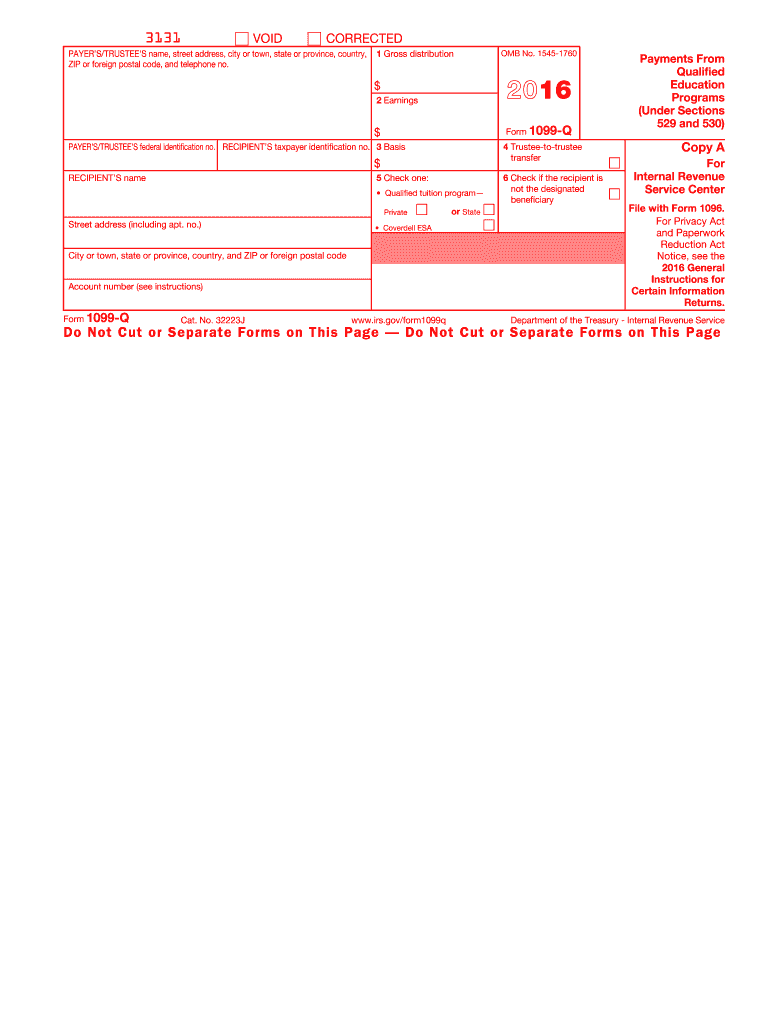
E, country, and ZIP or foreign postal code (keep for your records) 6 If this box is checked, the recipient is not the designated beneficiary or State Coverdell ESA If the fair market value (FMV) is shown below, see Pub. 970, Tax Benefits for Education, for how to figure earnings. Account number (see instructions) Form 1099-Q OMB No. 1545-1760 www.irs.gov/form1099q Payments From Qualified Education Programs (Under Sections 529 and 530) Copy B For Recipient This is important tax info.

Open form follow the instructions

Easily sign the form with your finger

Send filled & signed form or save
How to fill out the IRS 1099-Q online
Filling out the IRS 1099-Q form is essential for reporting distributions from qualified education programs. This guide will provide clear and detailed instructions on completing the form online, ensuring that you provide the necessary information accurately.
Follow the steps to complete the form online:
- Click ‘Get Form’ button to obtain the IRS 1099-Q and open it in the appropriate editor.
- Enter the payer’s or trustee's name, street address, city or town, state or province, country, ZIP or foreign postal code, and telephone number in the designated fields.
- In the ‘Gross distribution’ box, input the total amount distributed from the qualified program. This amount includes both principal and earnings.
- Next, fill in the ‘Earnings’ box, indicating the portion of the gross distribution that represents earnings.
- Provide the basis amount in the corresponding box, which refers to the original contributions made to the account.
- If applicable, check the ‘Trustee-to-trustee transfer’ box to indicate that a direct transfer has occurred.
- Select the type of distribution by checking either ‘Qualified tuition program—Private’ or ‘Coverdell ESA’ in the appropriate box.
- If the recipient is not the designated beneficiary, check that box accordingly.
- Input the recipient’s name, address, and taxpayer identification number in the designated fields.
- Once all the information is filled out and verified, you have the option to save changes, download, print, or share the completed form.
Complete your IRS 1099-Q form online today to ensure accurate reporting and compliance.
Experience a faster way to fill out and sign forms on the web. Access the most extensive library of templates available.
Related content
Jun 6, 2025 — Information about Form 1099-Q, Payments from Qualified Education Programs...
Student loan interest deduction. For 2024, the amount of your student loan interest...
Jan 4, 2017 — Form 1099R. If you began receiving periodic payments of a life annuity in...
Get answers to your most pressing questions about US Legal Forms API.
Does 1099-Q get reported on the parent's return?
Typically, the IRS 1099-Q is reported on the parent’s return if they claim the student as a dependent. However, it’s essential to correctly determine the nature of the distributions, as it affects tax liabilities. Our platform can help clarify whether the parent or student should report the income, ensuring a smooth tax filing experience.
Will the IRS catch a missing 1099-Q?
Yes, the IRS has processes in place to identify unreported IRS 1099-Q income. If you fail to report it, you may face penalties or interest charges later. To avoid surprises during tax season, it’s a good idea to stay informed and follow best practices, including the resources provided on our site.
How do I report 1099-Q on TurboTax?
When using TurboTax to report the IRS 1099-Q, navigate to the section for income and choose 'Other income,' where you can input the amounts shown on the 1099-Q form. TurboTax typically guides you through the necessary questions, ensuring you capture any taxable earnings if applicable. Our platform also has user-friendly guides to assist you in the TurboTax process.
How do I report 1099-Q on my taxes?
To report IRS 1099-Q on your taxes, enter the amounts from the form into the appropriate sections of your tax return. If there are taxable distributions, ensure to report those correctly to avoid discrepancies with the IRS. For step-by-step guidance, our platform offers reliable resources to streamline your reporting process.
Do I need to include 529 distributions on my tax return?
Yes, you should include 529 distributions on your tax return, especially those reported by the IRS 1099-Q. If the funds were used for qualifying education expenses, you can generally avoid taxes on the earnings. It's crucial to keep track of qualifying expenses to maximize your tax benefits, and our site can assist you in understanding these requirements.
How do I report 529 withdrawals on my taxes?
To report 529 withdrawals on your taxes, you will need to include information from the IRS 1099-Q on your return. Ensure that you account for any taxable earnings if the funds were not used for qualified educational expenses. For clarity, our platform provides helpful tools and resources to guide you through the process.
Who claims the 1099-Q, parent or student?
The IRS 1099-Q can be claimed by either the parent or the student, depending on who is the beneficiary of the 529 plan. If the student is a dependent, the parent usually claims the distribution. To ensure compliance and optimize your tax benefits, consider using uslegalforms for a better understanding of your situation.
Do I have to report a 1099-Q on my tax return?
Yes, you must report the IRS 1099-Q on your tax return if you received distributions from a 529 plan. Generally, the earnings portion of the distribution may be taxable if not used for qualified education expenses. Understanding how to categorize this on your return can save you from potential tax liabilities, so consulting a tax professional or exploring resources on our platform can be beneficial.
Is 1099-Q reported as income?
The IRS 1099-Q may be reported as income if the amount you received exceeds your qualified education expenses. Understanding what portion of the IRS 1099-Q is taxable is crucial, so keep detailed records of how the funds were used to support your claim.
How do I get my 1099-Q?
To obtain your IRS 1099-Q, you can contact the financial institution that holds the 529 account or qualified education program. They typically issue the IRS 1099-Q automatically each tax season, but you may also request a copy if you haven't received it.
Use professional pre-built templates to fill in and sign documents online faster. Get access to thousands of forms.
If you believe that this page should be taken down, please follow our DMCA take down process here.
This form is available in several versions. Select the version you need from the drop-down list below.