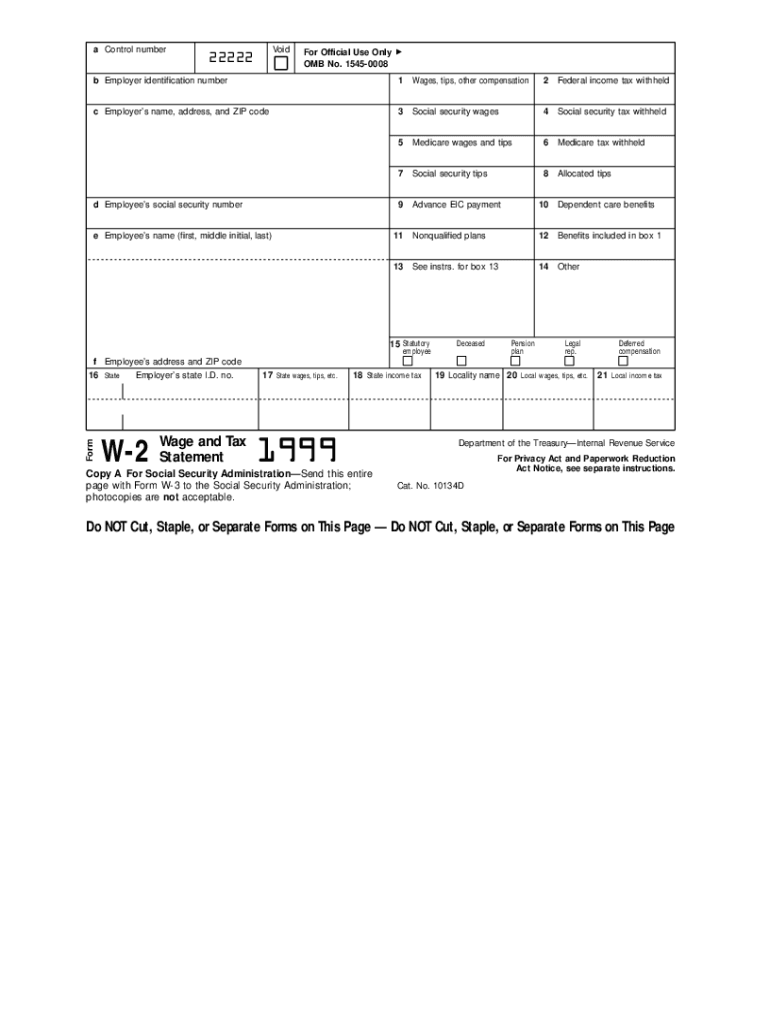
Able" form. As such, it must be printed using special paper, special inks, and within precise specifications. Additional information about the printing of these specialized tax forms can be found in: Publication 1167, Substitute Printed, Computer-Prepared, and Computer-Generated Tax Forms and Schedules; and, Publication 1179, Specifications for Paper Document Reporting and Paper Substitutes for Forms 1096, 1098, 1099 Series, 5498, and W-2G. The publications listed above may be obtained by c.

Open form follow the instructions

Easily sign the form with your finger

Send filled & signed form or save
How to fill out the IRS W-2 online
The IRS W-2 form, also known as the Wage and Tax Statement, is essential for reporting wages and taxes withheld for employees. This guide provides detailed steps to efficiently complete the W-2 online, ensuring you accurately provide necessary information.
Follow the steps to fill out the IRS W-2 online
- Press the 'Get Form' button to access the W-2 form and open it in your preferred online platform.
- In box a, enter the control number if applicable, which is used for internal reference by the employer.
- In box b, input the employer identification number, a unique number assigned to the employer by the IRS.
- Fill in box c with the employer’s name, address, and ZIP code to provide complete identification of the employer.
- In box d, enter the employee’s social security number to ensure accurate filing and reporting of earnings.
- In box e, write the employee’s name, including first, middle initial, and last name, to properly identify the recipient of the W-2.
- In box f, provide the employee’s address and ZIP code to complete their identification information.
- Complete box 1 by entering the total wages, tips, and other compensation received by the employee during the tax year.
- Fill in box 2 with the total federal income tax withheld from the employee's pay throughout the year.
- In box 3, enter the total social security wages which may differ from the total wages reported in box 1.
- Complete box 4 with the total social security tax withheld from the employee's pay.
- In box 5, report the total Medicare wages and tips, indicating the amount subject to Medicare tax.
- Fill in box 6 with the total Medicare tax withheld throughout the year.
- Include any tips as reported in box 7, and provide allocated tips in box 8 if applicable.
- Complete box 9 with any advance earned income credit payments provided to the employee.
- In box 10, report any dependent care benefits offered to the employee.
- Fill out any relevant information in boxes 11 to 14 regarding nonqualified plans and other benefits.
- In box 15, check if the statutory employee or pension plan statuses apply, marking as necessary.
- For box 16, provide the employer's state identification number. Then complete boxes 17 to 21 with state-specific wage and tax information if applicable.
- Once all sections are filled out, review the information for accuracy. Save your changes and decide whether to download, print, or share the completed W-2.
Complete your IRS W-2 form online today for accurate reporting of your wages and taxes.
Experience a faster way to fill out and sign forms on the web. Access the most extensive library of templates available.
Related content
Jan 17, 2025 — Important information on employment tax withholding obligations and Form...
IRS Form W-2, or 'Wage and Tax Statement,' reports an employee's income, taxes withheld...
May 2, 2017 — Do not use these forms to report wages subject to U.S. income tax...
Get answers to your most pressing questions about US Legal Forms API.
What is a W-2 visa in the USA?
The term 'W-2 visa' can be misleading; in the USA, there is no specific visa known as the W-2 visa. Instead, the IRS W-2 form is crucial for employees working under various visa categories who earn taxable income. Make sure to consult tax professionals or resources like uslegalforms to understand your responsibilities based on your visa status.
What are W2 tax terms in the USA?
W2 tax terms in the USA encompass fundamental concepts linked to the IRS W-2 that every employee should grasp. Key terms include gross income, which is your total earnings, and net income, which is what you actually take home after taxes. Familiarity with these terms enables employees to navigate their tax responsibilities effectively and avoid unexpected liabilities.
What are W-2 tax terms in the USA?
2 tax terms in the USA refer to various components associated with the IRS 2 that employees need to understand. These include terms like taxable income, withholdings, and credits that may affect your final tax return. Understanding these terms is vital for effective tax planning and compliance, helping you avoid penalties.
What is a W-2 in the USA?
The IRS W-2 is a standard tax form issued by employers to report an employee's annual wages and tax withholdings. It includes details such as total earnings, federal and state taxes withheld, and other deductions. Employees use the W-2 form when filing their tax returns to ensure accurate reporting of their income.
Is W-2 only for US citizens?
No, the IRS W-2 is not limited to US citizens. Any employee, regardless of citizenship status, can receive a W-2 if they work for a company that files taxes in the United States. Therefore, individuals on work visas or permanent residents also receive this essential tax document.
What is a W-2 role in the USA?
In the USA, a W-2 role refers to a position where employees receive their earnings reported on an IRS W-2 form. This means the employer withholding taxes from each paycheck, including Social Security and Medicare taxes. This arrangement benefits employees by ensuring compliance with tax regulations and simplifying tax filing at the end of the year.
What is W2 in US visa?
The IRS W-2 is a crucial document for employees in the United States, as it reflects their annual earnings and tax withholdings. If you are on a US visa and employed, your employer will issue a W-2 form, which summarises your income and the taxes deducted. This form is essential when filing your yearly tax return, as it helps you determine any tax refunds or payments owed.
What is the easiest way to get a W-2?
The easiest way to get your IRS W-2 is to log into your employer’s payroll portal, where you can usually download it without hassle. If you cannot find it there, reach out to your employer for assistance in obtaining your W-2 directly. Alternatively, using USLegalForms can simplify your search for your W-2, providing you with step-by-step guidance tailored to your needs.
How can I access W-2?
You can access your IRS W-2 by visiting your employer’s payroll website or by contacting the HR department directly. They can provide you with a copy of your W-2, ensuring you have the necessary information for your tax return. If you face challenges accessing it, USLegalForms offers resources to streamline this process and help you get your W-2 quickly.
How do I access W-2?
To access your IRS W-2, you can request it from your employer at the end of each tax year. Many employers provide electronic access through payroll systems, allowing you to log in and download your W-2 directly. If you cannot obtain it this way, consider using services like USLegalForms, which can help you request your IRS W-2 from your employer efficiently.
Use professional pre-built templates to fill in and sign documents online faster. Get access to thousands of forms.
If you believe that this page should be taken down, please follow our DMCA take down process here.
This form is available in several versions. Select the version you need from the drop-down list below.