Loading
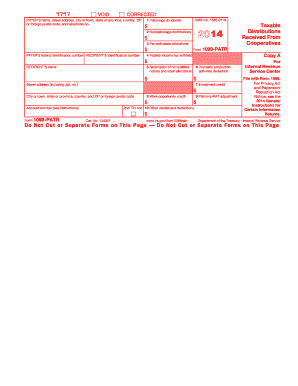
Get Irs 1099-patr 2014
This website is not affiliated with IRS
How it works
-

Open form follow the instructions
-

Easily sign the form with your finger
-

Send filled & signed form or save
How to fill out the IRS 1099-PATR online
Filling out the IRS 1099-PATR form online is an important step for reporting distributions received from cooperatives. This guide will provide clear, step-by-step instructions on how to fill out the form accurately and efficiently.
Follow the steps to successfully complete the IRS 1099-PATR online
- Click ‘Get Form’ button to obtain the form and open it in the editor.
- Begin by entering the payer's name, their street address, city or town, state or province, country, ZIP or foreign postal code, and telephone number in the appropriate fields.
- Fill in the payer's federal identification number and the recipient's identification number, ensuring accuracy for proper identification.
- In Box 1, enter the amount of patronage dividends received during the year. This may include cash or written notices of allocation.
- In Box 2, record any nonpatronage distributions received during the year.
- For Box 3, fill in the amounts for per-unit retain allocations received.
- Complete Box 4 if any federal income tax was withheld. Include the amount of backup withholding if applicable.
- In Box 5, include any amounts received from redeeming nonqualified notices and retain allocations.
- Record the domestic production activities deduction in Box 6, if applicable.
- Fill in Box 7 with any investment credits passed through from the cooperative.
- If there are any work opportunity credits, note them in Box 8.
- For Box 9, include any alternative minimum tax adjustments provided by the cooperative.
- Complete Box 10 for any other credits and deductions passed through to you.
- Once all fields are filled, review the document for completeness and accuracy. Save your changes, then download, print, or share the form as needed.
Complete your IRS 1099-PATR form online today for efficient and accurate reporting.
Get form
Experience a faster way to fill out and sign forms on the web. Access the most extensive library of templates available.
Related links form
Report your IRS 1099-PATR on Schedule F in the section designated for cooperative distributions. It is essential to clearly categorize this income to ensure accurate reporting. Correctly completing this section can provide you with beneficial deductions and lower your overall taxable income.
Get This Form Now!
Use professional pre-built templates to fill in and sign documents online faster. Get access to thousands of forms.