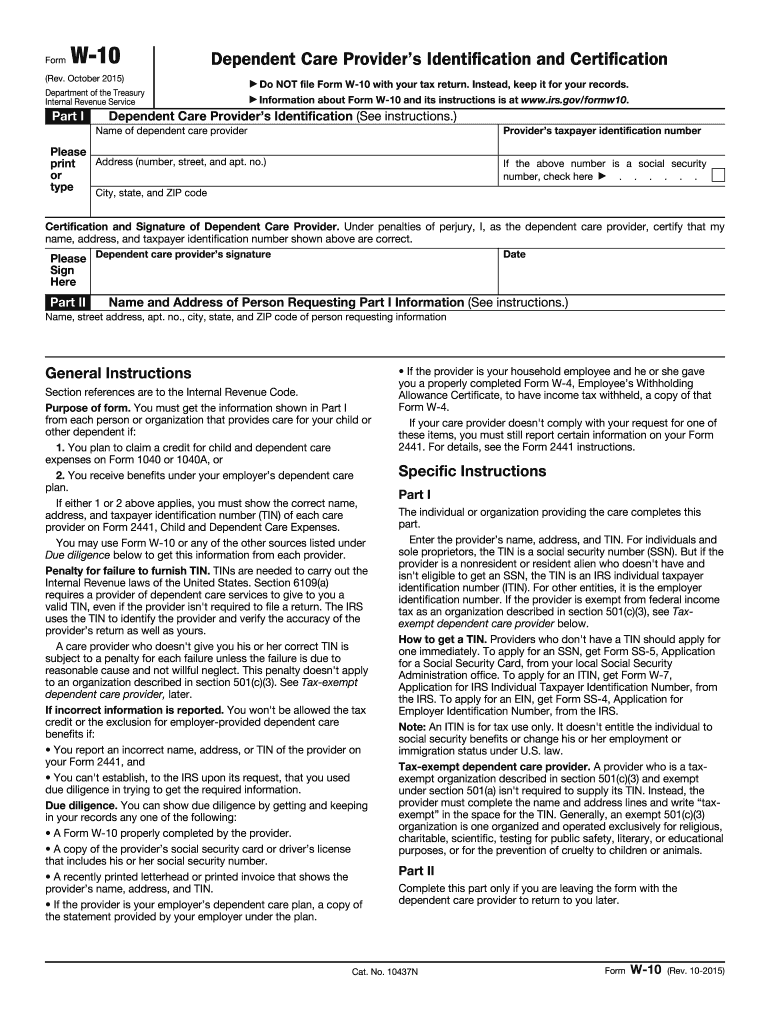
F the provider is your employer s dependent care plan, a copy of the statement provided by your employer under the plan. If the provider is your household employee and he or she gave you a properly completed Form W-4, Employee s Withholding Allowance Certificate, to have income tax withheld, a copy of that Form W-4. If your care provider doesn't comply with your request for one of these items, you must still report certain information on your Form 2441. For details, see the Form 2441 in.

Open form follow the instructions

Easily sign the form with your finger

Send filled & signed form or save
How to fill out the IRS W-10 online
The IRS W-10 form is essential for obtaining identification and certification from dependent care providers. This guide will walk you through the process of filling it out online, ensuring you understand each section and field.
Follow the steps to complete the IRS W-10 form correctly.
- Click the ‘Get Form’ button to access the IRS W-10 form. This will open the document in your preferred editor for completion.
- In Part I, fill in the dependent care provider’s identification section. Input their taxpayer identification number (TIN), name, and address (including street address, city, state, and ZIP code). If the TIN is a social security number, be sure to check the corresponding box.
- Next, the dependent care provider must certify and sign the form. They will need to confirm that their information is accurate by signing their name in the designated area and dating the form.
- Part II asks for the name and address of the person requesting the information from Part I. Fill in the relevant details, including street address, city, state, and ZIP code.
- Once all sections are complete, review the form for accuracy. Make any necessary changes to ensure all information is correct and up to date.
- Finally, save your changes, and you may choose to download, print, or share the completed form as needed.
Complete your forms online today to ensure you have all necessary documentation for your dependent care providers.
Experience a faster way to fill out and sign forms on the web. Access the most extensive library of templates available.
Related content
Apr 29, 2025 — Use this form to get the correct name, address and taxpayer...
2022 · Cited by 1 — Your employer must give you a Form W-2 (or similar statement)...
Dec 21, 2011 — You receive an electronic acknowledgment within 48 hours that the IRS has...
Get answers to your most pressing questions about US Legal Forms API.
How to claim childcare on taxes?
To claim child care on your taxes, complete IRS Form 2441 and report your eligible expenses. Ensure you gather all required documentation, including the IRS W-10 form from your child care provider. This approach helps you maximize your tax benefits effortlessly.
Who fills out a W10 form?
The W-10 form is filled out by child care providers. They provide their taxpayer identification number for parents who are claiming child care expenses. By using the IRS W-10 form, providers can ensure clarity and compliance with IRS regulations.
What is the IRS form for child care expenses?
The primary IRS form for claiming child care expenses is IRS Form 2441. This form calculates the amount of child and dependent care credit you can receive. For proper documentation, using the IRS W-10 form to obtain information about your care provider is also essential.
How does a W10 work?
The IRS W-10 form allows child care providers to supply their taxpayer identification number to parents. This form ensures that parents can accurately claim child care expenses on their taxes. It’s a straightforward process, benefiting both providers and parents when filing tax returns.
What are the IRS rules for claiming a dependent?
To claim a dependent, the IRS has specific rules regarding relationship, residency, and financial support. Generally, the dependent must live with you for more than half the year, and you must provide more than half of their financial support. If you provide child care, utilizing the IRS W-10 form can assist you in validating your claims.
How do I report child care income on my taxes?
If you receive income from providing child care services, you must report this income on your taxes. Use IRS Schedule C to report this income if you are self-employed. Additionally, keeping thorough records, including any IRS W-10 forms from parents, simplifies the reporting process.
Does the IRS ask for proof of child care expenses?
Yes, the IRS requires proof of child care expenses when you claim them on your tax return. This means you should keep receipts and any other relevant documents. Using the IRS W-10 form, which provides details about your care provider, can also help substantiate your claims.
What IRS form do I need to claim child care?
To claim child care expenses, you typically need to fill out IRS Form 2441, which is used to report child and dependent care expenses. Additionally, you may need the IRS W-10 form to identify your care provider. Completing these forms correctly ensures you maximize your tax credits related to child care.
What is a W-10 form used for?
10 form is used to report expenses related to dependent care, enabling taxpayers to claim benefits for child care costs. The IRS W10 ensures you document the details accurately, allowing you to receive any applicable credits. If you need assistance with filling out this form, consider utilizing resources available on US Legal Forms for detailed guidance.
Do you file W-10?
Yes, filing the W-10 form is necessary if you are claiming certain tax benefits, specifically related to dependent care expenses. The IRS requires this form to ensure you comply with their guidelines regarding these benefits. If you are unsure about how to fill out the W-10, platforms like US Legal Forms can provide helpful templates and resources.
Use professional pre-built templates to fill in and sign documents online faster. Get access to thousands of forms.
If you believe that this page should be taken down, please follow our DMCA take down process here.
This form is available in several versions. Select the version you need from the drop-down list below.