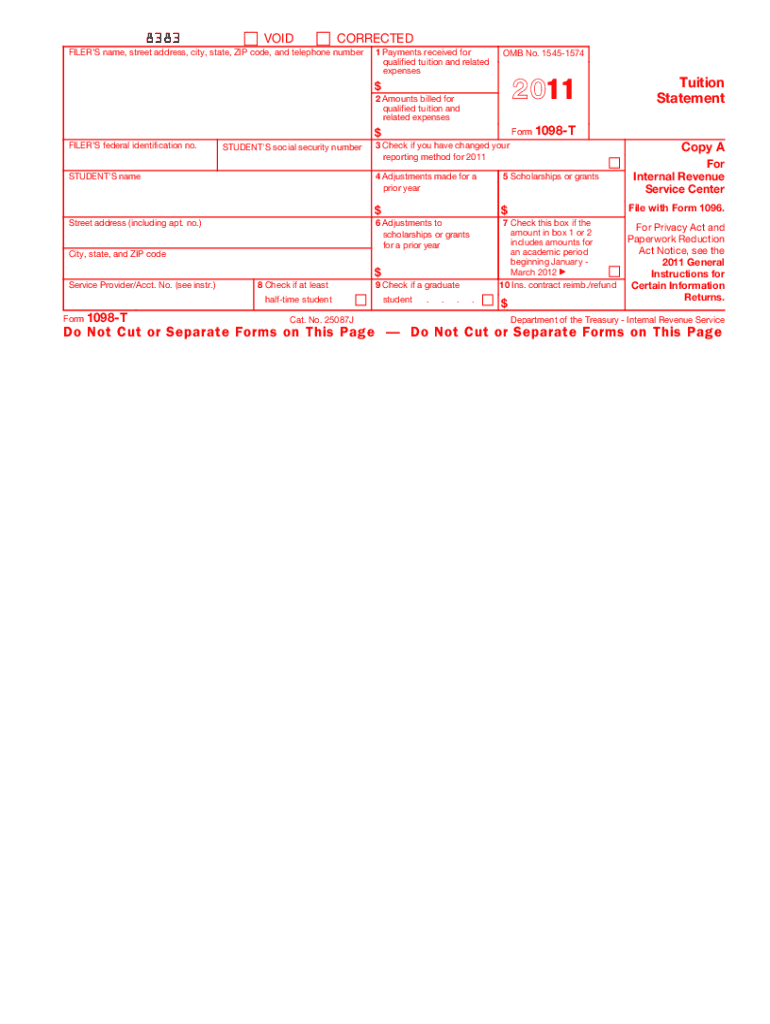
S form. Do not file copy A downloaded from this website. The official printed version of this IRS form is scannable, but the online version of it, printed from this website, is not. A penalty may be imposed for filing forms that can t be scanned. See part O in the current General Instructions for Certain Information Returns for more information about penalties. To order official IRS forms, call 1-800-TAX-FORM (1-800-829-3676) or Order Information Returns and Employer Returns Online, and we l.
Loading

Open form follow the instructions

Easily sign the form with your finger

Send filled & signed form or save
How to fill out the IRS 1098-T online
The IRS 1098-T form serves as a tuition statement that provides information on qualified tuition and related expenses. This guide will walk you through each section of the form, ensuring that you understand how to properly complete it online.
Follow the steps to accurately fill out the IRS 1098-T online.
- Click ‘Get Form’ button to obtain the form and open it in the editor.
- Enter the filer's information in the space provided, including their name, street address, city, state, ZIP code, and telephone number in the designated fields.
- Input the filer's federal identification number to ensure accurate reporting to the IRS.
- Fill out the student's social security number accurately, as this is vital for both the student and the IRS record.
- In box 1, report the total payments received for qualified tuition and related expenses. If applicable, subtract any related reimbursements or refunds.
- In box 2, note the total amounts billed for qualified tuition and related expenses, after accounting for any reductions.
- If the educational institution changed its reporting method in 2011, check the box in box 3.
- Provide any adjustments made for a prior year in box 4 that pertain to qualified tuition and fees.
- In box 5, indicate the total amount of scholarships or grants administered by the institution.
- Document any adjustments to scholarships or grants for a prior year in box 6.
- If the amount in box 1 or 2 includes amounts for a period starting in January to March 2012, check box 7.
- If the student is enrolled at least half-time, check box 8.
- Check box 9 if the student is considered a graduate student.
- Finally, add any insurance contract reimbursements or refunds in box 10.
- Review all entered information for accuracy and completeness. You can then save changes, download, print, or share the form as needed.
Complete your IRS forms online today to ensure compliance and benefit from potential educational tax credits.
Experience a faster way to fill out and sign forms on the web. Access the most extensive library of templates available.
Related content
Jun 6, 2025 — Eligible educational institutions file Form 1098-T for each student they...
Jun 6, 2025 — Eligible educational institutions file Form 1098-T for each student they...
• Copies of Form 1098-T, Tuition Statement, from each institution the student attended...
Get answers to your most pressing questions about US Legal Forms API.
How do I get my 1098 form from the IRS?
To obtain your IRS 1098-T form from the IRS, you will typically need to rely on your educational institution, as they directly report this form to the IRS. The IRS does not send these forms to taxpayers, so it's best to contact your school. For additional tax-related documents, you might consider using resources like uslegalforms to find solutions tailored for your needs.
How do I get a copy of my 1098-T?
To get a copy of your IRS 1098-T, start by checking your school's online portal, where many institutions upload these forms. If you cannot find it online, reach out to your school's registrar or financial aid office for assistance. They can provide you with a duplicate or guide you through the process to obtain it.
Does 1098-T get sent to the IRS?
Your IRS 1098-T form is indeed sent to the IRS by your educational institution. This helps the IRS keep track of the education credits and deductions you may claim. It's crucial to sync the information on your tax return with what appears on your IRS 1098-T for a smoother filing process.
Does the IRS get a copy of my 1098-T?
Yes, the IRS receives a copy of your IRS 1098-T form directly from your educational institution. This form is necessary for verifying the educational credits you claim on your tax return. Therefore, ensure that the information on your form is accurate to prevent any discrepancies with the IRS.
Can I get a copy of my 1098 online?
Yes, you can often obtain a copy of your IRS 1098-T online through your school's student portal or financial services office. Many institutions provide electronic access to tax forms for convenience. If you cannot find it online, contact your school's office directly to request a copy; they are usually able to assist you quickly.
Can I file my taxes without my 1098-T form?
While it is possible to file your taxes without your IRS 1098-T form, it is not recommended. The IRS 1098-T helps you claim education-related tax benefits, and without it, you may miss out on deductions or credits. If you do not receive your form in time, you can estimate your eligible expenses and file for an extension to ensure you submit accurate information.
Where does my 1098-T come from?
Your IRS 1098-T form usually comes from the educational institution you attended during the tax year. Colleges and universities are required to provide this form to help report qualified tuition and related expenses. You can typically receive it electronically or by mail, depending on your school's policy. Always check with your institution for specific details about distribution.
How much does a 1098 help with taxes?
The IRS 1098-T can significantly help with your taxes by potentially qualifying you for various education credits and deductions. Depending on your specific circumstances, you could reduce your tax bill or increase your refund. Keep in mind that the savings may vary based on the amounts reported on your form and your overall tax situation. To navigate this, consider US Legal Forms for comprehensive support in tax filing.
How do I enter my 1098-T on my tax return?
Entering your IRS 1098-T on your tax return involves placing it in the correct section of your tax form. For most individuals, this will be in the education sections of IRS Form 1040 or 1040A. Use the amounts from the form accurately to ensure you claim the right credits or deductions. If you need a step-by-step guide, US Legal Forms can assist you in seamlessly entering this information.
Does filing a 1098-T increase the refund?
Filing an IRS 1098-T may increase your tax refund if you qualify for education-related tax credits such as the American Opportunity Credit or the Lifetime Learning Credit. These credits can significantly reduce your tax liability and potentially result in a higher refund. To maximize your benefits, make sure to keep proper documentation. US Legal Forms provides resources to help you understand how to take full advantage of these credits.
Use professional pre-built templates to fill in and sign documents online faster. Get access to thousands of forms.
If you believe that this page should be taken down, please follow our DMCA take down process here.
This form is available in several versions. Select the version you need from the drop-down list below.