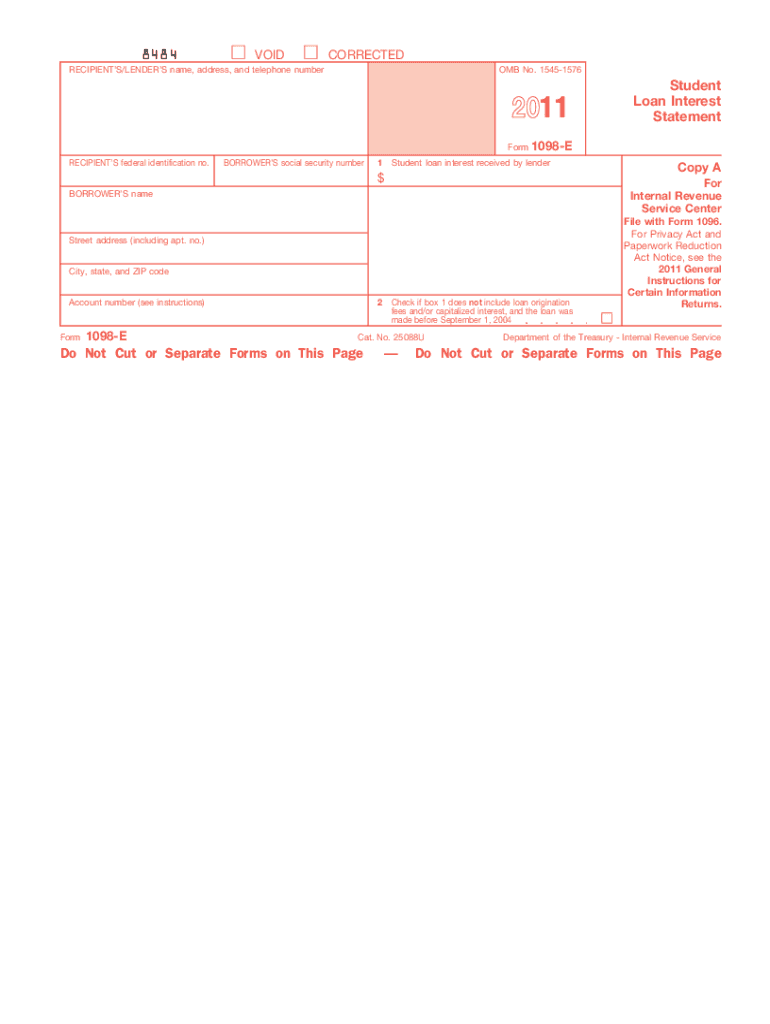
Nformation about penalties. To order official IRS forms, call 1-800-TAX-FORM (1-800-829-3676) or Order Information Returns and Employer Returns Online, and we ll mail you the scannable forms and other products. See IRS Publications 1141, 1167, 1179 and other IRS resources for information about printing these tax forms. 8484 VOID CORRECTED RECIPIENT S/LENDER S name, address, and telephone number OMB No. 1545-1576 2011 Form RECIPIENT S federal identification no. BORROWER S social.
Loading

Open form follow the instructions

Easily sign the form with your finger

Send filled & signed form or save
How to fill out the IRS 1098-E online
Filling out the IRS 1098-E form is essential for reporting student loan interest for tax purposes. This guide provides detailed, step-by-step instructions to help users accurately complete the form online.
Follow the steps to fill out the 1098-E form online effectively.
- Click the ‘Get Form’ button to obtain the IRS 1098-E form and open it in your online editor.
- Locate the recipient’s/lender’s name, address, and telephone number section. Enter the complete details as required.
- In the recipient’s federal identification number field, input the federal ID number of the lender.
- Fill out the borrower’s social security number section with the correct social security number of the borrower.
- In box 1, input the total amount of student loan interest received by the lender during the tax year.
- If applicable, check box 2 to indicate that loan origination fees or capitalized interest are not included in box 1 for loans made before September 1, 2004.
- Complete the borrower’s name, street address, city, state, and ZIP code fields accurately.
- If there is an account number assigned to the borrower’s loan by the lender, include it in the specified field.
- Once all fields are filled out accurately, save the changes made to the form.
- Download, print, or share the completed form as needed.
Complete your IRS 1098-E forms online now to ensure accurate reporting of your student loan interest.
Experience a faster way to fill out and sign forms on the web. Access the most extensive library of templates available.
Related content
Jun 6, 2025 — If you receive student loan interest of $600 or more from an individual...
File Form 1098-E, Student Loan Interest Statement, if you receive student loan interest of...
Jan 31, 2018 — If you receive a Form 1098 from the cooper- ative housing corporation...
Get answers to your most pressing questions about US Legal Forms API.
What gives you a bigger tax refund?
Several factors contribute to a bigger tax refund, but one key aspect is maximizing deductions. Claiming eligible expenses, like those reported on the IRS 1098-E, can effectively reduce taxable income. Furthermore, utilizing tax credits also enhances your refund potential. Always explore all applicable deductions and credits to ensure you receive the full benefits.
How do I report a 1098 on my taxes?
To report an IRS 1098-E on your taxes, gather the form and fill out the appropriate sections on your tax return. You will list the deductible interest amount from the form, adhering to IRS guidelines. It's essential to maintain accurate records to support your claims. Should you need assistance, consider using uslegalforms for a guided experience.
Can I look up my 1098 online?
Yes, you can usually look up your 1098 online through your lender's website or educational institution portal. Just navigate to the tax documents section to find your IRS 1098-E. If you need further help, customer support can assist you in retrieving your documents.
How long does it take to get 1098-T electronically?
If your school provides electronic copies, you can usually access your 1098-T within a few days of its release. Log into your student account for a prompt download of your IRS 1098-E. If you encounter delays, contact your institution's customer service for further details.
When should I expect my 1098-E?
You should expect to receive your IRS 1098-E by the end of January each year, as lenders must issue them by January 31. If you haven’t received it by early February, check your mailing address or reach out to your lender for confirmation. Staying ahead of this timeline will help you file your taxes on time.
Can I find my 1098-T form online?
Yes, many institutions provide online access to the 1098-T form. By logging into your student account, you can typically download your IRS 1098-E easily. If you cannot locate it, reach out to your educational institution for support.
What happens if I didn't get my 1098-E?
If you didn't receive your 1098-E, first check with the lender who issued the form. They may have sent it to an incorrect address or not generated one for you. You can also retrieve this information via your online account or contact them directly for assistance.
Can I file my taxes without my 1098?
Yes, you can file taxes without your 1098, but it may complicate the process. The information on your IRS 1098-E is critical for calculating eligible deductions. If you can't obtain it, consult a tax professional for guidance on how to proceed.
Can I file my taxes without my 1098-T form?
You may file your taxes without your 1098-T form, but it could impact your educational tax credits. The IRS 1098-E provides valuable information that may assist you in claiming deductions. To ensure accurate filing, aim to obtain the form directly from your institution.
Can I look up my 1098-T online?
Yes, you can look up your 1098-T online through your school's student portal or financial services section. Many institutions provide digital access to tax forms like the IRS 1098-E. If you face difficulties, consider reaching out to your school's financial aid office for assistance.
Use professional pre-built templates to fill in and sign documents online faster. Get access to thousands of forms.
If you believe that this page should be taken down, please follow our DMCA take down process here.
This form is available in several versions. Select the version you need from the drop-down list below.