Loading
Form preview
  • US Legal Forms
  • Other Templates
  • Tax Forms
  • Executive Department Treasury IRS Forms
  • Irs 990 - Schedule G 2014

Get Irs 990 - Schedule G 2014

Ported more than $15,000 on Form 990-EZ, line 6a. (b) Pull tabs/instant bingo/progressive bingo (a) Bingo 1 Gross revenue . . . Cash prizes . . . . 3 Noncash prizes . . . 4 Rent/facility costs . . . 5 Other direct expenses (d) Total gaming (add col. (a) through col. (c)) (c) Other gaming . 2 Direct Expenses (d) Total events (add col. (a) through col. (c)) . . 10 11 . . 6 Revenue (c) Other events Less: Contributions . . Gross income (line 1 minus line 2) . . . .

This website is not affiliated with IRS

How it works

  1. Open form

    Open form follow the instructions

  2. Easily sign form

    Easily sign the form with your finger

  3. Share form

    Send filled & signed form or save

How to fill out the IRS 990 - Schedule G online

Filling out the IRS 990 - Schedule G is essential for organizations engaging in fundraising or gaming activities. This guide will provide clear, step-by-step instructions to help users complete the form accurately and efficiently online.

Follow the steps to fill out the IRS 990 - Schedule G.

  1. Press 'Get Form' button to access the form and open it in the editor.
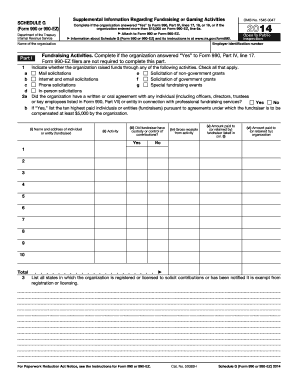
  2. Review Part I, which addresses supplemental information about fundraising or gaming activities. Complete this section if the organization answered 'Yes' to Form 990, Part IV, lines 17, 18, or 19, or reported over $15,000 on Form 990-EZ, line 6a.
  3. In Part I, indicate whether the organization engaged in various fundraising activities by checking all applicable options (e.g., mail solicitations, Internet and email solicitations, phone solicitations).
  4. Complete question 2a regarding any agreements with individuals or entities for professional fundraising services. If applicable, list the ten highest-paid fundraisers, providing their names, addresses, activities, custody details, gross receipts, and compensation amounts.
  5. In Part II, include details of fundraising events. Complete this section if you answered 'Yes' to Form 990, Part IV, line 18, or reported more than $15,000 in fundraising event contributions. List all events that generated gross receipts higher than $5,000.
  6. Detail each event by providing the gross receipts, cash prizes, noncash prizes, rent costs, food and beverage expenses, entertainment costs, and other direct expenses for each listed event.
  7. In Part III, provide information on gaming activities if the organization reported this in Form 990, Part IV, line 19. Fill out gross revenue, cash prizes, noncash prizes, rent costs, and other expenses related to gaming activities.
  8. If required, explain any gaming licenses revoked, suspended, or terminated during the tax year and provide any necessary details about the organization’s gaming activities and revenue.
  9. Lastly, review Part IV for any additional supplemental information required based on prior answers. Complete any explanations necessary for the previously listed line items.
  10. Once all sections are filled out and reviewed, save your changes. You can also choose to download, print, or share the completed form.

Begin completing your IRS 990 - Schedule G online today to ensure your organization meets its compliance requirements.

Get form

Experience a faster way to fill out and sign forms on the web. Access the most extensive library of templates available.

Related content

Schedule G (Form 990) (Rev. December 2024)
3. List all states in which the organization is registered or licensed to solicit...
Learn more
IRS Form 990 Schedule G - University Development
What is it? This form must be completed for any fundraising event with gross receipts of...
Learn more
f990pf--2017.pdf
1. Contributions, gifts, grants, etc., received (attach schedule). 2. Check ▷ if the...
Learn more

Related links form

ETISR-SF 2009 Humana GNA02NHHH IHSAA Form D 2011 Infuenza Immunization Consent

Questions & Answers

Get answers to your most pressing questions about US Legal Forms API.

Contact support

To account for fundraising expenses, list all related costs incurred during your fundraising activities on Schedule G of the IRS 990. This includes expenses like promotional materials, event costs, and staff time devoted to fundraising. Maintaining detailed records of these costs is crucial for transparency and can help justify the expenses reported. Using a platform like USLegalForms can aid in organizing and reporting these expenses efficiently.

You report donations on the IRS 990 in the revenue section, specifically under contributions and grants. Be sure to differentiate between restricted and unrestricted donations to provide clarity in your reporting. Accurate documentation of donations showcases your funding sources and is essential for transparency. Ensure this information is easily accessible to help build trust with your donors.

Yes, you can file IRS Form 990 electronically, including Schedule G, through the IRS e-File system. Electronic filing simplifies the process, allowing faster processing and confirmation of your submission. Plus, it minimizes errors often associated with paper submissions. Using platforms like USLegalForms can streamline this process, ensuring compliance and accuracy.

Organizations that report more than $15,000 in fundraising activities should file Schedule G with their IRS 990. This requirement typically applies to charities and nonprofits that actively engage in fundraising events. Failing to file this schedule when necessary can lead to compliance issues. Therefore, it's vital to understand your filing obligations.

Fundraising expenses can be found on the IRS 990 - Schedule G, where you will list all costs directly associated with fundraising events. This includes expenses for materials, venue rental, and any necessary promotions. Properly categorizing these expenses helps maintain clarity in your financial reporting. This organization is essential for managing your nonprofit’s finances effectively.

To report fundraising income, you should first calculate the total funds raised from various events and activities. Then, include this information in the revenue section of the IRS 990. By doing so, you maintain transparency with stakeholders and uphold compliance with IRS requirements.

A fundraising event on the IRS 990 is any organized activity that generates revenue for a nonprofit. This can include galas, charity runs, auctions, and more. Reporting these events on Schedule G helps illustrate the organization's financial activities and the community's engagement.

A Schedule G on a 990 is essential for organizations to disclose their fundraising events and the financial outcomes of those events. This schedule examines the methods used for fundraising and the revenues generated, providing a comprehensive view of the organization's fundraising landscape. Understanding this schedule can greatly enhance your financial reporting.

To report fundraising income on the IRS 990, organizations should aggregate total income from fundraising activities and include it in the revenue section. This income can come from events, direct mail campaigns, and online donations. Reporting this accurately illustrates the effectiveness of fundraising strategies and ensures compliance.

Schedule G Part III focuses specifically on fundraising events, detailing the nature of each event and the financial outcomes they produced. It includes information on event revenues, expenses, and the net income generated from these activities. By filling this part accurately, nonprofits demonstrate accountability in their fundraising efforts.

Get This Form Now!

Use professional pre-built templates to fill in and sign documents online faster. Get access to thousands of forms.
If you believe that this page should be taken down, please follow our DMCA take down processhere.
Get IRS 990 - Schedule G
  • Adoption
  • Bankruptcy
  • Contractors
  • Divorce
  • Home Sales
  • Employment
  • Identity Theft
  • Incorporation
  • Landlord Tenant
  • Living Trust
  • Name Change
  • Personal Planning
  • Small Business
  • Wills & Estates
  • Packages A-Z
  • Affidavits
  • Bankruptcy
  • Bill of Sale
  • Corporate - LLC
  • Divorce
  • Employment
  • Identity Theft
  • Internet Technology
  • Landlord Tenant
  • Living Wills
  • Name Change
  • Power of Attorney
  • Real Estate
  • Small Estates
  • Wills
  • All Forms
  • Forms A-Z
  • Other Templates
  • Legal Hub
  • About Us
  • Help Portal
  • Legal Resources
  • Blog
  • Affiliates
  • Contact Us
  • Delete My Account
  • Site Map
  • Industries
  • Forms in Spanish
  • Localized Forms
  • State-specific Forms
  • Forms Kit
  • Real Estate Handbook
  • All Guides
  • Notarize
  • Incorporation services
  • For Consumers
  • For Small Business
  • For Attorneys
  • USLegal
  • FormsPass
  • pdfFiller
  • signNow
  • altaFlow
  • DocHub
  • Instapage
Form Packages
  • Adoption
  • Bankruptcy
  • Contractors
  • Divorce
  • Home Sales
  • Employment
  • Identity Theft
  • Incorporation
  • Landlord Tenant
  • Living Trust
  • Name Change
  • Personal Planning
  • Small Business
  • Wills & Estates
  • Packages A-Z
Form Categories
  • Affidavits
  • Bankruptcy
  • Bill of Sale
  • Corporate - LLC
  • Divorce
  • Employment
  • Identity Theft
  • Internet Technology
  • Landlord Tenant
  • Living Wills
  • Name Change
  • Power of Attorney
  • Real Estate
  • Small Estates
  • Wills
  • All Forms
  • Forms A-Z
  • Other Templates
Customer Service
  • Legal Hub
  • About Us
  • Help Portal
  • Legal Resources
  • Blog
  • Affiliates
  • Contact Us
  • Delete My Account
  • Site Map
  • Industries
  • Forms in Spanish
  • Localized Forms
  • State-specific Forms
  • Forms Kit
Legal Guides
  • Real Estate Handbook
  • All Guides
Prepared for you
  • Notarize
  • Incorporation services
Our Customers
  • For Consumers
  • For Small Business
  • For Attorneys
Our Sites
  • USLegal
  • FormsPass
  • pdfFiller
  • signNow
  • altaFlow
  • DocHub
  • Instapage
Social Media
Call us now toll free:
+1 833 426 79 33
As seen in:
© Copyright 1999-2026 airSlate Legal Forms, Inc. 17 Station Street, Ste. 203, Brookline, MA 02445
  • Your Privacy Choices
  • Terms of Service
  • Privacy Notice
  • Content Takedown Policy
  • Bug Bounty Program
IRS 990 - Schedule G
This form is available in several versions.
Select the version you need from the drop-down list below.
2020 IRS 990 - Schedule G
Select form
  • 2020 IRS 990 - Schedule G
  • 2019 IRS 990 - Schedule G
  • 2018 IRS 990 - Schedule G
  • 2017 IRS 990 - Schedule G
  • 2016 IRS 990 - Schedule G
  • 2015 IRS 990 - Schedule G
  • 2014 IRS 990 - Schedule G
  • 2013 IRS 990 - Schedule G
  • 2012 IRS 990 - Schedule G
  • 2011 IRS 990 - Schedule G
  • 2010 IRS 990 - Schedule G
Select form