Loading
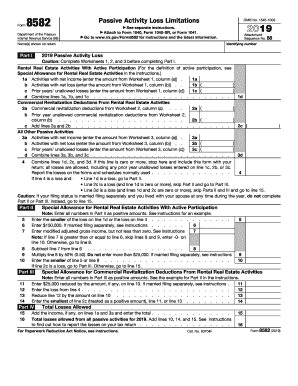
Get Irs 8582 2019
This website is not affiliated with IRS
How it works
-

Open form follow the instructions
-

Easily sign the form with your finger
-

Send filled & signed form or save
How to fill out the IRS 8582 online
Filling out the IRS Form 8582, Passive Activity Loss Limitations, is an essential task for users who have passive losses or income. This guide provides a comprehensive overview of how to accurately complete this form online, ensuring compliance with IRS regulations.
Follow the steps to successfully complete your form
- Click ‘Get Form’ button to obtain the form and open it in the editor.
- Review the form's purpose. This form helps in reporting passive activity losses and limitations. Ensure you have all necessary financial documents ready for accurate completion.
- Begin with Part I by inputting figures from Worksheets 1, 2, and 3 before filling out this section. Record any activities with net income, net loss, and prior unallowed losses as needed.
- In lines 1a, 1b, and 1c of Part I, enter the required amounts based on your Worksheets. These relate to your rental real estate activities with active participation.
- Continue with line 1d where you will combine lines 1a, 1b, and 1c to total your passive activity losses.
- Proceed to the next sections for commercial revitalization deductions if applicable. Fill in lines 2a, 2b, and 2c to account for these amounts.
- Move to All Other Passive Activities in Part I. Fill out sections 3a, 3b, and 3c as required.
- Once you have completed Part I, review lines 1d, 2c, and 3d and combine these for your final total on line 4, as specified by IRS guidelines.
- If line 4 indicates a loss, proceed to Part II by entering the smaller of the loss on line 1d or line 4. Follow further instructions based on your filing status.
- Finish with Parts III and IV, ensuring all calculations reflect true amounts and that any special allowances are completed accurately.
- After reviewing all sections for accuracy, save your changes. At this point, you can download, print, or share your completed IRS Form 8582 as needed.
Begin filling out your IRS Form 8582 online today to ensure accurate reporting of your passive activity losses.
Get form
Experience a faster way to fill out and sign forms on the web. Access the most extensive library of templates available.
Related links form
To report farmland rental, use IRS Schedule E, where you will outline your rental income and any related expenses. If you experience passive losses, IRS Form 8582 is necessary to account for these losses appropriately. This thorough approach ensures you meet your tax obligations while managing your financial records efficiently.
Get This Form Now!
Use professional pre-built templates to fill in and sign documents online faster. Get access to thousands of forms.