Get Ca Dhcs 4000 A 2010-2026
How it works
-

Open form follow the instructions
-

Easily sign the form with your finger
-

Send filled & signed form or save
How to use or fill out the CA DHCS 4000 A online
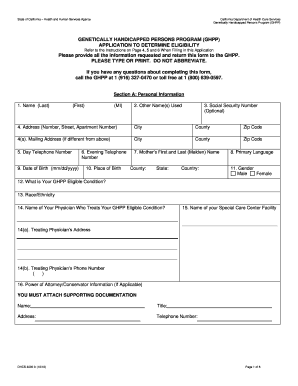
Filling out the CA DHCS 4000 A form can be an essential step in determining eligibility for the Genetically Handicapped Persons Program (GHPP). This guide provides clear, step-by-step instructions to help you complete the form accurately and efficiently in an online format.
Follow the steps to complete the CA DHCS 4000 A form online.
- Press the ‘Get Form’ button to access the CA DHCS 4000 A form and open it for editing.
- Begin with Section A, Personal Information. Provide your last name, first name, and middle initial. Ensure that you attach proof of identity if required.
- If applicable, write any other names you have used. This includes maiden names or legal name changes.
- Enter your Social Security Number. Remember that this is optional.
- Fill in your residential address accurately, including the street number, street name, apartment number, city, county, and zip code. Avoid using a P.O. Box here.
- If your mailing address is different, provide it in the indicated section. This can include a P.O. Box if that is where you prefer to receive your mail.
- Complete the daytime and evening telephone number fields, ensuring that you include the area code.
- Provide your mother’s first and last name (maiden name) as requested.
- Indicate your primary language for communication.
- Fill in your date of birth using the format mm/dd/yyyy.
- Specify your place of birth, including the county and state, as well as the country if outside of the United States.
- Select your gender by indicating either male or female.
- Clearly state your GHPP eligible condition by selecting from the provided list or specifying if it's another condition.
- Identify your race/ethnicity according to the options outlined in the form.
- Enter the name of your treating physician for the GHPP eligible condition.
- Provide the address and phone number of your treating physician.
- If applicable, enter the information for your Power of Attorney or conservator, and include supporting documentation.
- Proceed to Section B: Health Insurance Information, and respond to whether you have Medi-Cal, Medicare, or other health insurance.
- If you have other insurance, provide the name of the insurance company and the type of plan.
- Fill in the policy number and coverage start date, and indicate who pays for the policy.
- If any changes in your insurance have occurred, explain them in the designated area.
- Complete Section C: Certification by initialing each statement and then sign and date the form.
- After thoroughly reviewing your entries for accuracy, save your changes, and choose to download, print, or share the form as necessary.
Complete your CA DHCS 4000 A form online today to ensure your eligibility for the Genetically Handicapped Persons Program.
To request retroactive Medi-Cal, submit a completed application along with necessary documentation to the local DHCS office. Ensure you specify that you are seeking retroactive eligibility when you apply. Using tools available on platforms like uslegalforms can make this process more straightforward and help you understand the requirements for CA DHCS 4000 A.