Loading
Get Irs 1095-c 2014
This website is not affiliated with IRS
How it works
-

Open form follow the instructions
-

Easily sign the form with your finger
-

Send filled & signed form or save
How to fill out the IRS 1095-C online
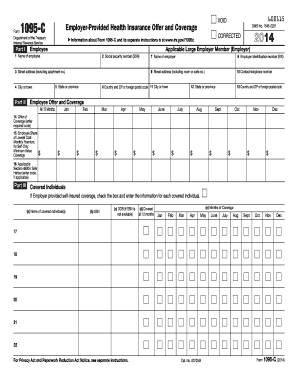
The IRS 1095-C form is essential for reporting health coverage offered by employers under the Affordable Care Act. Completing this form online can seem daunting, but with clear instructions, you can ensure accurate submission.
Follow the steps to complete the IRS 1095-C form online.
- Click ‘Get Form’ button to obtain the form and open it in the editor.
- Begin by entering the name of the employee in line 1. Make sure to use the full, legal name as it appears on official documents.
- In line 2, provide the employee's social security number (SSN). This may show only the last four digits for privacy, but be aware that the issuer must report the full SSN to the IRS.
- Lines 3 through 6 require the employee's address. Enter the street address, city or town, state, and ZIP code accurately to avoid any issues.
- Move to Part II, starting with line 7, where you will enter the name of the employer. Ensure this matches official documentation to prevent discrepancies.
- Line 8 requires the employer identification number (EIN), which is a unique identifier for the employer. This can usually be found on the employer's tax filings.
- Complete lines 9 through 13 with the employer's street address, city or town, state, and ZIP code, ensuring everything is correct.
- In line 10, add the contact telephone number for inquiries related to the form. It should be a direct line to the HR or benefits department.
- Next, focus on Part II - enter the relevant codes in line 14 to describe the health coverage offered to the employee and their eligible family members.
- For line 15, report the employee share of the lowest-cost monthly premium for self-only coverage. Enter the dollar amount accurately.
- Complete line 16 by providing the applicable section 4980H safe harbor code, if applicable, to ensure compliance with the employer shared responsibility provisions.
- In Part III, for each covered individual, fill out the name, SSN or TIN, and date of birth if the SSN is not provided. Indicate coverage status for the entire year or specific months.
- Once all fields are completed, review the information for accuracy. Make necessary corrections, if needed, before submitting.
- Finally, save changes, download, print, or share the completed form as required. Ensure that you keep a copy for your records.
Start filling out the IRS 1095-C form online today to ensure compliance and accurate reporting.
Get form
Experience a faster way to fill out and sign forms on the web. Access the most extensive library of templates available.
Related links form
There is no direct penalty for failing to file the IRS 1095-C, but not having it could complicate your interactions with the IRS. This form is used to verify your compliance with health coverage requirements. Keeping the 1095-C on hand can help you avoid penalties that arise from not documenting your health insurance status.
Get This Form Now!
Use professional pre-built templates to fill in and sign documents online faster. Get access to thousands of forms.