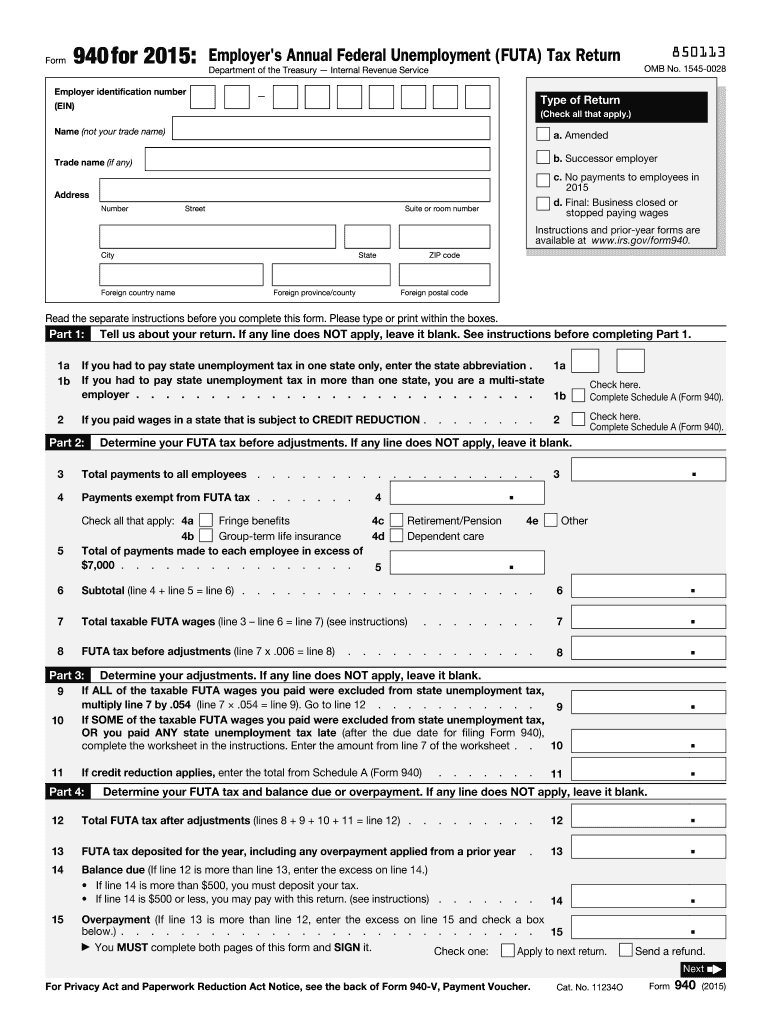
E date for filing Form 940), complete the worksheet in the instructions. Enter the amount from line 7 of the worksheet . . 10 9 Check here. Complete Schedule A (Form 940). . . . . . . . . . . . Overpayment (If line 13 is more than line 12, enter the excess on line 15 and check a box below.) . . . . . . . . . . . . . . . . . . . . . . . . . . . . 15 You MUST complete both pages of this form and SIGN it. Check one: Apply to next return. . . . . Send a refund. Next For Pr.

Open form follow the instructions

Easily sign the form with your finger

Send filled & signed form or save
How to fill out the IRS 940 online
The IRS 940 form is essential for employers to report and pay federal unemployment tax (FUTA) annually. This guide provides a clear, step-by-step approach to completing the form online, ensuring you meet all necessary requirements.
Follow the steps to successfully complete the IRS 940 online.
- Click the ‘Get Form’ button to obtain the IRS 940 form and access it in your online editor.
- Enter your employer identification number (EIN) in the designated field at the top of the form.
- Indicate the type of return by checking the appropriate boxes for 'Amended,' 'Successor employer,' 'No payments to employees in 2015,' or 'Final: Business closed or stopped paying wages.'
- Provide your business name (not your trade name), address, city, state, and ZIP code in the required fields.
- In Part 1, report details about your state unemployment tax payments, where applicable, by filling out lines 1a and 1b according to your situation.
- Complete Part 2 by listing total payments to all employees, exempt payments, and determining your total taxable FUTA wages. Follow the calculations specified in the form.
- Calculate your FUTA tax before adjustments in Part 3 by following instructions related to line accumulation.
- Move to Part 4 and finalize your FUTA tax determination and any balance due or overpayment. Make sure to review your calculations carefully.
- If applicable, complete Part 5 to report your FUTA tax liability by quarter only if your calculations indicate an amount over $500.
- If you require a third-party designee to discuss your return with the IRS, specify their details in Part 6.
- Sign and date the form in Part 7, certifying the accuracy of the information provided.
- After filling out the form, make sure to save any changes, download a copy for your records, and print it if necessary before submission.
Complete your IRS 940 form online today to ensure compliance and timely payment.
Experience a faster way to fill out and sign forms on the web. Access the most extensive library of templates available.
Related content
Jun 26, 2025 — Use Form 940 to report your annual Federal Unemployment Tax Act (FUTA)...
Form 940. TREASURY DEPARTMENT. INTERNAL REVENUE SERVICE. ANNUAL RETURN OF EXCISE TAX ON...
Because you paid wages in a state that is subject to credit reduction, you must complete...
Get answers to your most pressing questions about US Legal Forms API.
Do I have to file both 940 and 941?
Yes, you may need to file both IRS 940 and 941, as they serve different purposes. Form 941 is for reporting quarterly withholding for income and payroll taxes, while Form 940 addresses your annual FUTA tax liability. Filing both forms correctly will help you stay compliant and avoid penalties.
Is FUTA $42 per employee?
FUTA tax is typically set at 6.0% of the first $7,000 in wages per employee, resulting in a maximum tax of $420 per employee. However, if you receive credits for state unemployment taxes, the effective rate may decrease, potentially lowering your tax burden. Be sure to correctly calculate your liability on IRS 940 to maximize credits.
Do I have to file a 940 annual return?
Yes, as an employer, you must file IRS 940 annually to report your FUTA tax liability. This form summarizes your taxable wages, the taxes you owe, and any credits you may claim. Filing on time prevents costly penalties and keeps your business compliant with tax laws.
Do I have to file FUTA quarterly?
No, you do not have to file FUTA quarterly. The IRS requires employers to submit Form 940 annually to report FUTA taxes owed. Filing IRS 940 accurately ensures that you comply with tax regulations and helps you avoid any unnecessary issues.
Is form 941 mandatory?
Yes, Form 941 is mandatory for most employers to report income taxes, Social Security tax, and Medicare tax withheld from employees’ paychecks. However, if you qualify as a seasonal employer or don’t have employees in a given quarter, you may not need to file. Keep in mind that filing IRS 940 and 941 can keep your compliance in check.
How do I submit a payment to FUTA?
To submit a payment to the Federal Unemployment Tax Act (FUTA), you can use the Electronic Federal Tax Payment System (EFTPS) or send a check with your Form 940. Ensure you submit payment by the due dates to avoid any penalties. Using IRS 940 to report your FUTA payments can help keep your records organized.
Can I file IRS form 940 online?
Yes, you can file IRS form 940 online using various tax software platforms or through the IRS e-file system. Online filing usually provides a faster and more convenient option, ensuring accurate submissions. Additionally, these platforms often offer guidance throughout the filing process. Using uslegalforms can also enhance your experience by providing essential resources and templates.
Can IRS forms be printed?
Yes, IRS forms can be printed. You can access and print these forms directly from the IRS website. Ensure that you are using the most current version to avoid any complications with your tax filings. If you use tax preparation software, you can usually print directly from the application, making it a straightforward process.
Can I print out a non-filer form?
The IRS does not provide a specific 'non-filer form' for printing. However, if you need to prepare IRS form 940, you can find guidance on filing and reporting requirements on the IRS website. It’s vital to understand your filing status and obligations before proceeding. Using platforms like uslegalforms can provide clarity on your requirements and streamline your preparation process.
Do you staple form 940?
It is advisable not to staple IRS form 940 or any accompanying schedules. The IRS prefers that you submit the forms flat, without any attachments or staples. This practice helps avoid processing issues and ensures that your form is handled efficiently. Always refer to IRS guidelines for any updates on submission requirements.
Use professional pre-built templates to fill in and sign documents online faster. Get access to thousands of forms.
If you believe that this page should be taken down, please follow our DMCA take down process here.
This form is available in several versions. Select the version you need from the drop-down list below.