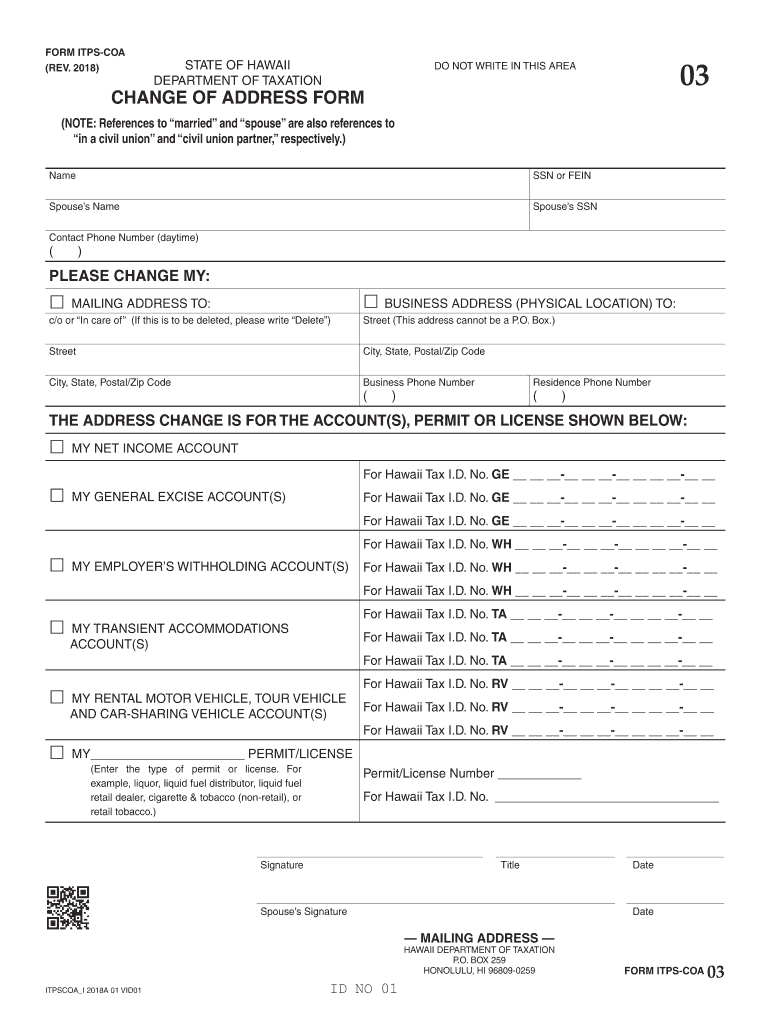
Clear Form FORM ITPS-COA REV. STATE OF HAWAII DEPARTMENT OF TAXATION DO NOT WRITE IN THIS AREA CHANGE OF ADDRESS FORM NOTE References to married and spouse are also references to in a civil union and civil union partner respectively. Name SSN or FEIN Spouse s Name Spouse s SSN Contact Phone Number daytime PLEASE CHANGE MY BUSINESS ADDRESS PHYSICAL LOCATION TO M AILING ADDRESS TO c/o or In care of If this is to be deleted please write Delete Street This address cannot be a P. O. Box. Street City .
Loading

Open form follow the instructions

Easily sign the form with your finger

Send filled & signed form or save
How to fill out the HI DoT ITPS-COA online
The HI DoT ITPS-COA form is essential for notifying the Hawaii Department of Taxation about changes in your address for various accounts. This guide provides step-by-step instructions to help you efficiently complete the online form, ensuring a smooth submission process.
Experience a faster way to fill out and sign forms on the web. Access the most extensive library of templates available.
Related content
Jul 17, 2025 — Hawaii Tax Forms (Alphabetical Listing) Form ITPS-COA – Change of...
DOT. directly observed therapy. DOU. direct observation unit. DP. dorsalis pedis ... CoA 3...
The frequency indication changes and scanning stops when the system tunes in a station...
Get answers to your most pressing questions about US Legal Forms API.
How to apply for a general excise tax license in Hawaii?
To apply for a general excise tax license in Hawaii, you need to complete Form BB-1, the Application for Business Registration. This form can be submitted online or in person at your local tax office. Remember that obtaining this license is crucial for legal business operations in Hawaii. The uslegalforms platform offers tools and resources to simplify this application process for you.
How to fill out G-49 form in Hawaii?
To fill out the G-49 form in Hawaii, you must gather your business income details and your general excise tax payments for the year. Follow the instructions provided on the form, making sure to report all necessary figures accurately. Once completed, submit the form to the Hawaii Department of Taxation by the due date. For a seamless experience, you might find the uslegalforms website helpful for step-by-step guidance.
Do I have to file both G45 and G49?
Yes, if you operate a business in Hawaii, you typically need to file both G45 and G49 forms. G45 is the General Excise Tax Estimated Payment form, whereas G49 is the Annual Return for General Excise and Use Taxes. Filing both ensures you remain compliant with Hawaii's tax regulations. For clarity in filling out these forms, the uslegalforms platform can assist you with detailed instructions.
How do I file an amended Hawaii tax return?
To file an amended Hawaii tax return, you will need to use Form N-101A, which is the Amended Hawaii Income Tax Return. Make sure to complete the form with the corrected information and provide a brief explanation for the changes. Sending your amended return to the appropriate address ensures faster adjustments. The uslegalforms platform can provide the necessary forms and guidance for this process.
What is 1099G Hawaii?
A 1099G in Hawaii is a tax form that reports certain government payments, such as unemployment compensation or state tax refunds. If you received such payments last year, you will get a 1099G form, which you need for your tax filing. It's important to include this form when you prepare your tax return to avoid any discrepancies with the IRS. You can learn more about managing this form on the uslegalforms platform.
Where do I send my Hawaii federal tax return?
You should send your Hawaii federal tax return to the appropriate address listed by the IRS. Typically, if you file Form 1040, the return goes to either the Kansas City or Austin processing center, based on your residency. Make sure to check the latest guidelines from the IRS, as sending it to the correct location ensures faster processing. For more information, consider using the uslegalforms platform for assistance.
How do I get a Hawaii tax clearance certificate?
To obtain a Hawaii tax clearance certificate, you must submit an application to the Department of Taxation. This process often requires settling any outstanding tax obligations, so prepare by organizing your tax records. Acquiring this certificate is sometimes necessary for business transactions or licensing. For a comprehensive guide to this process and related forms, consult uslegalforms, especially for HI DoT ITPS-COA matters.
Does the IRS still use the 1040EZ form?
As of the latest updates, the IRS has discontinued the use of the 1040EZ form, replacing it with the 1040 form that incorporates simplified sections. This change aims to streamline the filing process while still accommodating those with simple tax situations. It is important to stay up-to-date with these changes to ensure you follow the correct procedures under the HI DoT ITPS-COA. Uslegalforms can assist in navigating these updates smoothly.
Is 1040EZ the hardest tax form to complete?
The 1040EZ form is actually one of the simplest tax forms available. It is designed for individuals with uncomplicated tax situations, making completion rather easy compared to more complex forms. The clarity of the instructions helps ensure that users can navigate the process with confidence. However, should you need support, uslegalforms is an excellent tool for the HI DoT ITPS-COA.
How is taxable income calculated on the 1040EZ?
Taxable income on the 1040EZ is calculated by taking your total income and subtracting any adjustments, such as standard deductions. It is essential to report only the income types listed, as this form is meant for simple filing situations. Understanding this calculation is key to accurately managing your taxes under the HI DoT ITPS-COA. For further clarity, uslegalforms provides useful resources.
Use professional pre-built templates to fill in and sign documents online faster. Get access to thousands of forms.
If you believe that this page should be taken down, please follow our DMCA take down process here.