Loading
Get Ks K-59 2019
How it works
-

Open form follow the instructions
-

Easily sign the form with your finger
-

Send filled & signed form or save
How to fill out the KS K-59 online
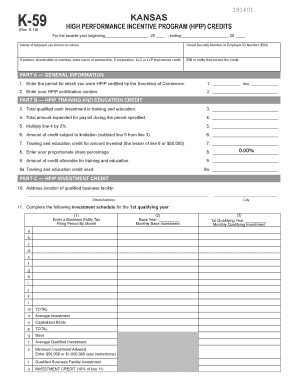
The KS K-59 form is an essential document for claiming High Performance Incentive Program (HPIP) credits in Kansas. This guide provides step-by-step instructions to assist users in completing the form accurately and efficiently in an online format.
Follow the steps to fill out the KS K-59 online effectively.
- Press the ‘Get Form’ button to access the KS K-59 document and open it for editing.
- Begin by filling out the general information section at the top of the form. Enter the taxable year start and end dates in the provided spaces.
- Provide your name and identification number, either Social Security Number or Employer ID Number (EIN), as required.
- If applicable, enter the name and EIN of the partnership, S corporation, LLC, or LLP that earned the credit in the designated areas.
- In Part A, indicate the period for which you were certified by the Secretary of Commerce and your HPIP certification number.
- Proceed to Part B and record the total qualified cash investment in training and education on line 3.
- On line 4, enter the total amount spent for payroll during the specified period.
- Calculate 2% of the amount entered on line 4 and record this value on line 5.
- Subtract the amount on line 5 from the amount on line 3 and enter the result on line 6.
- Enter the lesser of the amount on line 6 or $50,000 on line 7 for your training and education credit.
- For line 8, indicate your proportionate share percentage, entering 100% if not a partner, shareholder, or member.
- Multiply the amount on line 7 by the percentage from line 8 to determine the amount allowable for the training and education credit and enter it on line 9.
- In the HPIP Investment Credit section (Part C), provide the address of the qualified business facility on line 10.
- Fill out the investment schedule from lines 11 through 34, entering the appropriate investment amounts and following the instructions for each sub-line.
- Complete Part D by entering the relevant employment information, including the number of jobs created and retained, as specified.
- Finally, save your changes to the completed form, and you can download and print it for submission.
Complete your KS K-59 form online today for efficient filing of your HPIP credits.
Get form
Experience a faster way to fill out and sign forms on the web. Access the most extensive library of templates available.
The K3 tax form is associated with Kansas tax filings, primarily used for reporting income or credits. This form may be relevant to specific tax situations and ensures compliance with state tax regulations. If you need assistance understanding how the K3 fits into your overall tax picture, resources like uslegalforms can provide valuable information and templates to simplify the process.
Get This Form Now!
Use professional pre-built templates to fill in and sign documents online faster. Get access to thousands of forms.