Loading
Get Irs 4562 2019
This website is not affiliated with IRS
How it works
-

Open form follow the instructions
-

Easily sign the form with your finger
-

Send filled & signed form or save
How to fill out the IRS 4562 online
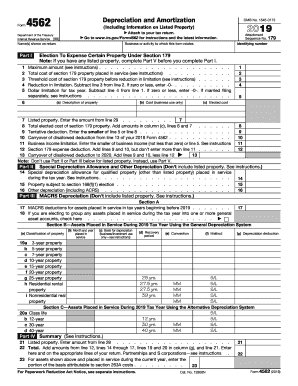
Filling out the IRS 4562 form is an essential step in accurately reporting depreciation and amortization for tax purposes. This guide provides comprehensive and supportive instructions to help users navigate the form with confidence.
Follow the steps to complete the IRS 4562 form online.
- Click ‘Get Form’ button to obtain the IRS 4562 form and open it in the editor.
- Enter your name or the names as shown on your return in the designated fields. Make sure this information matches your tax return to avoid discrepancies.
- Specify the business or activity that the form relates to by providing a brief description.
- Complete Section 179 by providing the maximum amount allowed, total cost of section 179 property placed in service, threshold cost before reduction, and any applicable reductions.
- Fill out Part I, including columns for description of property, cost for business use only, and elected cost where applicable.
- If you have listed property, make sure to complete Part V before finishing Part I.
- Continue to Part II for special depreciation allowances, including any qualified property placed in service during the tax year.
- Proceed to Part III to fill in the details for MACRS depreciation. Complete the necessary sections regarding the classification of property and enter data for each asset as directed.
- Complete Part IV, summarizing the depreciation and amortization amounts and entering the totals where specified.
- If applicable, fill out Section A and Section B under Part V for listed property, ensuring to provide all relevant information.
- Finalize your form by reviewing all entries for accuracy. Once complete, you can save changes, download, print, or share the form for submission.
Ensure your tax submissions are accurate by completing the IRS 4562 form online now.
Get form
Experience a faster way to fill out and sign forms on the web. Access the most extensive library of templates available.
Related links form
Yes, TurboTax includes IRS 4562 in its software, allowing you to easily file your depreciation claims. The platform guides you through the process, helping you input the necessary information efficiently. This user-friendly feature makes it simpler for taxpayers to report depreciation and maximize deductions on their tax returns.
Get This Form Now!
Use professional pre-built templates to fill in and sign documents online faster. Get access to thousands of forms.