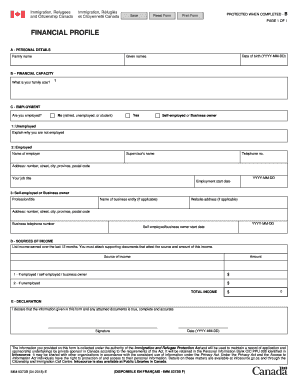
Is your family size? ? C - EMPLOYMENT Are you employed? Yes No (retired, unemployed, or student) Self-employed or Business owner 1: Unemployed Explain why you are not employed 2: Employed Name of employer Supervisor's name Telephone no. Address: number, street, city, province, postal code YYYY-MM-DD Your job title Employment start date 3: Self-employed or Business owner Profession/title Name of business entity (if applicable) Website address (if applicable) Address: number, stre.

How it works
  • Open form

    Open form follow the instructions

  • Easily sign form

    Easily sign the form with your finger

  • Share form

    Send filled & signed form or save

How to fill out the Canada IMM 5373B E online

This guide provides a comprehensive overview of how to fill out the Canada IMM 5373B E form online. It is designed to help users navigate each section of the form with ease, ensuring that all required information is accurately submitted.

Follow the steps to complete your Canada IMM 5373B E form online.

  1. Click the ‘Get Form’ button to obtain the form and open it in the editor.
  2. Begin by filling out Section A: Personal details. Enter your family name, given names, and date of birth in the format YYYY-MM-DD.
  3. Proceed to Section B: Financial capacity. Indicate your family size by providing the number of individuals in your household.
  4. Move to Section C: Employment. Here, indicate your employment status by selecting one of the options: 'Yes' if you are employed, 'No' if you are retired, unemployed, or studying, or 'Self-employed or Business owner'. If you are unemployed, provide a brief explanation.
  5. If employed, complete the fields related to your employment: provide your employer's name, supervisor's name, telephone number, and address. Also, indicate your job title and the employment start date.
  6. For self-employed or business owners, include your profession/title, the name of the business entity if applicable, the website address if available, business telephone number, and the start date of self-employment.
  7. In Section D: Sources of income, list all income earned over the last 12 months. Ensure you attach supporting documents that verify the sources and amounts of this income.
  8. Calculate your total income and enter it in the designated field at the bottom of Section D.
  9. Finally, in Section E: Declaration, affirm that the information you have provided is true, complete, and accurate. Enter the date in the format YYYY-MM-DD and provide your signature.
  10. After completing all sections, review your form for accuracy. You may then save changes, download, print, or share the completed form as needed.

Complete your Canada IMM 5373B E form online today for a seamless submission experience.

Get form

Experience a faster way to fill out and sign forms on the web. Access the most extensive library of templates available.

Related content

Consular Report of a Birth Abroad - U.S. Citizens...

A Consular Report of Birth Abroad (CRBA) is a federal document certifying the acquisition...

Learn more
(PDF) Ref-sponsor

This guide outlines the Private Sponsorship of Refugees (PSR) program in Canada, providing...

Learn more
FORM 10-K OR WILLIAMS-SONOMA, INC.

Mar 30, 2021 — We operate in the U.S., Puerto Rico, Canada, Australia and the United...

Learn more
Questions & Answers

Get answers to your most pressing questions about US Legal Forms API.

Contact support

Which website is best for Canada immigration?

The best website for Canada immigration is Canada.ca, as it remains the official government source for immigration information. This site offers detailed instructions for completing various forms, including the Canada IMM 5373B E. Relying on this official platform ensures that you receive accurate, up-to-date information and resources throughout your immigration journey.

To obtain an Electronic Travel Authorization (eTA) for Canada, you must apply online through the official Government of Canada website. The process is straightforward and requires some basic information and a valid passport. This step is particularly useful for travelers from visa-exempt countries planning to visit Canada, as it enhances the entry process while ensuring compliance with requirements.

The best immigration program for Canada varies based on your qualifications, skills, and circumstances. Programs like Express Entry, Provincial Nominee Programs, and family sponsorships cater to different applicant profiles. Assess your eligibility for the Canada IMM 5373B E and other related forms to determine the right fit for your immigration goals.

The best portal for obtaining a Canada visa is the official Government of Canada website, Canada.ca. This site provides a user-friendly interface and essential resources for completing your visa application correctly, including the Canada IMM 5373B E form. By using this portal, you can ensure your application is processed efficiently.

The required bank balance for Canada immigration depends on the specific immigration program you choose, such as the Express Entry system. For many programs, you must demonstrate sufficient funds to support yourself and your family after arriving in Canada. The Canada IMM 5373B E form may also require you to submit proof of these funds to show financial stability.

To obtain a biometric instruction letter in Canada, you first need to complete your application for immigration, including the Canada IMM 5373B E form. Once your application is processed, you will receive a letter that instructs you on how and where to provide your biometrics. It's essential to follow the instructions carefully to ensure a smooth immigration process.

The official website for immigration to Canada is Canada.ca. Here, you can find comprehensive information about various immigration processes, including the Canada IMM 5373B E form. This site provides guidance on applying for visas, checking application status, and accessing helpful resources for new immigrants.

When you sponsor someone in Canada, you may be financially responsible for them for a specified period, typically three to ten years, depending on the relationship. This responsibility starts once they arrive in Canada and is crucial for ensuring their basic needs are met. Understanding the implications of the Canada IMM 5373B E can help clarify your obligations. Consulting resources through uslegalforms can also provide valuable insights into sponsorship responsibilities.

To sponsor someone in Canada, you must meet certain requirements established by Immigration, Refugees and Citizenship Canada. You need to demonstrate that you can support your sponsored individual financially while using forms like the Canada IMM 5373B E. Additionally, you must be a Canadian citizen or a permanent resident. Make sure you gather all necessary documentation to enhance the sponsorship process.

When returning to Canada, you typically need to complete the customs declaration form. The Canada IMM 5373B E specifically addresses customs requirements. This form ensures that you declare any goods you are bringing back to Canada. Remember, being thorough with your declaration helps facilitate a smooth entry back home.

Get This Form Now!

Use professional pre-built templates to fill in and sign documents online faster. Get access to thousands of forms.

If you believe that this page should be taken down, please follow our DMCA take down process here.

Canada IMM 5373B E Form

This form is available in several versions. Select the version you need from the drop-down list below.

Get Canada IMM 5373B E