Loading
Form preview
  • US Legal Forms
  • Other Templates
  • Tax Forms
  • Executive Department Treasury IRS Forms
  • Irs Instruction 2441 2019

Get Irs Instruction 2441 2019

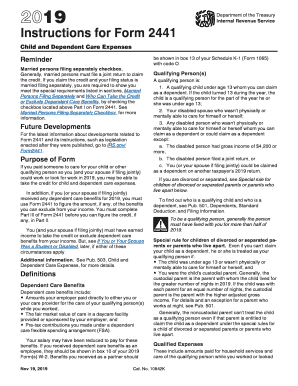
Claimed as a dependent on another taxpayer's 2018 return. If you are divorced or separated, see Special rule for children of divorced or separated parents, below. To find out who is a qualifying child and who is a dependent, see Pub. 501, Dependents, Standard Deduction, and Filing Information. ! To be a qualifying person, the person must have lived with you for more than half of 2018. CAUTION Special rule for children of divorced or separated parents. Even if you can't claim your child as a.

This website is not affiliated with IRS

How it works

  1. Open form

    Open form follow the instructions

  2. Easily sign form

    Easily sign the form with your finger

  3. Share form

    Send filled & signed form or save

How to fill out the IRS Instruction 2441 online

Filling out the IRS Instruction 2441 can seem daunting, but with a clear understanding of the requirements and steps involved, you can efficiently complete the form. This guide aims to provide a straightforward approach to filling out the Child and Dependent Care Expenses form online.

Follow the steps to successfully complete the IRS Instruction 2441.

  1. Click 'Get Form' button to access the form and open it in your preferred online editor.
  2. In Part I, indicate your filing status and, if applicable, check the box for married persons filing separately. Ensure you understand the special requirements for this status.
  3. Complete Part II to calculate your child and dependent care expenses. Enter your earned income information on the designated lines.
  4. In Part III, report any dependent care benefits received during the tax year. Include amounts shown on your W-2 form.
  5. Confirm all entries in the form, double-checking for accuracy and completeness. Then, save your changes, and you may download, print, or share the completed form as necessary.

Complete your IRS Instruction 2441 online today to ensure you benefit from the available credits for child and dependent care expenses.

Get form

Experience a faster way to fill out and sign forms on the web. Access the most extensive library of templates available.

Related content

Instructions for Form 2441 (2024) | Internal...
Dec 12, 2024 — You must use Form 2441 to figure the amount, if any, of the benefits you...
Learn more
Instructions for Form 2441
We ask for the information on this form to carry out the Internal Revenue laws of the...
Learn more
f2441--2017.pdf
3. Add the amounts in column (c) of line 2. Don't enter more than $3,000 for one...
Learn more

Related links form

DSSR SF 1190 Addendum 2004 DoT MCSA-5875 2013 DoT MCSA-5896 FAA 8400-6 2015

Questions & Answers

Get answers to your most pressing questions about US Legal Forms API.

Contact support

The $8,000 homebuyer tax credit was originally designed to assist first-time homebuyers in purchasing a home. This credit allowed eligible buyers to receive a significant deduction on their taxes. However, tax credits can change, so it’s vital to stay updated, and IRS Instruction 2441 can help you understand any current credits available.

To claim the $8,000 Child Tax Credit, ensure that you have all necessary documentation for your qualifying children and your income levels are within limits. You will need to fill out the appropriate tax forms and provide the required details about each child. Refer to IRS Instruction 2441 for specific instructions on completing your tax forms correctly.

Receiving only $1,200 for your dependent care credit may be due to your qualifying expenses not meeting the maximum eligibility criteria set by the IRS. This amount depends on the number of dependents and the actual amount spent on care. For further clarity, consult IRS Instruction 2441 to see how your situation aligns with the guidelines.

The IRS tax credit for $8,000 typically refers to the Child Tax Credit, which allows families to receive credits for each qualifying child. To ensure you maximize this credit, you'll need to meet certain income requirements and provide accurate information on your tax return. IRS Instruction 2441 is a valuable resource for understanding how to qualify for this credit.

There are several reasons why you might not receive the full Child Tax Credit, such as your income exceeding the limits or insufficient qualifying children. Sometimes, discrepancies in your tax filings can also impact your eligibility. To investigate further, review IRS Instruction 2441, which can provide clarity on your situation.

The maximum amount you can claim for the Child Tax Credit varies based on several factors, including your income and the number of qualifying children. As of the latest tax updates, the maximum is generally $2,000 per child under 17. For detailed information on how IRS Instruction 2441 affects your claims, consult the IRS guidelines.

Reporting child care income on your taxes involves identifying your total earnings from caring for children. You will need to report this income on your tax return, typically using Schedule C or Schedule C-EZ. For guidance on how to properly report this income, refer to IRS Instruction 2441.

To claim the dependent care credit on your taxes, first gather your qualifying expenses and the care provider's information. Use IRS Instruction 2441 to determine eligibility and the proper form to fill out. Ensure that you have the required details for your dependents, which can help maximize your credit claims.

Changing your dependency status requires you to update your tax return with the appropriate information about your dependents. You need to provide their details correctly on your return and ensure any changes reflect accurately. Consider referring to IRS Instruction 2441 to understand how these changes can affect your tax credits.

You may be required to fill out form 2441 to claim the Child and Dependent Care Expenses Credit, which helps reduce the tax burden associated with child care costs. If you have eligible expenses, completing this form is essential for claiming this credit. Understanding IRS Instruction 2441 is crucial in maximizing your potential refund.

Get This Form Now!

Use professional pre-built templates to fill in and sign documents online faster. Get access to thousands of forms.
If you believe that this page should be taken down, please follow our DMCA take down processhere.
Get IRS Instruction 2441
  • Adoption
  • Bankruptcy
  • Contractors
  • Divorce
  • Home Sales
  • Employment
  • Identity Theft
  • Incorporation
  • Landlord Tenant
  • Living Trust
  • Name Change
  • Personal Planning
  • Small Business
  • Wills & Estates
  • Packages A-Z
  • Affidavits
  • Bankruptcy
  • Bill of Sale
  • Corporate - LLC
  • Divorce
  • Employment
  • Identity Theft
  • Internet Technology
  • Landlord Tenant
  • Living Wills
  • Name Change
  • Power of Attorney
  • Real Estate
  • Small Estates
  • Wills
  • All Forms
  • Forms A-Z
  • Other Templates
  • Legal Hub
  • About Us
  • Help Portal
  • Legal Resources
  • Blog
  • Affiliates
  • Contact Us
  • Delete My Account
  • Site Map
  • Industries
  • Forms in Spanish
  • Localized Forms
  • State-specific Forms
  • Forms Kit
  • Real Estate Handbook
  • All Guides
  • Notarize
  • Incorporation services
  • For Consumers
  • For Small Business
  • For Attorneys
  • USLegal
  • FormsPass
  • pdfFiller
  • signNow
  • altaFlow
  • DocHub
  • Instapage
Form Packages
  • Adoption
  • Bankruptcy
  • Contractors
  • Divorce
  • Home Sales
  • Employment
  • Identity Theft
  • Incorporation
  • Landlord Tenant
  • Living Trust
  • Name Change
  • Personal Planning
  • Small Business
  • Wills & Estates
  • Packages A-Z
Form Categories
  • Affidavits
  • Bankruptcy
  • Bill of Sale
  • Corporate - LLC
  • Divorce
  • Employment
  • Identity Theft
  • Internet Technology
  • Landlord Tenant
  • Living Wills
  • Name Change
  • Power of Attorney
  • Real Estate
  • Small Estates
  • Wills
  • All Forms
  • Forms A-Z
  • Other Templates
Customer Service
  • Legal Hub
  • About Us
  • Help Portal
  • Legal Resources
  • Blog
  • Affiliates
  • Contact Us
  • Delete My Account
  • Site Map
  • Industries
  • Forms in Spanish
  • Localized Forms
  • State-specific Forms
  • Forms Kit
Legal Guides
  • Real Estate Handbook
  • All Guides
Prepared for you
  • Notarize
  • Incorporation services
Our Customers
  • For Consumers
  • For Small Business
  • For Attorneys
Our Sites
  • USLegal
  • FormsPass
  • pdfFiller
  • signNow
  • altaFlow
  • DocHub
  • Instapage
Social Media
Call us now toll free:
+1 833 426 79 33
As seen in:
© Copyright 1999-2026 airSlate Legal Forms, Inc. 17 Station Street, Ste. 203, Brookline, MA 02445
  • Your Privacy Choices
  • Terms of Service
  • Privacy Notice
  • Content Takedown Policy
  • Bug Bounty Program
IRS Instruction 2441
This form is available in several versions.
Select the version you need from the drop-down list below.
2022 IRS Instruction 2441
Select form
  • 2022 IRS Instruction 2441
  • 2020 IRS Instruction 2441
  • 2019 IRS Instruction 2441
  • 2018 IRS Instruction 2441
  • 2017 IRS Instruction 2441
  • 2016 IRS Instruction 2441
  • 2015 IRS Instruction 2441
  • 2013 IRS Instruction 2441
Select form