Loading
Form preview
  • US Legal Forms
  • Other Templates
  • Tax Forms
  • Executive Department Treasury IRS Forms
  • Irs 1040-ss 2019

Get Irs 1040-ss 2019

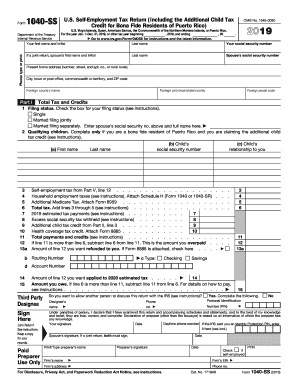
Oint Return? See instructions. Keep a copy for your records. Paid Preparer Use Only Third Party Designee Do you want to allow another person to discuss this return with the IRS (see instructions)? Designee s Phone Personal Identification name no. Number (PIN) Spouse s signature. If a joint return, both must sign. Print/Type preparer s name Preparer s signature Date Date Check if self-employed Firm s name Firm s EIN Firm s address Phone no.

This website is not affiliated with IRS

How it works

  1. Open form

    Open form follow the instructions

  2. Easily sign form

    Easily sign the form with your finger

  3. Share form

    Send filled & signed form or save

How to fill out the IRS 1040-SS online

Navigating the IRS 1040-SS form can seem daunting, but with this step-by-step guide, you will have the support you need to complete it efficiently. This guide provides clear instructions for each section of the form, ensuring you understand what is required.

Follow the steps to complete the IRS 1040-SS online.

  1. Press the ‘Get Form’ button to retrieve the IRS 1040-SS form and open it in your digital workspace.
  2. Enter your first and last name, along with your social security number in the designated fields at the top of the form.
  3. If filing jointly, input your partner's first name, last name, and social security number.
  4. Complete the present home address section with your street address, city, and ZIP code. If applicable, include foreign country details.
  5. In Part I, select your filing status by checking the appropriate box: single, married filing jointly, or married filing separately. If married filing separately, ensure you include your partner's information.
  6. If you are a bona fide resident of Puerto Rico and are claiming the additional child tax credit, fill out the information for each qualifying child as instructed.
  7. For the total tax and credits section, calculate your self-employment tax, household employment taxes, and additional Medicare tax, then sum these for the total tax line.
  8. In the payments and credits section, provide information on estimated tax payments and qualify for any additional credits you are claiming.
  9. Review the overpayment or amount owed calculations, ensuring accuracy in the amount you wish to be refunded or applied to future taxes.
  10. At the end of the form, you must sign and date your return. Include a phone number for contact purposes and enter any Identity Protection PIN if you have one.
  11. Once completed, you can save your changes, download, print, or share the form as needed.

Start filling out your IRS 1040-SS form online today to ensure your tax responsibilities are managed efficiently!

Get form

Experience a faster way to fill out and sign forms on the web. Access the most extensive library of templates available.

Related content

2024 Form 1040-SS
Part I. Total Tax and Credits (see instructions). 1 Filing status. Check the box for your...
Learn more
Form 1040-SS
You must also file Form 1040-SS to pay any employee social security and Medicare tax on...
Learn more
2014 Instructions for Form 1040NR
Apr 15, 2015 — Form 1040NR is the US Nonresident Alien Income Tax Return. Instructions...
Learn more

Related links form

AFMC 913 2012 AKC Form AEN999 2011 ALB Form 76 Amaryllis Centre for Healing Reiki Client Intake Form: Practitioner Vanessa Kary

Questions & Answers

Get answers to your most pressing questions about US Legal Forms API.

Contact support

The tax form 1040PR is specifically designed for residents of Puerto Rico to report income and calculate taxes. It is different from the IRS 1040-SS, which is for self-employed individuals outside of the U.S. Understanding these differences can help you choose the correct form for your tax situation.

Choosing between IRS 1040 and 1040 SR depends on your age and tax situation. If you are 65 years or older, the IRS 1040 SR might be beneficial as it offers a simplified format with larger print. However, if you do not meet the age requirement, the standard IRS 1040 form provides similar capabilities for reporting income.

No, you cannot email your tax returns directly to the IRS, including the IRS 1040-SS. The IRS requires physical forms to be mailed or filed electronically through authorized e-file providers. Using the e-filing option can streamline the submission process and provide immediate confirmation of receipt.

To ensure your IRS 1040-SS reaches the IRS safely, you should mail it to the address specified for your filing method and ensure you have a return receipt option selected. Using a mailing method that provides tracking allows you to verify that your return was received. This will help avoid delays in processing and potential penalties.

The most secure method to mail your tax returns, including the IRS 1040-SS, is to use a postal service that offers tracking and delivery confirmation. Options like certified mail from the USPS provide proof of mailing and delivery. Additionally, use a sturdy envelope and consider reinforcing sensitive areas to protect against tampering.

When mailing your tax return, including the IRS 1040-SS, make sure to use the appropriate address specified for your state. It’s advisable to send your return via certified mail or a tracked service to ensure delivery. By doing this, you can keep track of your submission and have peace of mind.

The IRS 1040-SS is a specific tax form used by self-employed individuals and business owners who earn income from sources outside of the United States. This form allows you to report your income and calculate your self-employment taxes. It is essential for individuals living abroad who need to ensure compliance with U.S. tax regulations.

Using the IRS 1040 form often makes sense for most individual taxpayers filing their annual returns. This form accommodates a wide range of income types and deductions, making it versatile for many situations. If you are unsure which form to use, starting with the 1040 is a common choice and can be simplified through services like USLegalForms. An understanding of your specific circumstances will guide your decision.

The IRS 1040-SR is specifically tailored for seniors aged 65 and older, allowing them to take advantage of a larger standard deduction. It features larger fonts and improved readability, making it user-friendly. This form serves the same basic purpose as the 1040 but incorporates elements to better accommodate older taxpayers. If you meet the age requirement, considering the 1040-SR might be beneficial.

The IRS 1040 form is for U.S. citizens and residents, while the 1040 NR is intended for non-resident aliens. If you are a foreign national earning income in the U.S., you would typically use the 1040 NR. Understanding which form applies to your situation helps ensure your tax filing is accurate and compliant. The distinctions can influence your overall tax strategy.

Get This Form Now!

Use professional pre-built templates to fill in and sign documents online faster. Get access to thousands of forms.
If you believe that this page should be taken down, please follow our DMCA take down processhere.
Get IRS 1040-SS
  • Adoption
  • Bankruptcy
  • Contractors
  • Divorce
  • Home Sales
  • Employment
  • Identity Theft
  • Incorporation
  • Landlord Tenant
  • Living Trust
  • Name Change
  • Personal Planning
  • Small Business
  • Wills & Estates
  • Packages A-Z
  • Affidavits
  • Bankruptcy
  • Bill of Sale
  • Corporate - LLC
  • Divorce
  • Employment
  • Identity Theft
  • Internet Technology
  • Landlord Tenant
  • Living Wills
  • Name Change
  • Power of Attorney
  • Real Estate
  • Small Estates
  • Wills
  • All Forms
  • Forms A-Z
  • Other Templates
  • Legal Hub
  • About Us
  • Help Portal
  • Legal Resources
  • Blog
  • Affiliates
  • Contact Us
  • Delete My Account
  • Site Map
  • Industries
  • Forms in Spanish
  • Localized Forms
  • State-specific Forms
  • Forms Kit
  • Real Estate Handbook
  • All Guides
  • Notarize
  • Incorporation services
  • For Consumers
  • For Small Business
  • For Attorneys
  • USLegal
  • FormsPass
  • pdfFiller
  • signNow
  • altaFlow
  • DocHub
  • Instapage
Form Packages
  • Adoption
  • Bankruptcy
  • Contractors
  • Divorce
  • Home Sales
  • Employment
  • Identity Theft
  • Incorporation
  • Landlord Tenant
  • Living Trust
  • Name Change
  • Personal Planning
  • Small Business
  • Wills & Estates
  • Packages A-Z
Form Categories
  • Affidavits
  • Bankruptcy
  • Bill of Sale
  • Corporate - LLC
  • Divorce
  • Employment
  • Identity Theft
  • Internet Technology
  • Landlord Tenant
  • Living Wills
  • Name Change
  • Power of Attorney
  • Real Estate
  • Small Estates
  • Wills
  • All Forms
  • Forms A-Z
  • Other Templates
Customer Service
  • Legal Hub
  • About Us
  • Help Portal
  • Legal Resources
  • Blog
  • Affiliates
  • Contact Us
  • Delete My Account
  • Site Map
  • Industries
  • Forms in Spanish
  • Localized Forms
  • State-specific Forms
  • Forms Kit
Legal Guides
  • Real Estate Handbook
  • All Guides
Prepared for you
  • Notarize
  • Incorporation services
Our Customers
  • For Consumers
  • For Small Business
  • For Attorneys
Our Sites
  • USLegal
  • FormsPass
  • pdfFiller
  • signNow
  • altaFlow
  • DocHub
  • Instapage
Social Media
Call us now toll free:
+1 833 426 79 33
As seen in:
© Copyright 1999-2026 airSlate Legal Forms, Inc. 17 Station Street, Ste. 203, Brookline, MA 02445
  • Your Privacy Choices
  • Terms of Service
  • Privacy Notice
  • Content Takedown Policy
  • Bug Bounty Program
IRS 1040-SS
This form is available in several versions.
Select the version you need from the drop-down list below.
2024 IRS 1040-SS
Select form
  • 2024 IRS 1040-SS
  • 2023 IRS 1040-SS
  • 2022 IRS 1040-SS
  • 2021 IRS 1040-SS
  • 2020 IRS 1040-SS
  • 2019 IRS 1040-SS
  • 2018 IRS 1040-SS
  • 2017 IRS 1040-SS
  • 2016 IRS 1040-SS
  • 2015 IRS 1040-SS
  • 2014 IRS 1040-SS
  • 2013 IRS 1040-SS
  • 2012 IRS 1040-SS
  • 2011 IRS 1040-SS
  • 2010 IRS 1040-SS
Select form