Loading
Form preview
  • US Legal Forms
  • Other Templates
  • Tax Forms
  • Executive Department Treasury IRS Forms
  • Irs 1041-t 2017

Get Irs 1041-t 2017

Top of the form. If the due date falls on a Saturday, Sunday, or legal holiday, file on the next business day. For a 2017 calendar year decedent s estate or trust, that date is March 6, 2018. Period Covered File the 2017 form for calendar year 2017 and fiscal years beginning in 2017 and ending in 2018. If the form is for a fiscal year or a short tax year, fill in the tax year space at the top of the form. Where To File If you are located in Please mail to the Connecticut, Delawa.

This website is not affiliated with IRS

How it works

  1. Open form

    Open form follow the instructions

  2. Easily sign form

    Easily sign the form with your finger

  3. Share form

    Send filled & signed form or save

How to fill out the IRS 1041-T online

Filling out the IRS 1041-T form can seem challenging, but with the right guidance, it can be a straightforward process. This guide offers step-by-step instructions to help you successfully complete this form and ensure accurate allocation of estimated tax payments to beneficiaries.

Follow the steps to complete the IRS 1041-T form online.

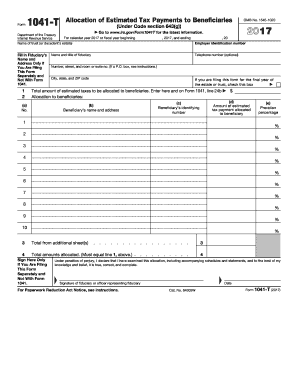
  1. Press the ‘Get Form’ button to obtain the IRS 1041-T form and open it in your chosen editor.
  2. At the top of the form, indicate the calendar or fiscal year for which you are filing. Include the beginning and ending dates accordingly.
  3. In the fiduciary’s section, fill in the name of the trust or decedent's estate. If you are filing this form separately and not with Form 1041, provide the fiduciary’s name, address, and optional telephone number.
  4. Enter the Employer Identification Number (EIN) for the trust or estate.
  5. If this is for the final year of the estate or trust, check the appropriate box.
  6. On line 1, input the total amount of estimated taxes to be allocated to beneficiaries. This figure must also be reflected on Form 1041, line 24b.
  7. For each beneficiary, provide their name and address in column (b), then enter their identifying number in column (c). Ensure this number is accurate to avoid processing delays.
  8. In column (d), list the amount of the estimated tax payment allocated to each beneficiary.
  9. Calculate the proration percentage for each beneficiary and enter it in column (e). This is the amount in column (d) divided by the total from line 1.
  10. If your allocations exceed 10 beneficiaries, list additional beneficiaries on a separate sheet and enter the total on line 3.
  11. Make sure that the total amounts allocated in line 4 match the amount on line 1.
  12. Finally, sign and date the form. If filing separately from Form 1041, this step is crucial.

Complete your IRS 1041-T form online today to ensure smooth and accurate tax allocation!

Get form

Experience a faster way to fill out and sign forms on the web. Access the most extensive library of templates available.

Related content

About Form 1041-T, Allocation of Estimated Tax...
Jan 29, 2025 — Information about Form 1041-T, Allocation of Estimated Tax Payments to...
Learn more
2008 Form 1041-T
The fiduciary files Form 1041-T to make the election. Once made, the election is...
Learn more
2016 Publication 575
Jan 4, 2017 — The earnings aren't taxed until distributed either in a with- drawal or in...
Learn more

Related links form

IRS 8332 2018 IRS 8332 2010 IRS 8332 1993 IRS 8379 2016

Questions & Answers

Get answers to your most pressing questions about US Legal Forms API.

Contact support

Yes, you can file IRS Form 1041 electronically. This provides you with a secure and efficient way to complete your filing responsibilities. By using approved e-filing systems, you can streamline your process and maintain greater accuracy when submitting your IRS 1041-T.

Certain IRS forms cannot be filed electronically, including some specific forms that are required for estates and trusts. It is essential to check the IRS website for a complete list of forms that must be submitted by mail. Knowing these details can help ensure compliance with IRS regulations related to IRS 1041-T.

Form 1041-T can indeed be filed electronically through authorized e-filing software. This option enhances your filing experience by providing quick submission and instant confirmation of your application. Consider using a trusted platform like uslegalforms for guidance in navigating the electronic filing process for IRS 1041-T.

Yes, you can make a payment related to IRS Form 1041 online. The IRS provides several options for making payments electronically, which offers convenience and efficiency in managing your tax obligations. Utilizing online payment services can ease your responsibilities connected with IRS 1041-T.

Filling out an IRS Form 1041 for an estate tax return involves several steps. Start by gathering all required financial information for the estate or trust, including income statements, deductions, and credits. A careful review of IRS guidelines can be invaluable in accurately completing the IRS 1041-T, or you may consider using resources like uslegalforms to simplify the process.

You can file IRS Form 1041 online through the IRS e-file system. This paperless process makes submitting your tax returns more convenient and secure. Utilizing online filing methods can help streamline your experience with IRS 1041-T, ensuring timely submissions and confirmations.

Yes, an IL 1041 can often be filed electronically. Most states, including Illinois, offer options for electronic filing of tax forms. Ensure you check the specific guidelines on the IRS website to confirm suitability for the IRS 1041-T and stay up to date on the most efficient filing methods.

You should file IRS Form 1041-T when you are addressing the tax obligations of an estate or trust that has income-generating assets. The due date typically aligns with the fiduciary tax return deadlines, which is usually April 15 for calendar year filers. Timely filing is crucial to avoid penalties and ensure compliance with IRS regulations concerning the IRS 1041-T.

The IRS Form 1041-T is used to report the allocation of income and deductions to beneficiaries of estates or trusts. It ensures that beneficiaries receive proper credit for their share of income on their personal tax returns. Utilizing this form accurately is essential for tax planning and compliance.

The purpose of a trust tax return, such as the IRS Form 1041, is to report the income generated by the trust. It allows the IRS to determine how much tax is due based on that income. Filing this return is an essential responsibility of trustees to maintain compliance.

Get This Form Now!

Use professional pre-built templates to fill in and sign documents online faster. Get access to thousands of forms.
If you believe that this page should be taken down, please follow our DMCA take down processhere.
Get IRS 1041-T
  • Adoption
  • Bankruptcy
  • Contractors
  • Divorce
  • Home Sales
  • Employment
  • Identity Theft
  • Incorporation
  • Landlord Tenant
  • Living Trust
  • Name Change
  • Personal Planning
  • Small Business
  • Wills & Estates
  • Packages A-Z
  • Affidavits
  • Bankruptcy
  • Bill of Sale
  • Corporate - LLC
  • Divorce
  • Employment
  • Identity Theft
  • Internet Technology
  • Landlord Tenant
  • Living Wills
  • Name Change
  • Power of Attorney
  • Real Estate
  • Small Estates
  • Wills
  • All Forms
  • Forms A-Z
  • Other Templates
  • Legal Hub
  • About Us
  • Help Portal
  • Legal Resources
  • Blog
  • Affiliates
  • Contact Us
  • Delete My Account
  • Site Map
  • Industries
  • Forms in Spanish
  • Localized Forms
  • State-specific Forms
  • Forms Kit
  • Real Estate Handbook
  • All Guides
  • Notarize
  • Incorporation services
  • For Consumers
  • For Small Business
  • For Attorneys
  • USLegal
  • FormsPass
  • pdfFiller
  • signNow
  • altaFlow
  • DocHub
  • Instapage
Form Packages
  • Adoption
  • Bankruptcy
  • Contractors
  • Divorce
  • Home Sales
  • Employment
  • Identity Theft
  • Incorporation
  • Landlord Tenant
  • Living Trust
  • Name Change
  • Personal Planning
  • Small Business
  • Wills & Estates
  • Packages A-Z
Form Categories
  • Affidavits
  • Bankruptcy
  • Bill of Sale
  • Corporate - LLC
  • Divorce
  • Employment
  • Identity Theft
  • Internet Technology
  • Landlord Tenant
  • Living Wills
  • Name Change
  • Power of Attorney
  • Real Estate
  • Small Estates
  • Wills
  • All Forms
  • Forms A-Z
  • Other Templates
Customer Service
  • Legal Hub
  • About Us
  • Help Portal
  • Legal Resources
  • Blog
  • Affiliates
  • Contact Us
  • Delete My Account
  • Site Map
  • Industries
  • Forms in Spanish
  • Localized Forms
  • State-specific Forms
  • Forms Kit
Legal Guides
  • Real Estate Handbook
  • All Guides
Prepared for you
  • Notarize
  • Incorporation services
Our Customers
  • For Consumers
  • For Small Business
  • For Attorneys
Our Sites
  • USLegal
  • FormsPass
  • pdfFiller
  • signNow
  • altaFlow
  • DocHub
  • Instapage
Social Media
Call us now toll free:
+1 833 426 79 33
As seen in:
© Copyright 1999-2026 airSlate Legal Forms, Inc. 17 Station Street, Ste. 203, Brookline, MA 02445
  • Your Privacy Choices
  • Terms of Service
  • Privacy Notice
  • Content Takedown Policy
  • Bug Bounty Program
IRS 1041-T
This form is available in several versions.
Select the version you need from the drop-down list below.
2021 IRS 1041-T
Select form
  • 2021 IRS 1041-T
  • 2020 IRS 1041-T
  • 2019 IRS 1041-T
  • 2018 IRS 1041-T
  • 2017 IRS 1041-T
  • 2016 IRS 1041-T
  • 2012 IRS 1041-T
Select form