S from farming or fishing). To figure the estate s or trust s AGI, see the instructions for line 15c of Form 1041, U.S. Income Tax Return for Estates and Trusts. However, if a return was not filed for 2015 or that return did not cover a full 12 months, item (2) does not apply. For this purpose, include household employment taxes when figuring the tax shown on the tax return, but only if: The estate or trust will have federal income tax withheld from any income, or The estate or trust.
Loading

Open form follow the instructions

Easily sign the form with your finger

Send filled & signed form or save
How to fill out the IRS 1041-ES online
Completing the IRS 1041-ES form online can simplify your tax preparation process for estates and trusts. This guide will walk you through the necessary steps to accurately fill out the form, ensuring that you meet your estimated tax payment obligations effectively.
Follow the steps to complete the IRS 1041-ES form online.
- Click ‘Get Form’ button to obtain the 1041-ES form and open it in your preferred editor.
- Begin by entering the name of the estate or trust along with its employer identification number (EIN) in the appropriate fields.
- Provide the fiduciary's name, title, and address to ensure accurate identification of the responsible party.
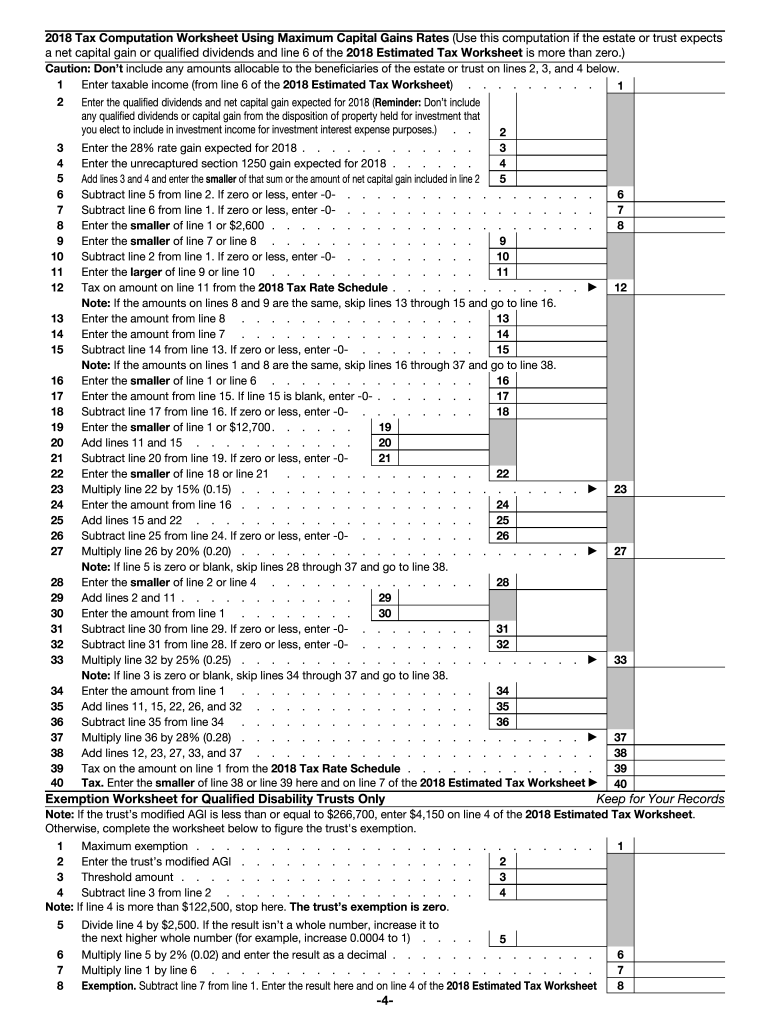
- Calculate the estimated tax using the 2016 Estimated Tax Worksheet provided within the form, ensuring to account for any credits and strategies applicable to your situation.
- Fill out the payment voucher section by entering the estimated tax amount, ensuring clarity in the payment due date is noted based on your filing schedule.
- Review all entered information for accuracy, making sure all calculations are correct and compliance is maintained with IRS guidelines.
- Finally, save your changes and choose to either download, print, or share the completed form, making sure to retain copies for your records.
Take action now and complete your IRS 1041-ES form online.
Experience a faster way to fill out and sign forms on the web. Access the most extensive library of templates available.
Related content
Jan 29, 2025 — Use Form 1041-ES to figure and pay estimated tax for an estate or trust...
Jan 15, 1996 — Estimated tax is the amount of tax an estate or trust expects to owe for...
Mar 1, 2017 — Publication 505 covers tax withholding and estimated tax, including how to...
Get answers to your most pressing questions about US Legal Forms API.
What is the 90% rule for estimated taxes?
The 90% rule for estimated taxes states that you can avoid an underpayment penalty by paying at least 90% of your current year's tax due or 100% of last year's tax liability. This rule applies to individuals and estates alike. By using IRS 1041-ES, you can determine the correct estimated payments needed to comply with this requirement.
How to fill out a 1041 estate tax return?
Filling out a 1041 estate tax return involves providing information about the decedent, the estate's income, and deductions. Ensure you accurately report the income generated by the estate assets, as well as any distributions made to beneficiaries. The IRS 1041-ES can provide clarity on how to properly compute and file these amounts effectively.
How do I report the sale of a house on 1041?
When reporting the sale of a house on IRS Form 1041, you must first determine if the property was part of the estate or held by the trust. You should report the proceeds from the sale, expenses related to the sale, and the basis of the property. Using IRS 1041-ES will help ensure you accurately complete and file your taxes for the estate.
What is the IRS form 1041 for dummies?
The IRS form 1041 is used by estates and trusts to report their income, deductions, and taxes. Think of it as a tax return for an estate, similar to what individuals file. This form helps calculate the tax liability for the estate or trust for the year. For a straightforward understanding of how to complete it, resources like US Legal Forms provide easy-to-follow instructions and essential tools.
Can I file IRS form 1041 electronically?
Yes, you can file IRS form 1041 electronically, which is a quick and efficient method. E-filing minimizes processing time and provides instant confirmation that your return has been submitted. Many tax software programs are authorized by the IRS to file this form electronically. This option simplifies the filing process for many estates.
Do I have to file a 1041 for an estate with no income?
Even if an estate has no income, filing an IRS 1041 may still be necessary under certain circumstances. The IRS requires a return if the estate exceeds a specific threshold, even if no income is reported. It’s crucial to determine your estate’s filing requirements based on its total value and assets. If you’re uncertain, platforms like US Legal Forms can offer guidance and help ensure you meet your obligations.
How much is the exemption for an estate on a 1041?
The exemption amount for an estate on IRS 1041 can vary based on the current tax laws. However, generally, estates can benefit from significant exclusion amounts before taxes apply. It’s essential to stay updated on the latest tax regulations, as they can change. Consult with a tax professional or utilize resources like US Legal Forms for accurate and current information.
What is deductible on a 1041 for an estate?
When filing IRS 1041 for an estate, certain expenses are deductible. These can include administrative costs, funeral expenses, and debts of the decedent at the time of death. Understanding what qualifies as a deductible expense can help reduce the estate's taxable income effectively. Make sure to keep detailed records of these expenses to support your deductions.
Where do I file 1041-ES?
You should file IRS 1041-ES forms with the IRS. The specific address depends on your state of residence, so check the IRS guidelines for accurate filing locations. Filing electronically is also an option that many find efficient and time-saving. Ensure all required documents are included to avoid delays.
Can I make 1040 ES payments through EFTPS?
Yes, you can use the Electronic Federal Tax Payment System (EFTPS) to make 1040 ES payments. This system allows you to schedule payments in advance, making it easier to manage your tax liabilities for the IRS 1041-ES. By utilizing EFTPS, you benefit from a secure, reliable platform that ensures your payments are processed on time. It’s a fantastic option for those who want to stay organized and in compliance.
Use professional pre-built templates to fill in and sign documents online faster. Get access to thousands of forms.
If you believe that this page should be taken down, please follow our DMCA take down process here.
This form is available in several versions. Select the version you need from the drop-down list below.