Loading
Form preview
  • US Legal Forms
  • Other Templates
  • Tax Forms
  • Executive Department Treasury IRS Forms
  • Irs 5498-sa 2016

Get Irs 5498-sa 2016

Ecurity Administration makes to your MA MSA are not includible in your gross income nor are they deductible. Neither you nor your employer can make contributions to your MA MSA. Generally, contributions you or someone other than your employer make to your HSA are deductible on your tax return. Employer contributions to your HSA may be excluded from your income and are not deductible by you. You and your employer can make contributions to your HSA in the same year. See Form 8853 and its instructi.

This website is not affiliated with IRS

How it works

  1. Open form

    Open form follow the instructions

  2. Easily sign form

    Easily sign the form with your finger

  3. Share form

    Send filled & signed form or save

How to fill out the IRS 5498-SA online

Filling out the IRS 5498-SA form online can be an essential part of managing your health savings account (HSA), Archer medical savings account (MSA), or Medicare Advantage MSA. This guide will provide clear, step-by-step instructions to help you navigate the process effectively.

Follow the steps to complete the IRS 5498-SA form online.

  1. Click the ‘Get Form’ button to obtain the IRS 5498-SA form and open it in the editor.
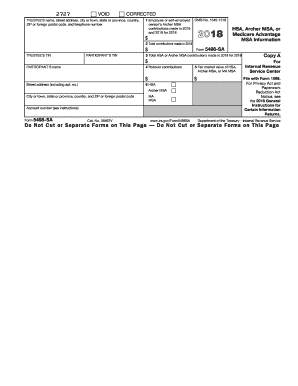
  2. Enter the trustee’s name, street address, city or town, state or province, country, ZIP or foreign postal code, and telephone number in the designated fields.
  3. Fill in the participant's social security number and name. This information is critical for the IRS to identify the account holder.
  4. In Box 1, report the contributions made by the employee or self-employed person to the Archer MSA for the year reported. Ensure this reflects contributions made in 2016 and 2017 for the tax year 2016.
  5. Complete Box 2 with the total contributions made in 2016 to the HSA or Archer MSA. This may include contributions from qualified HSA funding distributions.
  6. In Box 3, indicate the total HSA or Archer MSA contributions made in 2017 specifically for the tax year 2016.
  7. If applicable, record any rollover contributions in Box 4. Rollover contributions may arise from an Archer MSA to this Archer MSA or from an HSA to this HSA.
  8. Fill Box 5 with the fair market value of the HSA, Archer MSA, or MA MSA at the end of 2016.
  9. Finalize by indicating the account number in Box 6, which may show an account or unique number assigned by the trustee.
  10. Review all entered information for accuracy. Once you are satisfied with your entries, save any changes, and choose to download, print, or share the form as needed.

Complete your IRS 5498-SA form online today and ensure your health savings account is managed correctly.

Get form

Experience a faster way to fill out and sign forms on the web. Access the most extensive library of templates available.

Related content

About Form 5498-SA, HSA, Archer MSA, or Medicare...
Jan 28, 2025 — File Form 5498-SA for each person for whom you maintained an HSA, Archer...
Learn more
Form 5498-SA now available online - News
Apr 30, 2024 — The 5498-SA is the IRS form that reports all contributions to your HSA...
Learn more
2016 Publication 560
Jan 26, 2017 — For specific information about reporting corrective distributions, see...
Learn more

Related links form

ZA Composer/Author Application for Samro Membership TSP-70 2010 DD 370 2009 TSP-70 2008

Questions & Answers

Get answers to your most pressing questions about US Legal Forms API.

Contact support

To report HSA contributions, refer to the IRS 5498-SA and enter the total contributions on your tax return, typically on Form 8889. Make sure the amounts align with what is shown on the form. By accurately entering this information, you can fully utilize the tax benefits associated with your Health Savings Account.

You do not place the IRS 5498-SA anywhere on your tax return, as it is not a required submission. Instead, use it to verify your HSA information and make sure your contributions are reported correctly in the respective sections of your tax forms. Reference it as necessary to avoid mistakes.

In TurboTax, you won’t enter the IRS 5498-SA directly. Instead, you will input HSA contributions or distributions as prompted by the software. Use the information from your form to guide your entries and ensure accurate reporting.

You don’t need to report the IRS 5498-SA on your taxes. Use the information it provides to double-check your HSA contributions and relevancy to your tax filings. This way, you maintain compliance with IRS regulations while benefiting from your tax-advantaged account.

You do not report the IRS 5498-SA directly on your tax return. Instead, use it as a reference to ensure that all contributions and distributions are accurately entered in the appropriate sections of your tax forms. Ensure your HSA contributions do not exceed the limits specified on the form.

The IRS 5498-SA does not require filing with your tax return. It's an informational document sent to both you and the IRS, outlining the funds contributed to your Health Savings Account. While you keep it for your records, you won't submit it when filing your taxes.

No, you do not report the IRS 5498-SA on your tax return. This form is a record for your information and does not need to be filed with your income taxes. However, reviewing the form can help you ensure that you've accurately reported any contributions or distributions on your tax forms.

Yes, the IRS 5498-SA serves as an informational document. It provides details about contributions made to your Health Savings Account (HSA) during the tax year. While it doesn't require you to file it with your return, it’s crucial for accurately reporting your contributions and understanding your HSA limits.

You do not report the IRS 5498-SA on your taxes directly, as this form serves as a record of contributions for your HSA. However, the contributions reported can affect your overall tax calculation, so maintain accurate records. By understanding the details on the 5498-SA, you can ensure that your tax returns reflect your contributions accurately. If needed, tools like uslegalforms can provide additional assistance for understanding tax implications.

Discrepancies between your HSA 5498 and W-2 can occur due to timing differences in reporting income and contributions. The IRS 5498 only captures HSA contributions while the W-2 reports your overall income and withholdings. If you notice a mismatch, it's a good idea to reach out to your plan administrator or tax advisor to clarify any issues. Utilizing uslegalforms can also assist you in sorting these differences.

Get This Form Now!

Use professional pre-built templates to fill in and sign documents online faster. Get access to thousands of forms.
If you believe that this page should be taken down, please follow our DMCA take down processhere.
Get IRS 5498-SA
  • Adoption
  • Bankruptcy
  • Contractors
  • Divorce
  • Home Sales
  • Employment
  • Identity Theft
  • Incorporation
  • Landlord Tenant
  • Living Trust
  • Name Change
  • Personal Planning
  • Small Business
  • Wills & Estates
  • Packages A-Z
  • Affidavits
  • Bankruptcy
  • Bill of Sale
  • Corporate - LLC
  • Divorce
  • Employment
  • Identity Theft
  • Internet Technology
  • Landlord Tenant
  • Living Wills
  • Name Change
  • Power of Attorney
  • Real Estate
  • Small Estates
  • Wills
  • All Forms
  • Forms A-Z
  • Other Templates
  • Legal Hub
  • About Us
  • Help Portal
  • Legal Resources
  • Blog
  • Affiliates
  • Contact Us
  • Delete My Account
  • Site Map
  • Industries
  • Forms in Spanish
  • Localized Forms
  • State-specific Forms
  • Forms Kit
  • Real Estate Handbook
  • All Guides
  • Notarize
  • Incorporation services
  • For Consumers
  • For Small Business
  • For Attorneys
  • USLegal
  • FormsPass
  • pdfFiller
  • signNow
  • altaFlow
  • DocHub
  • Instapage
Form Packages
  • Adoption
  • Bankruptcy
  • Contractors
  • Divorce
  • Home Sales
  • Employment
  • Identity Theft
  • Incorporation
  • Landlord Tenant
  • Living Trust
  • Name Change
  • Personal Planning
  • Small Business
  • Wills & Estates
  • Packages A-Z
Form Categories
  • Affidavits
  • Bankruptcy
  • Bill of Sale
  • Corporate - LLC
  • Divorce
  • Employment
  • Identity Theft
  • Internet Technology
  • Landlord Tenant
  • Living Wills
  • Name Change
  • Power of Attorney
  • Real Estate
  • Small Estates
  • Wills
  • All Forms
  • Forms A-Z
  • Other Templates
Customer Service
  • Legal Hub
  • About Us
  • Help Portal
  • Legal Resources
  • Blog
  • Affiliates
  • Contact Us
  • Delete My Account
  • Site Map
  • Industries
  • Forms in Spanish
  • Localized Forms
  • State-specific Forms
  • Forms Kit
Legal Guides
  • Real Estate Handbook
  • All Guides
Prepared for you
  • Notarize
  • Incorporation services
Our Customers
  • For Consumers
  • For Small Business
  • For Attorneys
Our Sites
  • USLegal
  • FormsPass
  • pdfFiller
  • signNow
  • altaFlow
  • DocHub
  • Instapage
Social Media
Call us now toll free:
+1 833 426 79 33
As seen in:
© Copyright 1999-2026 airSlate Legal Forms, Inc. 17 Station Street, Ste. 203, Brookline, MA 02445
  • Your Privacy Choices
  • Terms of Service
  • Privacy Notice
  • Content Takedown Policy
  • Bug Bounty Program
IRS 5498-SA
This form is available in several versions.
Select the version you need from the drop-down list below.
2022 IRS 5498-SA
Select form
  • 2022 IRS 5498-SA
  • 2021 IRS 5498-SA
  • 2020 IRS 5498-SA
  • 2019 IRS 5498-SA
  • 2018 IRS 5498-SA
  • 2017 IRS 5498-SA
  • 2016 IRS 5498-SA
Select form