Get Irs 5500-ez 2017
How it works
-

Open form follow the instructions
-

Easily sign the form with your finger
-

Send filled & signed form or save
How to fill out the IRS 5500-EZ online
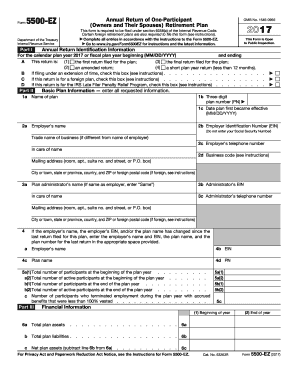
The IRS 5500-EZ form is a necessary document for one-participant retirement plans, providing essential information regarding the plan's financial status and compliance. This guide offers a clear and concise approach to completing the form online, ensuring you meet all requirements.
Follow the steps to successfully complete the IRS 5500-EZ online.
- Click ‘Get Form’ button to obtain the form and open it in your preferred editing tool.
- Identify the calendar plan year for which you are filing. Enter the start and end dates in MM/DD/YYYY format in the appropriate fields.
- Define the type of return you are submitting by selecting one of the following options: first return, amended return, final return, or short plan year return.
- If applicable, indicate if you are filing under an extension by checking the corresponding box.
- Provide essential basic plan information, including the plan name and three-digit plan number. Make sure to include the effective date of the plan.
- Enter the employer identification number (EIN), name, trade name of the business, and relevant contact information.
- List the plan administrator's information. If the administrator is the same as the employer, you can simply note 'Same.'
- Report financial information, including the total plan assets at both the beginning and the end of the year. Also, provide net plan assets and liabilities.
- Complete the contributions section by detailing amounts received from employers and participants during the year.
- Address compliance and funding questions pertaining to any participant loans and minimum funding requirements if applicable. Ensure to provide answers for all related queries.
- After completing all sections, review your entries for accuracy and completeness before finalizing.
- Once satisfied with the information entered, you can save changes, download a copy of the form, print it, or share it as needed.
Take action now and complete your IRS 5500-EZ form online to ensure compliance.
Get form
Related links form
The IRS form 5500 is used to report the financial condition, investments, and operations of employee benefit plans. It helps ensure compliance with federal regulations and provides essential information to the Department of Labor. Filing this form keeps your plan transparent and safeguards participants’ benefits. Utilizing uslegalforms can simplify your filing process and keep you compliant.