Loading
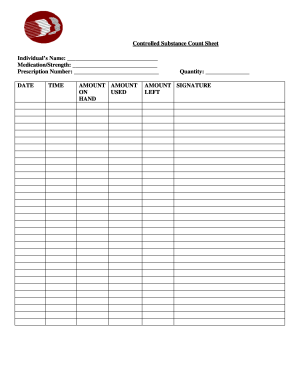
Get De Controlled Substance Count Sheet
How it works
-

Open form follow the instructions
-

Easily sign the form with your finger
-

Send filled & signed form or save
How to fill out the DE Controlled Substance Count Sheet online
The DE Controlled Substance Count Sheet is an important document for tracking the usage of controlled substances. This guide will provide you with clear, step-by-step instructions on how to complete this form online, ensuring accuracy and compliance.
Follow the steps to complete the DE Controlled Substance Count Sheet online
- Press the ‘Get Form’ button to access the DE Controlled Substance Count Sheet and open it in the appropriate editor.
- Begin by entering the individual’s name in the designated field at the top of the form.
- Next, fill in the medication name and strength in the corresponding field.
- Provide the prescription number in the required section.
- Record the date on which you are completing the form.
- Fill in the time of the count in the specified field.
- Indicate the amount on hand in the appropriate space.
- Document the amount used by entering it in the relevant field.
- In the 'Amount Left' section, input the quantity remaining after the usage.
- Ensure to sign the sheet where indicated to confirm the accuracy of the information.
- Once all fields are completed, you can save your changes, download the document, print it, or share it as needed.
Complete your DE Controlled Substance Count Sheet online today for efficient tracking.
The DEA closely monitors controlled substances through various systems, including prescription drug monitoring programs. These programs help track prescriptions issued and filled in real-time. Utilizing the DE Controlled Substance Count Sheet becomes essential to ensure compliance and to stay informed about your prescription habits.