Loading
Form preview
  • US Legal Forms
  • Form Library
  • Tax Forms
  • Executive Department Treasury IRS Forms
  • Irs 1041-a 2012

Get Irs 1041-a 2012

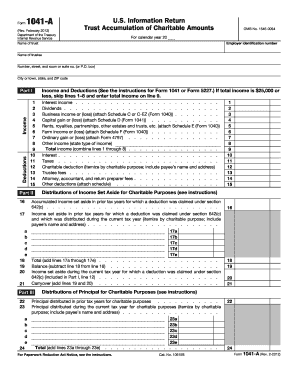
Ritable Amounts OMB No. 1545-0094 For calendar year 20 Employer identification number Name of trustee Number, street, and room or suite no. (or P.O. box) City or town, state, and ZIP code Deductions Income Part I Income and Deductions (See the instructions for Form 1041 or Form 5227.) If total income is $25,000 or less, skip lines 1 8 and enter total income on line 9. 1 2 3 4 5 6 7 8 9 10 11 12 13 14 15 Part II Interest income . . . . . . . . . . . . . . . . . . . . . . . . . Dividen.

This website is not affiliated with IRS

How it works

  1. Open form

    Open form follow the instructions

  2. Easily sign form

    Easily sign the form with your finger

  3. Share form

    Send filled & signed form or save

How to fill out the IRS 1041-A online

Filling out the IRS 1041-A form can be a straightforward process if approached step-by-step. This guide will provide clear instructions to ensure users can efficiently complete this form online, facilitating the reporting of charitable amounts for trusts.

Follow the steps to successfully complete the IRS 1041-A

  1. Click ‘Get Form’ button to obtain the form and open it in the editor.
  2. Fill in the trust's name and employer identification number at the top of the form.
  3. Provide the name of the trustee and their contact information, including address and ZIP code.
  4. In Part I, report all income and deductions. If total income is $25,000 or less, skip lines 1–8 and enter the total income directly on line 9.
  5. Detail all sources of income in Part I, including interest income, dividends, business income, and any capital gains.
  6. In Part II, provide the deductions the trust is claiming, such as charitable deductions, trustee fees, and any relevant attorney or preparer fees.
  7. For distributions of income set aside for charitable purposes in Part II, document all distributions made during the current tax year, including the amount and purpose.
  8. Move to Part IV to complete the balance sheets. Input figures for assets and liabilities, ensuring each category is accurately filled out.
  9. Sign and date the form. If applicable, any preparer must fill out their information in the Paid Preparer area.
  10. Once all fields are completed, review the form for accuracy, and then save changes, download, print, or share the completed document as necessary.

Complete your IRS forms online for a smoother filing experience today.

Get form

Experience a faster way to fill out and sign forms on the web. Access the most extensive library of templates available.

Related content

About Form 1041-A, U.S. Information Return Trust...
Jan 29, 2025 — Form 1041-A is used by trusts claiming a contributions deduction under...
Learn more
26 U.S. Code § 1041 - Transfers of property...
(a) General ruleNo gain or loss shall be recognized on a transfer of property from an...
Learn more
Instructions for Form 7004 (Rev. December 2017)
Feb 1, 2018 — Form 7004 is used to request an automatic extension of time to file...
Learn more

Related links form

IRS 706 2011 IRS 706 2009 IRS 706 2001 IRS 706 1999

Questions & Answers

Get answers to your most pressing questions about US Legal Forms API.

Contact support

Yes, you can use TurboTax to file form 1041. TurboTax provides an easy-to-follow process for handling estate and trust tax returns, including the IRS 1041-A. Leveraging such tools can make filing more manageable and help ensure that you are compliant with tax regulations.

Several IRS forms can be filed electronically, including the IRS 1041-A, 1040, and more. Many taxpayers prefer electronic filing due to its speed and convenience. Consulting a service like US Legal Forms can help you identify which forms you can file electronically.

Yes, the IRS 1041-A can be filed electronically. Many tax software platforms, such as US Legal Forms, make this process simple and convenient. By filing electronically, you can ensure accuracy and reduce the processing time for your returns.

Yes, the IRS form 1041 can indeed be filed electronically. E-filing streamlines the process and helps you receive confirmation that the IRS has received your return. Various tax software solutions support this electronic filing option, making it easier to complete your responsibilities. By choosing electronic submission, you reduce the possibility of delays that often occur with paper filings.

If there is no income generated by the estate or trust, filing an IRS 1041 is generally not required. However, there may be circumstances that still necessitate filing based on the structure or conditions of the trust. It's advisable to review the IRS guidelines or seek guidance from a tax professional to determine your obligations. US Legal Forms can provide clarity in specific scenarios.

Currently, you cannot file an estate tax return electronically. The IRS requires specific forms, such as Form 706, to be filed on paper. However, ensuring accuracy in your return is essential, as mistakes can lead to complications. For assistance, check out US Legal Forms, which provides the necessary resources to help navigate this process.

You must file the IRS 1041-A if you are representing an estate or trust that generates gross income of $600 or more. Also, if any beneficiary is a non-resident alien, a filing is required. Understanding your role as a fiduciary is vital to meeting IRS obligations. For further help, consider using US Legal Forms to guide you through the requirements.

Generally, individuals are not required to file an IRS 1041 if the estate or trust has no taxable income or if gross income is below $600. However, if there are specific conditions, such as a non-resident beneficiary, you may still need to file. Always review the IRS guidelines to ensure compliance. If needed, US Legal Forms can help clarify these nuances.

Certain IRS forms are not eligible for electronic submission, including some specialized tax forms like 1099 series and 8508 requests for extensions. Specifically, the IRS typically determines which forms can be filed electronically each tax year. Always check the IRS website for the latest updates. For any concerns, consider consulting with a tax professional to clarify your filing options.

The IRS 1041-A form must be filed by estates or trusts that have gross income of $600 or more for the tax year. Additionally, if any beneficiary is a non-resident alien, the form is required. It's essential to understand your obligations as a fiduciary to ensure compliance with IRS regulations. If you’re unsure, utilizing the US Legal Forms platform can provide you with guidance and the right resources.

Get This Form Now!

Use professional pre-built templates to fill in and sign documents online faster. Get access to thousands of forms.
If you believe that this page should be taken down, please follow our DMCA take down processhere.
Get IRS 1041-A
  • Adoption
  • Bankruptcy
  • Contractors
  • Divorce
  • Home Sales
  • Employment
  • Identity Theft
  • Incorporation
  • Landlord Tenant
  • Living Trust
  • Name Change
  • Personal Planning
  • Small Business
  • Wills & Estates
  • Packages A-Z
  • Affidavits
  • Bankruptcy
  • Bill of Sale
  • Corporate - LLC
  • Divorce
  • Employment
  • Identity Theft
  • Internet Technology
  • Landlord Tenant
  • Living Wills
  • Name Change
  • Power of Attorney
  • Real Estate
  • Small Estates
  • Wills
  • All Forms
  • Forms A-Z
  • Form Library
  • Legal Hub
  • About Us
  • Help Portal
  • Legal Resources
  • Blog
  • Affiliates
  • Contact Us
  • Delete My Account
  • Site Map
  • Industries
  • Forms in Spanish
  • Localized Forms
  • State-specific Forms
  • Forms Kit
  • Real Estate Handbook
  • All Guides
  • Notarize
  • Incorporation services
  • For Consumers
  • For Small Business
  • For Attorneys
  • USLegal
  • FormsPass
  • pdfFiller
  • signNow
  • altaFlow
  • DocHub
  • Instapage
Form Packages
  • Adoption
  • Bankruptcy
  • Contractors
  • Divorce
  • Home Sales
  • Employment
  • Identity Theft
  • Incorporation
  • Landlord Tenant
  • Living Trust
  • Name Change
  • Personal Planning
  • Small Business
  • Wills & Estates
  • Packages A-Z
Form Categories
  • Affidavits
  • Bankruptcy
  • Bill of Sale
  • Corporate - LLC
  • Divorce
  • Employment
  • Identity Theft
  • Internet Technology
  • Landlord Tenant
  • Living Wills
  • Name Change
  • Power of Attorney
  • Real Estate
  • Small Estates
  • Wills
  • All Forms
  • Forms A-Z
  • Form Library
Customer Service
  • Legal Hub
  • About Us
  • Help Portal
  • Legal Resources
  • Blog
  • Affiliates
  • Contact Us
  • Delete My Account
  • Site Map
  • Industries
  • Forms in Spanish
  • Localized Forms
  • State-specific Forms
  • Forms Kit
Legal Guides
  • Real Estate Handbook
  • All Guides
Prepared for you
  • Notarize
  • Incorporation services
Our Customers
  • For Consumers
  • For Small Business
  • For Attorneys
Our Sites
  • USLegal
  • FormsPass
  • pdfFiller
  • signNow
  • altaFlow
  • DocHub
  • Instapage
Social Media
Call us now toll free:
+1 833 426 79 33
As seen in:
© Copyright 1999-2026 airSlate Legal Forms, Inc. 3720 Flowood Dr, Flowood, Mississippi 39232
  • Your Privacy Choices
  • Terms of Service
  • Privacy Notice
  • Content Takedown Policy
  • Bug Bounty Program
IRS 1041-A
This form is available in several versions.
Select the version you need from the drop-down list below.
2018 IRS 1041-A
Select form
  • 2018 IRS 1041-A
  • 2017 IRS 1041-A
  • 2012 IRS 1041-A
Select form