Loading
Form preview
  • US Legal Forms
  • Other Templates
  • Tax Forms
  • Executive Department Treasury IRS Forms
  • Irs 1040-es (nr) 2018

Get Irs 1040-es (nr) 2018

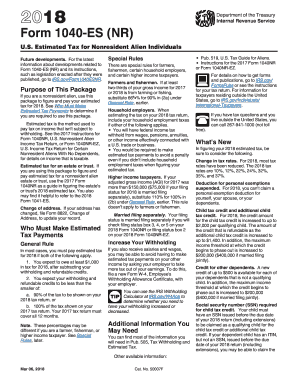
Lated to Form 1040-ES (NR) and its instructions, such as legislation enacted after they were published, go to IRS.gov/Form1040ESNR. Purpose of This Package If you are a nonresident alien, use this package to figure and pay your estimated tax for 2018. See Who Must Make Estimated Tax Payments to determine if you are required to use this package. Estimated tax is the method used to pay tax on income that isn t subject to withholding. See the 2017 Instructions for Form 1040NR, U.S. Nonresident.

This website is not affiliated with IRS

How it works

  1. Open form

    Open form follow the instructions

  2. Easily sign form

    Easily sign the form with your finger

  3. Share form

    Send filled & signed form or save

How to fill out the IRS 1040-ES (NR) online

Filling out the IRS 1040-ES (NR) online is a vital step for nonresident alien individuals aiming to calculate and pay their estimated taxes. This guide provides straightforward, step-by-step instructions to help users complete this form accurately and efficiently.

Follow the steps to fill out the IRS 1040-ES (NR) online.

  1. Press the ‘Get Form’ button to access the IRS 1040-ES (NR) and open it in your preferred online editor.
  2. Begin with the top section of the form where you will enter your personal information such as your name, address, and identifying number (SSN or ITIN). Ensure that all information is accurate.
  3. Proceed to calculate your adjusted gross income (AGI) by referring to the estimated income you expect for the year. This information will need to be reflected on Line 1.
  4. Estimate your itemized deductions, if applicable, and enter that total on Line 2a. If you qualify for specific deductions under section 199A, input that amount on Line 2b.
  5. Subtract the total deductions indicated on Line 2c from your AGI shown on Line 1 to determine your taxable income listed on Line 3.
  6. Using the Tax Rate Schedules provided, compute your estimated tax based on the taxable income calculated on Line 3, and enter that amount on Line 4.
  7. Add any other taxes you expect to incur (as instructed), and enter that total on Line 7. Include any self-employment tax that applies on Line 9.
  8. After calculating your total expected tax, use the lines provided to determine any credits you may qualify for, and subtract those from the total taxes due.
  9. Complete all necessary computations on the form to establish your required annual payment, ensuring to check if you must make estimated payments after evaluating your totals on Line 15c.
  10. Save all changes made to the form. You will have options at the end to download, print, or share your completed IRS 1040-ES (NR).

Complete your IRS 1040-ES (NR) online efficiently and ensure timely submission to avoid penalties!

Get form

Experience a faster way to fill out and sign forms on the web. Access the most extensive library of templates available.

Related content

About Form 1040-ES (NR), U.S. Estimated Tax for...
Dec 4, 2024 — If you are a nonresident alien, use this package to figure and pay your...
Learn more
2025 Form 1040-ES
Form 1040-ES is used to figure and pay estimated tax for 2025 on income not subject to...
Learn more
2014 Instructions for Form 1040NR
Apr 15, 2015 — Estimated tax paid with Form. 1040-ES or Form 1040-ES (NR). 3. Tax paid...
Learn more

Related links form

IRS 14310 2013 IRS 14310 2011 IRS 14414 2012 IRS 14438 2013

Questions & Answers

Get answers to your most pressing questions about US Legal Forms API.

Contact support

You should report your estimated tax payments on Line 26 of Form 1040 when filing your tax return. This line allows you to indicate the total amount of estimated taxes you submitted throughout the year. It is essential to keep track of these payments accurately to avoid underpayment issues later. Using IRS 1040-ES (NR) can simplify this process, ensuring you fill out your forms correctly.

An IRS underpayment penalty typically arises from not paying enough taxes throughout the year. Reasons for underpayment can include miscalculating your required estimated taxes or changes in your financial situation. The IRS 1040-ES (NR) provides a structured way to determine your estimated taxes, helping you avoid these mistakes. Understanding your tax obligations is crucial to preventing penalties.

To avoid IRS underpayment penalties, you should ensure that your estimated tax payments are accurate and timely. Utilizing the IRS 1040-ES (NR) can guide you through the payments you need to make throughout the year. Regularly reviewing your income and adjusting your payments as necessary is also beneficial. This proactive approach is key in preventing penalties and ensuring compliance.

The safe harbor for estimated tax payments means you can avoid underpayment penalties by either paying 90% of your current year’s tax or 100% of your previous year’s tax, whichever is smaller. For higher earners, the threshold is 110% of the prior year's tax. Using IRS 1040-ES (NR) forms can help you calculate these amounts accurately and avoid penalties. It is essential to know these figures for your financial safety.

Yes, you can electronically file form 1040NR through specific authorized tax software. This electronic option simplifies your filing experience and speeds up processing times. Before filing, confirm that the software supports the unique requirements of the IRS 1040-ES (NR) to ensure accurate submissions.

Yes, you can make your 1040NR payment online using the IRS payment portal or through approved third-party services. This method allows for fast, secure transactions and can help you meet deadlines efficiently. Consider using platforms like uslegalforms that guide you through payment options specifically for IRS 1040-ES (NR).

To submit your 1040-ES online, you need to use approved tax software that supports this form. Navigate to the payment section within the software, enter the necessary details, and follow prompts to ensure correctness. Remember, choosing user-friendly platforms like uslegalforms can simplify this submission process.

Yes, the 1040 NR can be filed electronically using specific tax software designed for non-residents. This option significantly streamlines the filing process and offers you convenience. Make sure the software accommodates the IRS 1040-ES (NR) and correctly handles your tax situation.

Certain IRS forms cannot be filed electronically, which include forms that require additional attachments or specific eligibility criteria. For instance, some complex tax situations may necessitate paper filing for forms like 1040-NR. Always check IRS guidelines to ensure your form, including IRS 1040-ES (NR), meets electronic filing criteria.

Yes, non-resident aliens can file online, but with specific restrictions. They can use the IRS online portal or certain approved software that accommodates IRS forms like the 1040-ES (NR). It is essential to verify whether the software supports your filing situation and provides the necessary guidance.

Get This Form Now!

Use professional pre-built templates to fill in and sign documents online faster. Get access to thousands of forms.
If you believe that this page should be taken down, please follow our DMCA take down processhere.
Get IRS 1040-ES (NR)
  • Adoption
  • Bankruptcy
  • Contractors
  • Divorce
  • Home Sales
  • Employment
  • Identity Theft
  • Incorporation
  • Landlord Tenant
  • Living Trust
  • Name Change
  • Personal Planning
  • Small Business
  • Wills & Estates
  • Packages A-Z
  • Affidavits
  • Bankruptcy
  • Bill of Sale
  • Corporate - LLC
  • Divorce
  • Employment
  • Identity Theft
  • Internet Technology
  • Landlord Tenant
  • Living Wills
  • Name Change
  • Power of Attorney
  • Real Estate
  • Small Estates
  • Wills
  • All Forms
  • Forms A-Z
  • Other Templates
  • Legal Hub
  • About Us
  • Help Portal
  • Legal Resources
  • Blog
  • Affiliates
  • Contact Us
  • Delete My Account
  • Site Map
  • Industries
  • Forms in Spanish
  • Localized Forms
  • State-specific Forms
  • Forms Kit
  • Real Estate Handbook
  • All Guides
  • Notarize
  • Incorporation services
  • For Consumers
  • For Small Business
  • For Attorneys
  • USLegal
  • FormsPass
  • pdfFiller
  • signNow
  • altaFlow
  • DocHub
  • Instapage
Form Packages
  • Adoption
  • Bankruptcy
  • Contractors
  • Divorce
  • Home Sales
  • Employment
  • Identity Theft
  • Incorporation
  • Landlord Tenant
  • Living Trust
  • Name Change
  • Personal Planning
  • Small Business
  • Wills & Estates
  • Packages A-Z
Form Categories
  • Affidavits
  • Bankruptcy
  • Bill of Sale
  • Corporate - LLC
  • Divorce
  • Employment
  • Identity Theft
  • Internet Technology
  • Landlord Tenant
  • Living Wills
  • Name Change
  • Power of Attorney
  • Real Estate
  • Small Estates
  • Wills
  • All Forms
  • Forms A-Z
  • Other Templates
Customer Service
  • Legal Hub
  • About Us
  • Help Portal
  • Legal Resources
  • Blog
  • Affiliates
  • Contact Us
  • Delete My Account
  • Site Map
  • Industries
  • Forms in Spanish
  • Localized Forms
  • State-specific Forms
  • Forms Kit
Legal Guides
  • Real Estate Handbook
  • All Guides
Prepared for you
  • Notarize
  • Incorporation services
Our Customers
  • For Consumers
  • For Small Business
  • For Attorneys
Our Sites
  • USLegal
  • FormsPass
  • pdfFiller
  • signNow
  • altaFlow
  • DocHub
  • Instapage
Social Media
Call us now toll free:
+1 833 426 79 33
As seen in:
© Copyright 1999-2026 airSlate Legal Forms, Inc. 17 Station Street, Ste. 203, Brookline, MA 02445
  • Your Privacy Choices
  • Terms of Service
  • Privacy Notice
  • Content Takedown Policy
  • Bug Bounty Program
IRS 1040-ES (NR)
This form is available in several versions.
Select the version you need from the drop-down list below.
2020 IRS 1040-ES (NR)
Select form
  • 2020 IRS 1040-ES (NR)
  • 2019 IRS 1040-ES (NR)
  • 2018 IRS 1040-ES (NR)
  • 2017 IRS 1040-ES (NR)
  • 2016 IRS 1040-ES (NR)
  • 2015 IRS 1040-ES (NR)
  • 2014 IRS 1040-ES (NR)
  • 2013 IRS 1040-ES (NR)
  • 2012 IRS 1040-ES (NR)
Select form