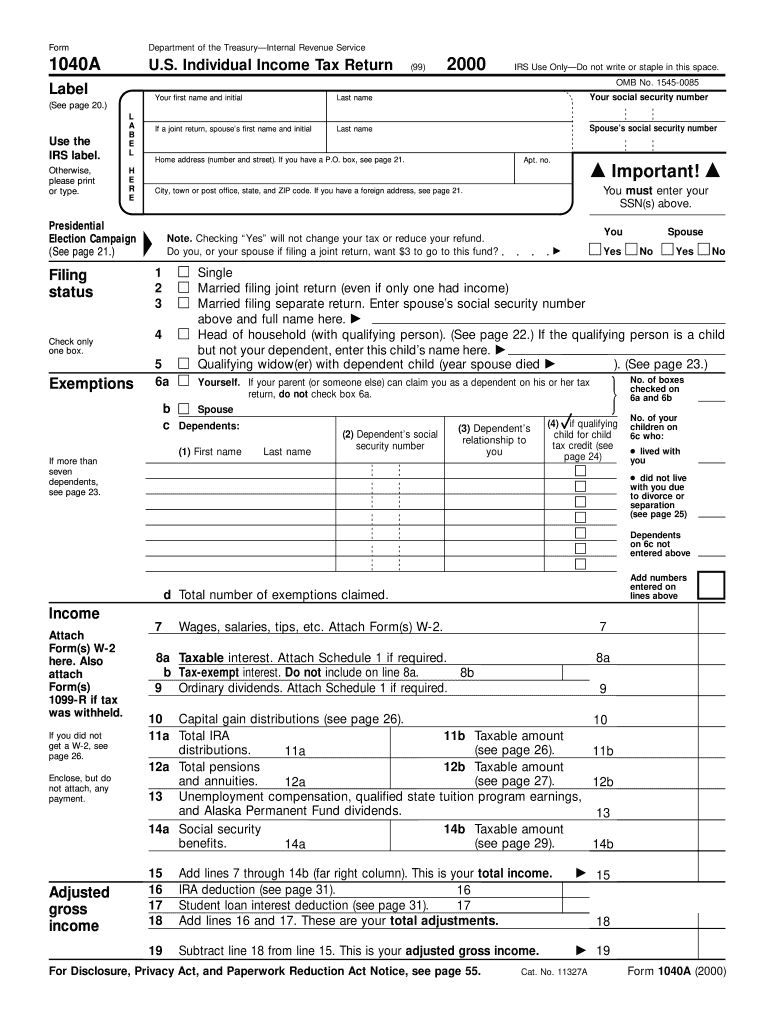
Pace. OMB No. 1545-0085 Label Use the IRS label. 2000 (99) L A B E L Filing status Check only one box. Exemptions Last name Your social security number If a joint return, spouse s first name and initial Last name Spouse s social security number Home address (number and street). If you have a P.O. box, see page 21. H E R E Presidential Election Campaign (See page 21.) Your first name and initial Apt. no. Important! You must enter your SSN(s) above. City, town or pos.
Loading

Open form follow the instructions

Easily sign the form with your finger

Send filled & signed form or save
How to fill out the IRS 1040-A online
Filing your taxes can be a daunting task, but understanding how to complete the IRS 1040-A form online can simplify the process. This guide provides a step-by-step walkthrough to ensure you fill out the form accurately and confidently.
Follow the steps to successfully complete the IRS 1040-A online.
- Click ‘Get Form’ button to access the IRS 1040-A form and begin filling it out in the editor.
- Enter your personal information, including your last name, social security number, and filing status. Ensure you select one option that applies to you, such as single, married filing jointly, or head of household.
- List your dependents by providing their first names, last names, their social security numbers, and the relationship to you. Make sure to check the box for qualifying child credits if applicable.
- Record your income details. Include wages, salaries, tips, taxable interest, and any other income sources, as indicated in the corresponding fields. Attach any necessary forms such as W-2 and 1099-R.
- Calculate your adjusted gross income by subtracting any adjustments from your total income. Follow the guidelines for deductions in this section.
- Determine your taxable income by entering the appropriate amounts for your standard deduction and exemptions.
- Complete the tax and credits section. Enter any applicable credits such as the child tax credit or education credits.
- Review your total payments and determine whether you are due a refund or owe additional taxes.
- Provide your bank information for direct deposit of any refund, if applicable. Fill in your routing number and account type.
- Sign and date the form, ensuring that both you and your spouse (if applicable) provide signatures. Check all information for accuracy before submission.
- Once completed, save your changes. You may also download, print, or share the form as needed.
Begin your tax filing process by completing the IRS 1040-A online today.
Experience a faster way to fill out and sign forms on the web. Access the most extensive library of templates available.
Related content
Use Schedule A (Form 1040 or 1040-SR) to figure your itemized deductions. In most cases...
Rents and royalties. 9. Income (or loss) from business or profession. 10. (a) Net...
instructions for Form 1040, line 52). 1040A filers: Enter the amount from line 6 of your...
Get answers to your most pressing questions about US Legal Forms API.
What is the difference between a W2 and a 1040?
The W-2 form provides details about your annual wages and tax withholding from your employer, while IRS 1040-A is the form you file to report your total income and calculate your taxes. Essentially, the W-2 summarizes your earnings and tax deductions, and you then use this information to complete your IRS 1040-A. Understanding this difference is crucial for accurate tax filing and ensuring compliance with IRS requirements.
What is the extra standard deduction for seniors over 65?
Seniors over 65 can claim an extra standard deduction when filing with IRS 1040-A. This deduction amount adds financial relief for older adults and varies based on tax filing status. Having this additional deduction can lower your taxable income significantly. By utilizing tools from US Legal Forms, you can ensure you maximize this benefit when completing your tax return.
What can be deducted on Form 1040 schedule A?
On IRS Form 1040-A, Schedule A allows taxpayers to itemize various deductions. Common deductions include mortgage interest, state and local taxes, and certain medical expenses. Using these deductions can lead to a lower taxable income, ultimately reducing your tax bill. If you find that these deductions apply to you, considering the comprehensive support available on US Legal Forms can simplify your filing process.
What is the difference between 1040 and 1040SR?
The key difference between IRS 1040 and 1040-SR lies in the target audience. While IRS 1040 is suitable for all individuals, 1040-SR caters specifically to seniors aged 65 or older. IRS 1040-SR offers larger print and a straightforward format to accommodate older taxpayers better. However, if your situation allows for it, you may find IRS 1040-A more beneficial due to its simplified approach.
Who should use 1040A?
Taxpayers who earn less than a specific threshold and do not itemize deductions generally benefit from using IRS 1040-A. This includes many students, retirees, and low to moderate-income earners. Moreover, if you take the standard deduction and do not have complex financial situations, IRS 1040-A is an efficient option for filing. Choosing this form can ease the entire tax filing experience.
What is IRS Form 1040 A?
IRS Form 1040-A serves as a simplified income tax return form designed for individuals with uncomplicated financial situations. It allows you to report income, claim tax credits, and receive a refund in a straightforward manner. By using IRS 1040-A, you can file quickly without overwhelming paperwork. This form is an excellent option for many filers looking for a more efficient way to handle their taxes.
Is my 1040 a tax return?
Yes, your IRS 1040-A is indeed a tax return. It is a document you submit to report your annual income and calculate your tax liabilities. Using the IRS 1040-A allows you to claim various credits and deductions, helping you lower the amount of tax you owe. Filing your tax return with IRS 1040-A contributes to ensuring you stay compliant with tax laws.
Who should use form 1040A?
IRS 1040-A is ideal for taxpayers with straightforward tax situations. If you earn under a certain income level, do not claim dependents, and have limited tax deductions, this form is a suitable choice. It simplifies the filing process while still allowing you to receive your tax credits, such as the Earned Income Tax Credit. Furthermore, using IRS 1040-A can help expedite your tax return.
What taxes are deductible on Schedule A?
You can deduct various taxes on Schedule A, including state income taxes, property taxes, and sales taxes. These deductions can significantly impact your overall tax liability. When filling out the IRS 1040-A, ensure you include all applicable taxes to leverage these benefits.
What cannot be included in medical expenses deducted on Schedule A?
Certain expenses cannot be included as medical expenses on Schedule A, such as cosmetic surgeries and general health club memberships. These expenses do not qualify under IRS guidelines for medical deductions. To maximize your deductions on IRS 1040-A, focus on expenses directly related to medical care, treatments, and prescriptions.
Use professional pre-built templates to fill in and sign documents online faster. Get access to thousands of forms.
If you believe that this page should be taken down, please follow our DMCA take down process here.
This form is available in several versions. Select the version you need from the drop-down list below.