Get Irs 1040 - Schedule H 2014
How it works
-

Open form follow the instructions
-

Easily sign the form with your finger
-

Send filled & signed form or save
How to fill out the IRS 1040 - Schedule H online
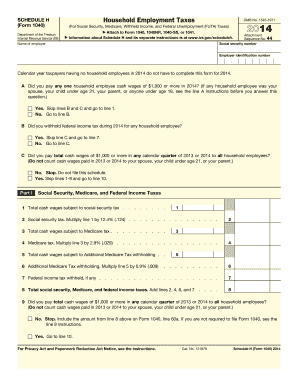
Filling out the IRS 1040 - Schedule H is crucial for reporting household employment taxes. This guide provides step-by-step instructions on how to accurately complete the form online, ensuring compliance with IRS regulations.
Follow the steps to complete the Schedule H form accurately.
- Click 'Get Form' button to obtain the form and open it in your preferred editing tool.
- Begin with entering your social security number and name as the employer. Ensure that the employer identification number is also filled in correctly.
- For line A, indicate whether you paid any household employee cash wages of $1,900 or more. If yes, skip lines B and C, and go to line 1. If no, proceed to line B.
- For line B, confirm if you withheld federal income tax for any household employee during the year. If yes, skip line C and go to line 7. If no, move to line C.
- In line C, indicate if you paid total cash wages of $1,000 or more in any calendar quarter for all household employees. If no, you do not need to file this schedule. If yes, skip lines 1-9 and go to line 10.
- Complete Part I: Fill in the total cash wages subject to social security tax on line 1. Calculate social security tax for line 2 by multiplying line 1 by 12.4% and enter the result.
- Continue in Part I to fill in total cash wages subject to Medicare tax on line 3. Calculate Medicare tax for line 4 by multiplying line 3 by 2.9%.
- If applicable, enter any federal income tax withheld in line 7. Total all taxes in line 8 by adding lines 2, 4, 6, and 7 together.
- For Part II, respond to the questions regarding federal unemployment (FUTA) tax. Depending on your answers, complete either Section A or Section B.
- In Part III, summarize the total household employment taxes. Ensure to check line 27 to determine if you are required to file Form 1040.
- If required, complete Part IV by providing your address and signature, ensuring all information is accurate before finalizing.
- Once all fields are completed, you can save your changes, download the form, print it for your records, or share it as needed.
Complete your Schedule H form online today to ensure accurate reporting of household employment taxes.
Get form
Related links form
No, Form 1040 and Form W-2 are not the same; they serve different purposes in the tax filing process. Form W-2 is a statement provided by employers to report wages and tax withholding for their employees. On the other hand, Form 1040 is the tax return document used by individuals to report their income and calculate their tax liability. The IRS 1040 - Schedule H can be part of Form 1040 if you are reporting household employee taxes, making both important in tax compliance.