Loading
Form preview
  • US Legal Forms
  • Other Templates
  • Tax Forms
  • Executive Department Treasury IRS Forms
  • Irs 1099-sa 2012

Get Irs 1099-sa 2012

Identification number. For your protection, this form may show only the last four digits of your social security number (SSN), individual taxpayer identification number (ITIN), or adoption taxpayer identification number (ATIN). However, the issuer has reported your complete identification number to the IRS, and, where applicable, to state and/or local governments. Spouse beneficiary. If you inherited an Archer MSA or MA MSA because of the death of your spouse, special rules apply. See the Instr.

How it works

  1. Open form

    Open form follow the instructions

  2. Easily sign form

    Easily sign the form with your finger

  3. Share form

    Send filled & signed form or save

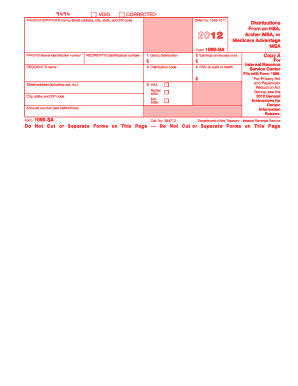
How to fill out the IRS 1099-SA online

Filling out the IRS 1099-SA form is essential for reporting distributions from health savings accounts (HSAs), Archer medical savings accounts (Archer MSAs), or Medicare Advantage MSAs. This guide will provide you with detailed, step-by-step instructions on completing the form accurately and efficiently online.

Follow the steps to complete the IRS 1099-SA form online.

  1. Click the ‘Get Form’ button to access the IRS 1099-SA form in the editor.
  2. Enter the trustee’s or payer’s name, address, city, state, and ZIP code in the designated fields.
  3. Provide the recipient's name and identification number, ensuring that the information matches their official documents.
  4. In Box 1, input the total gross distribution amount received during the tax year.
  5. If applicable, enter the earnings on any excess contributions you withdrew from an HSA or Archer MSA in Box 2.
  6. Select the appropriate distribution code from the list provided and input it in Box 3.
  7. If the account holder has passed away, indicate the fair market value of the account on the date of death in Box 4.
  8. Designate the type of account (HSA, Archer MSA, or Medicare Advantage MSA) in Box 5.
  9. Review all entries for accuracy and completeness before saving your changes.
  10. Once verified, proceed to save your changes, download, print, or share the form as needed.

Complete your IRS 1099-SA form online today and ensure your financial records are accurate.

Get form

Experience a faster way to fill out and sign forms on the web. Access the most extensive library of templates available.

Related content

About Form 1099-SA, Distributions From an HSA...
Dec 4, 2024 — File Form 1099-SA to report distributions made from a: The distribution...
Learn more
Health Savings Account Tax Forms - Human Resources
1099-SA. HealthEquity provides the 1099-SA tax form if there have been any distributions...
Learn more
2016 Publication 560
Jan 26, 2017 — You must report a contribution to a Roth ac count on Form W2 and a...
Learn more

Related links form

IRS W-9 2011 IRS W-9 2011 IRS W-9 2002 IRS W-9 2002

Questions & Answers

Get answers to your most pressing questions about US Legal Forms API.

Contact support

You can enter your IRS 1099-DIV by navigating to the investment income section on Freetaxusa. This section is specifically designed to capture dividend income, making it easier for you to input figures from your 1099-DIV. Accurate entry here will ensure that your tax return reflects all your income correctly.

To receive your IRS 1099-SA, you will typically receive it directly from your HSA custodian or administrator. This form should arrive by January 31, reflecting any distributions made during the previous tax year. If you haven't received it, contact your HSA provider to ensure they have your correct information to issue the form.

If your IRS Form 5498-SA is not available, it's often due to the timing of its issuance. Forms 5498-SA are usually sent by your HSA trustee after the tax year ends, reflecting contributions made. Check your account with your HSA custodian for availability, as this form is crucial for confirming your contributions and maintaining your records.

To enter your 1099 MISC on Freetaxusa, locate the section devoted to miscellaneous income. Here, you'll provide the details specified in your 1099 MISC, which is essential for reflecting any extra income correctly on your tax return. Ensure all figures match your form to maintain accuracy and stay compliant with IRS regulations.

In Drake software, you'll find a designated area for IRS 1099-SA within the Health Savings Account module. Access this section and carefully enter the distribution amounts shown on your 1099-SA. Doing this promptly enables you to reflect the proper information on your tax return, aiding in avoiding potential issues with the IRS.

Entering your IRS 1099-SA involves specifying the details in the correct platform section, whether you are using Freetaxusa or another tax software. Typically, look for the Health Savings Account area, which will guide you in entering the necessary figures for your HSA distributions. This ensures your tax return is both accurate and compliant.

You can record your HSA contributions by locating the HSA section within your Freetaxusa account. Here, you will find an option to input contributions, helping you to maximize your tax benefits. Accurately entering this information will assist in reflecting your contributions and related tax advantages on your return.

To enter your IRS 1099-SA on Freetaxusa, you'll navigate to the section for Health Savings Accounts. This area allows you to input the amounts shown on your 1099-SA, ensuring accurate reporting of distributions from your HSA. Make sure to enter these figures correctly, as they directly impact your tax calculations.

If you fail to report your HSA on your taxes, you could face penalties from the IRS, including fines or an increased tax bill. The IRS may also view the unreported distributions as taxable income, leading to unexpected financial ramifications. It is crucial to ensure compliance with tax regulations regarding your IRS 1099-SA. US Legal Forms can help you access the right tools and information to ensure you meet your reporting obligations.

Yes, you must report the IRS 1099-SA if you have received distributions from your Health Savings Account (HSA). These distributions need to be included on your tax return, as they are used to determine your tax liability. It's essential to accurately report this information to avoid penalties or complications. If you need guidance on how to report your IRS 1099-SA, US Legal Forms offers resources to simplify the process.

Get This Form Now!

Use professional pre-built templates to fill in and sign documents online faster. Get access to thousands of forms.
If you believe that this page should be taken down, please follow our DMCA take down processhere.
Get IRS 1099-SA
  • Adoption
  • Bankruptcy
  • Contractors
  • Divorce
  • Home Sales
  • Employment
  • Identity Theft
  • Incorporation
  • Landlord Tenant
  • Living Trust
  • Name Change
  • Personal Planning
  • Small Business
  • Wills & Estates
  • Packages A-Z
  • Affidavits
  • Bankruptcy
  • Bill of Sale
  • Corporate - LLC
  • Divorce
  • Employment
  • Identity Theft
  • Internet Technology
  • Landlord Tenant
  • Living Wills
  • Name Change
  • Power of Attorney
  • Real Estate
  • Small Estates
  • Wills
  • All Forms
  • Forms A-Z
  • Other Templates
  • Legal Hub
  • About Us
  • Help Portal
  • Legal Resources
  • Blog
  • Affiliates
  • Contact Us
  • Delete My Account
  • Site Map
  • Industries
  • Forms in Spanish
  • Localized Forms
  • State-specific Forms
  • Forms Kit
  • Real Estate Handbook
  • All Guides
  • Notarize
  • Incorporation services
  • For Consumers
  • For Small Business
  • For Attorneys
  • USLegal
  • FormsPass
  • pdfFiller
  • signNow
  • altaFlow
  • DocHub
  • Instapage
Form Packages
  • Adoption
  • Bankruptcy
  • Contractors
  • Divorce
  • Home Sales
  • Employment
  • Identity Theft
  • Incorporation
  • Landlord Tenant
  • Living Trust
  • Name Change
  • Personal Planning
  • Small Business
  • Wills & Estates
  • Packages A-Z
Form Categories
  • Affidavits
  • Bankruptcy
  • Bill of Sale
  • Corporate - LLC
  • Divorce
  • Employment
  • Identity Theft
  • Internet Technology
  • Landlord Tenant
  • Living Wills
  • Name Change
  • Power of Attorney
  • Real Estate
  • Small Estates
  • Wills
  • All Forms
  • Forms A-Z
  • Other Templates
Customer Service
  • Legal Hub
  • About Us
  • Help Portal
  • Legal Resources
  • Blog
  • Affiliates
  • Contact Us
  • Delete My Account
  • Site Map
  • Industries
  • Forms in Spanish
  • Localized Forms
  • State-specific Forms
  • Forms Kit
Legal Guides
  • Real Estate Handbook
  • All Guides
Prepared for you
  • Notarize
  • Incorporation services
Our Customers
  • For Consumers
  • For Small Business
  • For Attorneys
Our Sites
  • USLegal
  • FormsPass
  • pdfFiller
  • signNow
  • altaFlow
  • DocHub
  • Instapage
Social Media
Call us now toll free:
+1 833 426 79 33
As seen in:
© Copyright 1999-2026 airSlate Legal Forms, Inc. 17 Station Street, Suite 303, Brookline, MA 02445
  • Your Privacy Choices
  • Terms of Service
  • Privacy Notice
  • Content Takedown Policy
  • Bug Bounty Program
IRS 1099-SA
This form is available in several versions.
Select the version you need from the drop-down list below.
2019 IRS 1099-SA
Select form
  • 2019 IRS 1099-SA
  • 2018 IRS 1099-SA
  • 2017 IRS 1099-SA
  • 2016 IRS 1099-SA
  • 2015 IRS 1099-SA
  • 2014 IRS 1099-SA
  • 2013 IRS 1099-SA
  • 2012 IRS 1099-SA
  • 2011 IRS 1099-SA
  • 2010 IRS 1099-SA
Select form