Loading
Form preview
  • US Legal Forms
  • Other Templates
  • Tax Forms
  • Executive Department Treasury IRS Forms
  • Irs 1099-sa 2015

Get Irs 1099-sa 2015

D over to another HSA; an Archer MSA may be rolled over to another Archer MSA or an HSA. An MA MSA is not taxable if you used it to pay qualified medical expenses of the account holder only. If you did not use the distribution from an HSA, Archer MSA, or MA MSA to pay for qualified medical expenses, or in the case of an HSA or Archer MSA, you did not roll it over, you must include the distribution in your income (see Form 8853 or Form 8889). Also, you may owe a penalty. You may repay a mistaken.

This website is not affiliated with IRS

How it works

  1. Open form

    Open form follow the instructions

  2. Easily sign form

    Easily sign the form with your finger

  3. Share form

    Send filled & signed form or save

How to fill out the IRS 1099-SA online

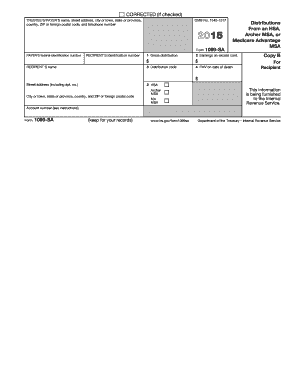
The IRS 1099-SA form is utilized to report distributions made from health savings accounts (HSAs), Archer medical savings accounts (MSAs), or Medicare Advantage (MA) MSAs. Understanding how to accurately fill out this form online can facilitate your tax filing process and ensure compliance with IRS regulations.

Follow the steps to complete the IRS 1099-SA online

  1. Click ‘Get Form’ button to obtain the form and open it in the editor.
  2. Identify the payer's details: Fill in the trustee's or payer's name, address (street, city, state, ZIP code), and telephone number in the designated fields.
  3. Enter the payer's federal identification number in the appropriate section, ensuring accuracy to avoid potential issues.
  4. Complete the recipient's information: Provide the recipient's name, address details (street, city, state, ZIP code), and their identification number.
  5. Input the distribution details: In box 1, report the ‘Gross distribution’ amount, and in box 2, specify any ‘Earnings on excess contributions’.
  6. Select the correct distribution code from the provided options for box 3, indicating the nature of the distribution.
  7. If applicable, enter the fair market value (FMV) of the account on the date of death in box 4.
  8. Indicate the type of account relevant to the distribution in box 5, checking the appropriate box for HSA, Archer MSA, or MA MSA.
  9. Review all the information entered to ensure accuracy before saving the document.
  10. Once completed, you can download, print, or share the form with the necessary parties as required.

Start completing your IRS 1099-SA online today to ensure timely and accurate filing.

Get form

Experience a faster way to fill out and sign forms on the web. Access the most extensive library of templates available.

Related content

About Form 1099-SA, Distributions From an HSA...
Dec 4, 2024 — File Form 1099-SA to report distributions made from a: The distribution...
Learn more
Health Savings Account Tax Forms - Human Resources
1099-SA. HealthEquity provides the 1099-SA tax form if there have been any distributions...
Learn more
2016 Publication 560
Jan 26, 2017 — You must report a contribution to a Roth ac count on Form W2 and a...
Learn more

Related links form

IRS W-8BEN Substitute Form 2009 IRS W-8BEN-E 2017 IRS W-8BEN-E 2016 IRS W-8BEN-E 2016

Questions & Answers

Get answers to your most pressing questions about US Legal Forms API.

Contact support

To enter the IRS 1099-SA in Drake software, navigate to the section designated for Income in your tax returns. You will find an option for reporting HSA distributions. Simply input the information from your 1099-SA form, and the software will guide you to ensure accurate reporting. If you encounter any challenges, Drake provides resources to assist you in managing your tax documents effectively.

Form 5498 is not the same as the IRS 1099-SA; each serves a specific function for tax reporting. While the 1099-SA informs the IRS about distributions made from HSAs, the 5498 serves to report contributions to those accounts. Being aware of these differences can keep you organized when preparing your taxes. If you need assistance with tax forms, consider using USLegalForms, which can streamline your filing process.

No, a 1099-SA is not the same as a 5498-SA. The IRS 1099-SA focuses on reporting distributions from HSAs, while the 5498-SA specifically reports contributions made to those accounts. Understanding the different roles these forms play will help you file your taxes more accurately and provide insight into your financial activities throughout the year. Clarity in these documents can support your tax planning efforts.

You receive the 5498-SA form if you made contributions to your Health Savings Account during the tax year. This form ensures that you report your contributions accurately to the IRS. Having the 5498-SA form on hand makes it easier for you to track your HSA contributions while considering the benefits of tax deductions. It is a crucial document for maintaining compliance with IRS regulations regarding HSAs.

The IRS 1099-SA and the 5498 forms serve different purposes. The 1099-SA form reports distributions from Health Savings Accounts (HSAs), while the 5498 is primarily used to report contributions to IRAs, including HSAs. Understanding these distinctions helps you manage your tax liabilities effectively. If you have both forms, it’s essential to recognize how each impacts your financial reporting.

You can obtain your 1099-SA form by contacting your HSA custodian or administrator. They may provide your form electronically via their website or send it to you via mail. Make sure to request your IRS 1099-SA as early as possible in the tax season to ensure you have all necessary documents for your tax return preparation.

To obtain your 5498-SA form, request it directly from your HSA provider. Many institutions provide this information electronically through their online portals. If you prefer a physical copy, your provider can mail it to you, ensuring that you have the necessary documentation for your records and tax filings.

Your 5498 SA may not be available if no contributions were made to your HSA or if your HSA administrator did not file the required paperwork. It’s important to confirm with your administrator about the status of contributions for the year. Understanding the details of your IRS 1099-SA can also shed light on this situation, so check both resources.

If your HSA contributions are not appearing, first verify that you have made contributions throughout the tax year. Sometimes, delays in processing by your HSA custodian can lead to this issue. Additionally, review your records to ensure that all contributions were properly reported on your IRS 1099-SA. If concerns persist, contact your HSA provider for clarification.

In Freetaxusa, you can enter the 1099-SA by going to the section for 'Income' and selecting ‘Additional Income’. Find the field for HSA distributions within this category. Enter the relevant amounts as shown on your IRS 1099-SA form, ensuring correct details to avoid any discrepancies.

Get This Form Now!

Use professional pre-built templates to fill in and sign documents online faster. Get access to thousands of forms.
If you believe that this page should be taken down, please follow our DMCA take down processhere.
Get IRS 1099-SA
  • Adoption
  • Bankruptcy
  • Contractors
  • Divorce
  • Home Sales
  • Employment
  • Identity Theft
  • Incorporation
  • Landlord Tenant
  • Living Trust
  • Name Change
  • Personal Planning
  • Small Business
  • Wills & Estates
  • Packages A-Z
  • Affidavits
  • Bankruptcy
  • Bill of Sale
  • Corporate - LLC
  • Divorce
  • Employment
  • Identity Theft
  • Internet Technology
  • Landlord Tenant
  • Living Wills
  • Name Change
  • Power of Attorney
  • Real Estate
  • Small Estates
  • Wills
  • All Forms
  • Forms A-Z
  • Other Templates
  • Legal Hub
  • About Us
  • Help Portal
  • Legal Resources
  • Blog
  • Affiliates
  • Contact Us
  • Delete My Account
  • Site Map
  • Industries
  • Forms in Spanish
  • Localized Forms
  • State-specific Forms
  • Forms Kit
  • Real Estate Handbook
  • All Guides
  • Notarize
  • Incorporation services
  • For Consumers
  • For Small Business
  • For Attorneys
  • USLegal
  • FormsPass
  • pdfFiller
  • signNow
  • altaFlow
  • DocHub
  • Instapage
Form Packages
  • Adoption
  • Bankruptcy
  • Contractors
  • Divorce
  • Home Sales
  • Employment
  • Identity Theft
  • Incorporation
  • Landlord Tenant
  • Living Trust
  • Name Change
  • Personal Planning
  • Small Business
  • Wills & Estates
  • Packages A-Z
Form Categories
  • Affidavits
  • Bankruptcy
  • Bill of Sale
  • Corporate - LLC
  • Divorce
  • Employment
  • Identity Theft
  • Internet Technology
  • Landlord Tenant
  • Living Wills
  • Name Change
  • Power of Attorney
  • Real Estate
  • Small Estates
  • Wills
  • All Forms
  • Forms A-Z
  • Other Templates
Customer Service
  • Legal Hub
  • About Us
  • Help Portal
  • Legal Resources
  • Blog
  • Affiliates
  • Contact Us
  • Delete My Account
  • Site Map
  • Industries
  • Forms in Spanish
  • Localized Forms
  • State-specific Forms
  • Forms Kit
Legal Guides
  • Real Estate Handbook
  • All Guides
Prepared for you
  • Notarize
  • Incorporation services
Our Customers
  • For Consumers
  • For Small Business
  • For Attorneys
Our Sites
  • USLegal
  • FormsPass
  • pdfFiller
  • signNow
  • altaFlow
  • DocHub
  • Instapage
Social Media
Call us now toll free:
+1 833 426 79 33
As seen in:
© Copyright 1999-2026 airSlate Legal Forms, Inc. 17 Station Street, Suite 303, Brookline, MA 02445
  • Your Privacy Choices
  • Terms of Service
  • Privacy Notice
  • Content Takedown Policy
  • Bug Bounty Program
IRS 1099-SA
This form is available in several versions.
Select the version you need from the drop-down list below.
2019 IRS 1099-SA
Select form
  • 2019 IRS 1099-SA
  • 2018 IRS 1099-SA
  • 2017 IRS 1099-SA
  • 2016 IRS 1099-SA
  • 2015 IRS 1099-SA
  • 2014 IRS 1099-SA
  • 2013 IRS 1099-SA
  • 2012 IRS 1099-SA
  • 2011 IRS 1099-SA
  • 2010 IRS 1099-SA
Select form