State income tax withheld 16 Local winnings $ $ 17 Local income tax withheld City or town, province or state, country, and ZIP or foreign postal code 2018 18 Name of locality This information is being furnished to the Internal Revenue Service Copy B Report this income on your federal tax return. If this form shows federal income tax withheld in box 4, attach this copy to your return. $ Under penalties of perjury, I declare that, to the best of my knowledge and belief, the name, addres.

Open form follow the instructions

Easily sign the form with your finger

Send filled & signed form or save
How to fill out the IRS W-2G online
Filling out the IRS W-2G form online is essential for reporting your gambling winnings to the IRS. This guide offers step-by-step instructions to ensure that you complete this form accurately and efficiently.
Follow the steps to complete your IRS W-2G form online.
- Click ‘Get Form’ button to obtain the form and open it in the editor.
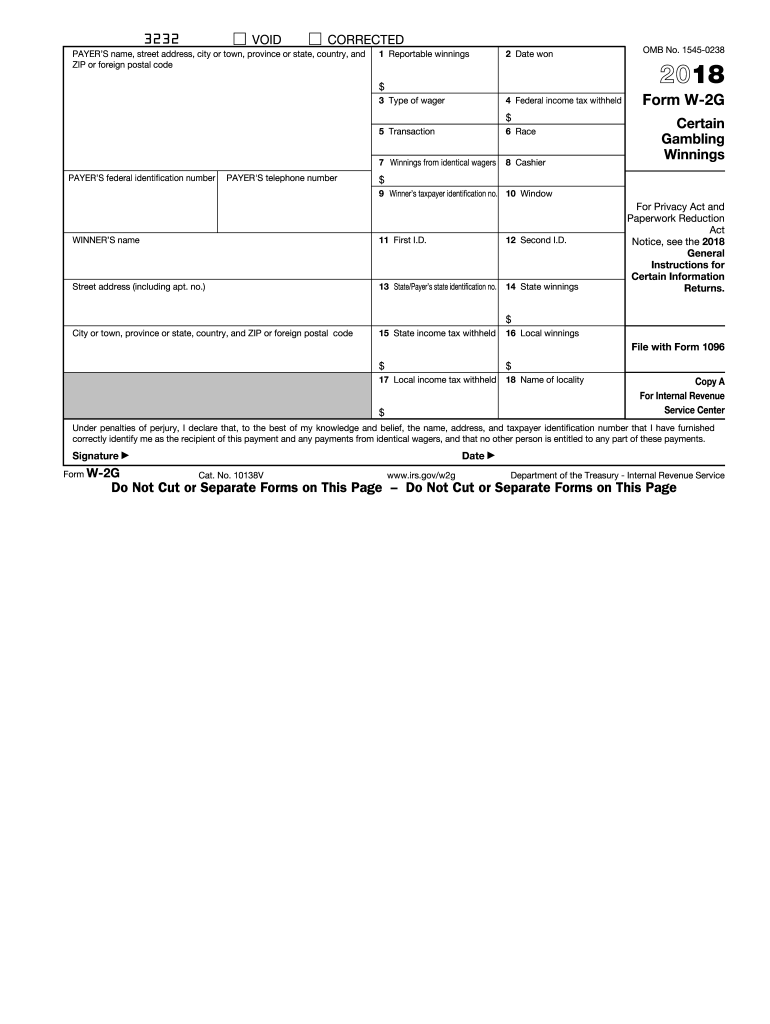
- Fill in the payer's information at the top of the form, including their name, address, city or town, state, country, and ZIP or foreign postal code.
- Input the date you won the gambling winnings in box 2.
- Enter the total reportable winnings in box 1, ensuring the amount reflects your total earnings.
- Provide the type of wager corresponding to your winnings in box 3.
- Record any federal income tax withheld from your winnings in box 4.
- Fill in the payer’s federal identification number and telephone number.
- Complete any additional sections on the form, such as state identification, state winnings, and local winnings in boxes 13 to 18.
- Sign and date the form to certify that the information provided is accurate and pertains solely to you as the winner.
- After reviewing all entries for correctness, save your changes, and choose to download, print, or share the completed form as needed.
Complete your IRS W-2G form online today to ensure your gambling winnings are reported accurately.
Experience a faster way to fill out and sign forms on the web. Access the most extensive library of templates available.
Related content
Jan 28, 2025 — File this form to report gambling winnings and any federal income tax...
Persons making payments of winnings subject to withholding must use Form 1096 to transmit...
May 2, 2017 — Do not use these forms to report wages subject to U.S. income tax...
Get answers to your most pressing questions about US Legal Forms API.
Where to enter W-2G on tax return?
You typically enter the information from your IRS W-2G on Schedule 1 of your Form 1040. This will allow the IRS to properly track your winnings as taxable income. It's important to accurately report these figures to avoid issues with your tax return.
How should you attach your W-2 to your tax return?
When filing your tax return with a W-2, you must attach the physical copy of your W-2G if you file by mail. If you use electronic filing, you will enter the information directly and not need to attach the form. Make sure to follow the submission guidelines for your chosen method.
How to file a tax return with W-2?
To file your tax return with your W-2, start by gathering your IRS W-2G forms and any other relevant income documents. You can use tax preparation software to help you enter details accurately. Complete your return, paying special attention to income reported from your W-2Gs.
How do I file my W-2 myself?
To file your W-2 yourself, you should collect all your W-2 forms, including the IRS W-2G, and fill out the appropriate tax forms. You can choose to use online tax software or paper forms for this process. After entering all required information, submit your return to the IRS directly.
Do I have to include every W-2 on taxes?
Yes, it is crucial to include every W-2 when filing your taxes to provide a complete picture of your income. Ignoring any W-2 forms, including the IRS W-2G, can lead to discrepancies and potential penalties. Take care to ensure all forms are reported.
What happens if I don't report a W-2G?
Not reporting a W-2G can lead to severe penalties and potential audits from the IRS. The IRS keeps track of individuals' incomes, and failing to report may cause discrepancies in your tax records. Always report every W-2G to maintain compliance.
Where do I enter Form W-2G on TurboTax?
In TurboTax, you can find the section for entering your IRS W-2G by navigating to the income section. Here, you can choose to enter your W-2G forms, which will guide you through the process. Follow the prompts carefully to ensure all required information is included.
How to enter multiple W2G?
When entering multiple IRS W-2G forms, you can do this easily using tax filing software. Simply select the option to add another W-2G and input the information for each form separately. Ensure all amounts and details are accurate to prevent errors in your tax return.
What happens if I don't report a W2G?
Failing to report a W-2G can lead to significant consequences, including penalties and interest on unpaid taxes. The IRS may issue a notice if they find discrepancies between reported income and your W-2G. It's essential to report all income, including amounts listed on Form W-2G, to avoid issues.
How do I file a tax return with W-2?
To file a tax return using the IRS W-2G, you must first gather your W-2 forms, which report your earnings and withholding. Then, use tax software or paper forms to input the information from your W-2s. Ensure that you check each line for accuracy and submit your return by the due date.
Use professional pre-built templates to fill in and sign documents online faster. Get access to thousands of forms.
If you believe that this page should be taken down, please follow our DMCA take down process here.
This form is available in several versions. Select the version you need from the drop-down list below.