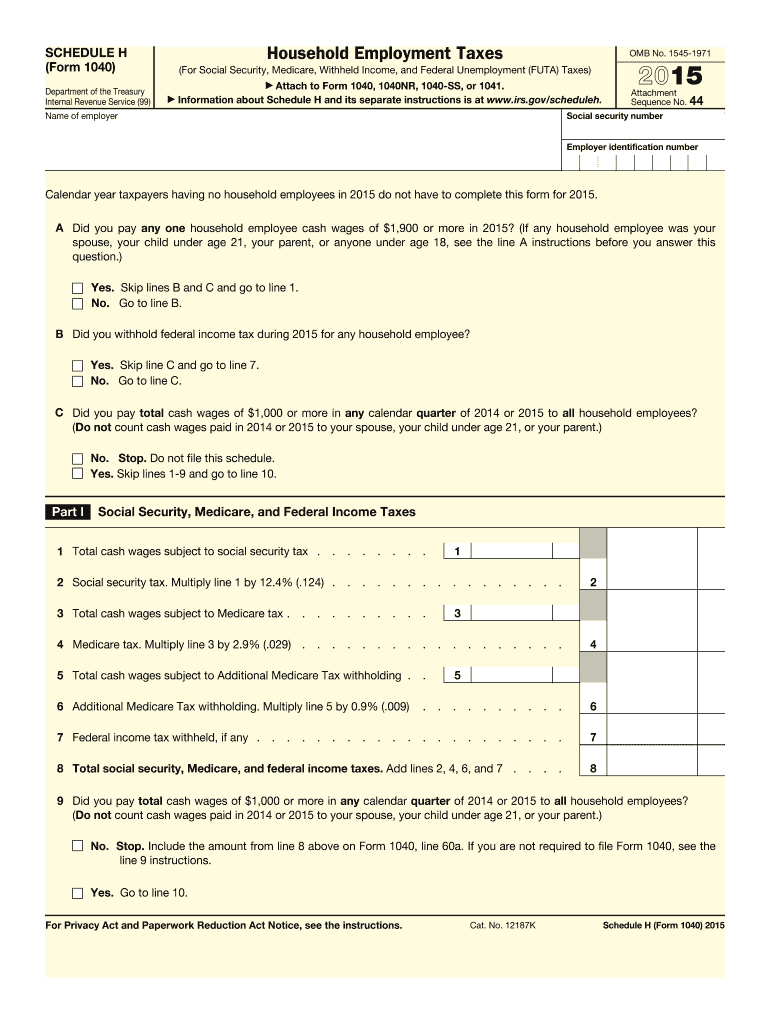
E for your state s unemployment tax? . . . . . 10 11 12 Next: If you checked the Yes box on all the lines above, complete Section A. If you checked the No box on any of the lines above, skip Section A and complete Section B. Section A 13 Name of the state where you paid unemployment contributions 14 Contributions paid to your state unemployment fund . . . . . . 14 15 Total cash wages subject to FUTA tax . . . . . . . . . . . . . . . . . . . . 16 FUTA tax. Multiply line 15.
Loading

Open form follow the instructions

Easily sign the form with your finger

Send filled & signed form or save
How to fill out the IRS 1040 - Schedule H online
Filling out the IRS 1040 - Schedule H form is essential for individuals who have household employees and need to report employment taxes. This guide provides a clear and structured approach to completing the form online, ensuring you have all the necessary information at your fingertips.
Follow the steps to complete your Schedule H efficiently.
- Click ‘Get Form’ button to access the form and open it in your preferred document editor.
- Begin by entering your social security number and the name of the employer in the appropriate fields at the top of the form.
- Answer the initial questions regarding household employees honestly, starting with line A to determine if you had any household employees and the wages paid.
- If the answer to line A is ‘Yes,’ fill out Part I by indicating the total cash wages subject to social security tax in line 1.
- Calculate the social security tax by multiplying the amount from line 1 by 12.4% and enter that figure in line 2.
- Proceed to enter the total cash wages subject to Medicare tax in line 3, then calculate the Medicare tax by multiplying the result by 2.9% to fill in line 4.
- If applicable, calculate any Additional Medicare Tax withholding and enter the value in line 6.
- Record any federal income tax that was withheld in line 7, then sum lines 2, 4, 6, and 7 to find the total taxes and list that in line 8.
- If you did not pay total cash wages of $1,000 or more in any calendar quarter, skip to line 9 instructions.
- Continue into Part II to answer additional questions regarding federal unemployment tax, ensuring all information is correctly recorded.
- Complete Section A or B in Part II based on your answers to the previous questions, noting all required amounts for wages and taxes.
- In Part III, enter the sum of your household employment taxes on line 26, and check if you are required to file Form 1040.
- If needed, complete Part IV which includes your address and signature.
- Once all sections are completed, make sure to review the form for accuracy, and then save your changes, download, print, or share the form as necessary.
Start filling out your IRS 1040 - Schedule H online now to ensure accurate reporting of your household employment taxes.
Experience a faster way to fill out and sign forms on the web. Access the most extensive library of templates available.
Related content
Jan 17, 2025 — Use Schedule H (Form 1040) to report household employment taxes if you...
May 2, 2017 — For more information, see Schedule H. (Form 1040), Household Employment...
Get answers to your most pressing questions about US Legal Forms API.
What is Schedule B form 1040?
Schedule B of Form 1040 is used to report interest and ordinary dividends. If you have income from savings accounts, investments, or securities, you must include it on this schedule. The IRS 1040 - Schedule H benefits those who need to report complex income streams, helping you ensure proper tax compliance. If you need assistance navigating the forms, consider using the US Legal Forms platform for accurate guidance.
What is a schedule form?
A schedule form is used to provide more detailed information in your tax return. For the IRS 1040 - Schedule H, these forms can help itemize deductions, report additional income, or claim credits. Using schedules can help you clarify your tax situation and maximize your potential refund. It's essential to use the correct schedules to ensure accurate reporting.
Is 1040 the same as W2?
The IRS 1040 - Schedule H is different from the W-2 form. While the W-2 reports your annual income and the taxes withheld by your employer, the 1040 form is your personal income tax return. The W-2 provides essential data for filling out the 1040, but they serve distinct functions in the tax filing process.
What is the Schedule 1, 2, and 3?
The IRS 1040 - Schedule H features various schedules to report different types of income and adjustments. Schedule 1 covers additional income and adjustments to income, while Schedule 2 focuses on additional taxes. Schedule 3 is for claiming nonrefundable credits. Each schedule plays an important role in accurately completing your tax return.
What is the difference between 1040 and 1040SR?
The primary difference between the IRS 1040 and 1040SR lies in who can use them and how they are formatted. The 1040SR is specifically designed for seniors aged 65 and older, featuring a larger font and simplified layout for better readability. However, both forms serve the same purpose in reporting income and calculating taxes owed. If you are eligible, consider using the 1040SR for ease during tax season.
Should I use 1040 or 1040 NR?
Deciding between the IRS 1040 and 1040 NR depends on your residency status. If you are a U.S. citizen or a resident alien, you should use the IRS 1040 form. Conversely, non-resident aliens must file the 1040 NR form to accurately report income and tax obligations. Consulting with a tax professional can help clarify which form is most suitable for your situation.
How do I attach forms to my tax return?
To attach forms to your tax return, first ensure you have all necessary documents ready, including the IRS 1040 - Schedule H if applicable. You should place the additional forms behind your main IRS 1040 form when filing by mail. If you are filing electronically, follow the provided prompts to upload or include these forms in your submission. Using US Legal Forms can simplify this process by providing templates and guidelines for properly filling out these forms.
What is the Schedule A of the 1040?
Schedule A of the IRS 1040 is used for itemizing deductions. This form can significantly impact your tax liability, allowing you to list eligible expenses such as medical costs, state taxes, and mortgage interest. If your total itemized deductions exceed the standard deduction, you can reduce your taxable income efficiently. Therefore, ensure you're familiar with how Schedule A interacts with your IRS 1040 - Schedule H.
What is the fastest way to talk to someone at IRS?
The fastest way to contact someone at the IRS is through their dedicated customer service number. Calling during non-peak hours, such as early mornings or late afternoons, can greatly reduce your wait time. Have your information ready, particularly if you are inquiring about your IRS 1040 - Schedule H, to speed up the process.
What is the tax filing form for the United States?
The primary tax filing form for individuals in the United States is the IRS 1040. This form allows you to report your income, claim deductions, and apply for tax credits. Different variations of the IRS 1040 exist to cater to various needs, such as the IRS 1040 - Schedule H specifically designed for household employment taxes. Using these forms correctly helps ensure compliance and accurate tax reporting.
Use professional pre-built templates to fill in and sign documents online faster. Get access to thousands of forms.
If you believe that this page should be taken down, please follow our DMCA take down process here.
This form is available in several versions. Select the version you need from the drop-down list below.