Loading
Form preview
  • US Legal Forms
  • Other Templates
  • Tax Forms
  • Executive Department Treasury IRS Forms
  • Irs 1099-sa 2017

Get Irs 1099-sa 2017

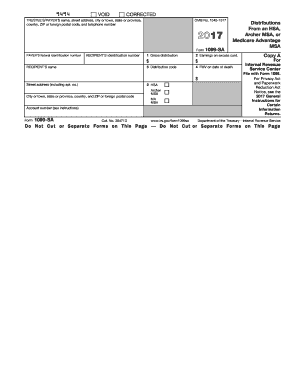
Ributions From an HSA, Archer MSA, or Medicare Advantage MSA RECIPIENT'S identification number RECIPIENT'S name 1 Gross distribution 2 Earnings on excess cont. $ PAYER'S federal identification number $ 3 Distribution code 4 FMV on date of death $ Street address (including apt. no.) City or town, state or province, country, and ZIP or foreign postal code Account number (see instructions) 5 HSA Archer MSA MA MSA Copy A For Internal Revenue Service Center File with Form 1096. For Priv.

This website is not affiliated with IRS

How it works

  1. Open form

    Open form follow the instructions

  2. Easily sign form

    Easily sign the form with your finger

  3. Share form

    Send filled & signed form or save

How to fill out the IRS 1099-SA online

Filling out the IRS 1099-SA form is essential for reporting distributions from health savings accounts, Archer medical savings accounts, or Medicare Advantage MSAs. This guide provides a detailed walkthrough of each section of the form to help you complete it accurately online.

Follow the steps to complete the IRS 1099-SA form online

  1. Click ‘Get Form’ button to obtain the form and open it in your editor.
  2. Enter the trustee's or payer's name and address in the designated fields. This information identifies who is reporting the distributions.
  3. Fill in the recipient's identification number and name. This identifies the person receiving the distribution.
  4. Input the gross distribution amount in Box 1. This is the total amount distributed from the account during the tax year.
  5. Next, enter any earnings on excess contributions in Box 2. This represents earnings on contributions that exceeded allowable limits.
  6. In Box 3, select the appropriate distribution code from the list provided. This code categorizes the nature of the distribution.
  7. If applicable, enter the fair market value (FMV) of the account on the date of death in Box 4. This information is necessary if the account holder has passed away.
  8. Indicate the type of account in Box 5 by marking the corresponding box—HSA, Archer MSA, or MA MSA.
  9. Complete any additional fields such as the payer's federal identification number and the account number if provided.
  10. Once all fields are filled, review the form for accuracy and completeness.
  11. Save changes to your document, and choose to download, print, or share the form as required.

Take the next step and complete your IRS 1099-SA form online today.

Get form

Experience a faster way to fill out and sign forms on the web. Access the most extensive library of templates available.

Related content

About Form 1099-SA, Distributions From an HSA...
Dec 4, 2024 — File Form 1099-SA to report distributions made from a: The distribution...
Learn more
Health Savings Account Tax Forms - Human Resources
1099-SA. HealthEquity provides the 1099-SA tax form if there have been any distributions...
Learn more
2016 Publication 560
Jan 26, 2017 — You must report a contribution to a Roth ac count on Form W2 and a...
Learn more

Related links form

IRS W-7(SP) 2007 IRS W-8 1992 IRS W-8BEN 2017 IRS W-8BEN 2017

Questions & Answers

Get answers to your most pressing questions about US Legal Forms API.

Contact support

A 5498 form may not be generated if no contributions were made to your HSA during the tax year. Additionally, it may not be created if your contributions did not meet the necessary thresholds set by the IRS. If you believe you should have received one, check with your HSA provider for confirmation.

To get your 5498-SA form, you should contact your HSA provider, as they are responsible for issuing this document. They typically send it out by May 31st every year. If you need it sooner, your provider may have an option to view it through their online portal.

In Freetaxusa, you can enter your IRS 1099-SA information by going to the 'Income' section of your tax return. Find the option related to HSA distributions and input the amounts shown on your 1099-SA. This will help ensure your tax return is accurate and compliant with IRS regulations.

You can obtain your IRS 1099-SA form from your HSA administrator. They are required to send it to you by January 31st of the following tax year. If you have not received it, consider logging into your online account or contacting customer support for assistance.

Your 5498-SA may not be available if contributions to your HSA have not been reported by your financial institution. This form is typically available by the end of May. If you do not see it, contact your HSA administrator to ensure they have processed and submitted the necessary information.

You can find your HSA contributions on your bank or financial institution's account statement. Many providers also send annual statements or provide access to online records. Additionally, these contributions should align with the information reported on the IRS 1099-SA form when you file your taxes.

Not receiving a 5498-SA form could mean your HSA contributions did not meet the filing requirements. This form generally reports the contributions made to your HSA during the tax year. If you think you should receive one, check your HSA provider for any discrepancies in contribution records.

To enter your IRS 1099-SA in Drake software, navigate to the 'Income' section of your tax return. Locate the field for 'Distributions from HSAs, Archer MSAs, and Medicare Advantage MSAs,' and input the figures from your 1099-SA form. This process ensures accurate reporting and helps you comply with IRS requirements.

You receive a 5498-SA form because it reports contributions you or your employer made to your health savings account. This form is essential for tracking your contributions throughout the tax year. Keeping this information organized helps you benefit fully from your health savings.

Form 5498 is not the same as the IRS 1099-SA. The 5498 form details contributions to your health savings account, whereas the 1099-SA outlines the distributions you received. This distinction is crucial for accurate tax reporting and understanding your financial situation.

Get This Form Now!

Use professional pre-built templates to fill in and sign documents online faster. Get access to thousands of forms.
If you believe that this page should be taken down, please follow our DMCA take down processhere.
Get IRS 1099-SA
  • Adoption
  • Bankruptcy
  • Contractors
  • Divorce
  • Home Sales
  • Employment
  • Identity Theft
  • Incorporation
  • Landlord Tenant
  • Living Trust
  • Name Change
  • Personal Planning
  • Small Business
  • Wills & Estates
  • Packages A-Z
  • Affidavits
  • Bankruptcy
  • Bill of Sale
  • Corporate - LLC
  • Divorce
  • Employment
  • Identity Theft
  • Internet Technology
  • Landlord Tenant
  • Living Wills
  • Name Change
  • Power of Attorney
  • Real Estate
  • Small Estates
  • Wills
  • All Forms
  • Forms A-Z
  • Other Templates
  • Legal Hub
  • About Us
  • Help Portal
  • Legal Resources
  • Blog
  • Affiliates
  • Contact Us
  • Delete My Account
  • Site Map
  • Industries
  • Forms in Spanish
  • Localized Forms
  • State-specific Forms
  • Forms Kit
  • Real Estate Handbook
  • All Guides
  • Notarize
  • Incorporation services
  • For Consumers
  • For Small Business
  • For Attorneys
  • USLegal
  • FormsPass
  • pdfFiller
  • signNow
  • altaFlow
  • DocHub
  • Instapage
Form Packages
  • Adoption
  • Bankruptcy
  • Contractors
  • Divorce
  • Home Sales
  • Employment
  • Identity Theft
  • Incorporation
  • Landlord Tenant
  • Living Trust
  • Name Change
  • Personal Planning
  • Small Business
  • Wills & Estates
  • Packages A-Z
Form Categories
  • Affidavits
  • Bankruptcy
  • Bill of Sale
  • Corporate - LLC
  • Divorce
  • Employment
  • Identity Theft
  • Internet Technology
  • Landlord Tenant
  • Living Wills
  • Name Change
  • Power of Attorney
  • Real Estate
  • Small Estates
  • Wills
  • All Forms
  • Forms A-Z
  • Other Templates
Customer Service
  • Legal Hub
  • About Us
  • Help Portal
  • Legal Resources
  • Blog
  • Affiliates
  • Contact Us
  • Delete My Account
  • Site Map
  • Industries
  • Forms in Spanish
  • Localized Forms
  • State-specific Forms
  • Forms Kit
Legal Guides
  • Real Estate Handbook
  • All Guides
Prepared for you
  • Notarize
  • Incorporation services
Our Customers
  • For Consumers
  • For Small Business
  • For Attorneys
Our Sites
  • USLegal
  • FormsPass
  • pdfFiller
  • signNow
  • altaFlow
  • DocHub
  • Instapage
Social Media
Call us now toll free:
+1 833 426 79 33
As seen in:
© Copyright 1999-2026 airSlate Legal Forms, Inc. 17 Station Street, Suite 303, Brookline, MA 02445
  • Your Privacy Choices
  • Terms of Service
  • Privacy Notice
  • Content Takedown Policy
  • Bug Bounty Program
IRS 1099-SA
This form is available in several versions.
Select the version you need from the drop-down list below.
2019 IRS 1099-SA
Select form
  • 2019 IRS 1099-SA
  • 2018 IRS 1099-SA
  • 2017 IRS 1099-SA
  • 2016 IRS 1099-SA
  • 2015 IRS 1099-SA
  • 2014 IRS 1099-SA
  • 2013 IRS 1099-SA
  • 2012 IRS 1099-SA
  • 2011 IRS 1099-SA
  • 2010 IRS 1099-SA
Select form