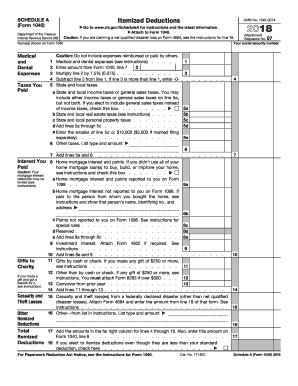
Get Irs 1040 - Schedule A 2018
How it works
-

Open form follow the instructions
-

Easily sign the form with your finger
-

Send filled & signed form or save
How to fill out the IRS 1040 - Schedule A online
Navigating the IRS 1040 - Schedule A form can be challenging, especially when it comes to reporting itemized deductions. This guide provides a comprehensive overview to help users fill out this important tax document online with confidence.
Follow the steps to effectively complete the IRS 1040 - Schedule A online.
- Click ‘Get Form’ button to obtain the form and open it in your editor.
- Enter your name(s) as shown on Form 1040 in the designated field at the top of the form.
- In the 'Medical and Dental Expenses' section, input your total medical and dental expenses in line 1. Be sure to only include expenses not reimbursed or paid by others.
- In line 2, enter the amount from Form 1040, line 7. Multiply this number by 7.5% (0.075) to calculate the deduction threshold.
- Subtract the result from line 2 from the total in line 1. If this amount is negative, enter -0- in the space provided.
- In the 'Taxes You Paid' section, choose between state and local income taxes or general sales taxes for line 5a and check the box if you are opting for sales taxes.
- Complete lines 5b and 5c with your real estate taxes and personal property taxes, then add lines 5a through 5c together in line 5d.
- In line 5e, enter the lesser of the total from line 5d or $10,000 ($5,000 if married filing separately).
- For any other taxes, indicate the type and amount in line 6. Add this amount to the one in line 5e to arrive at the total in line 7.
- In the 'Interest You Paid' section on line 8, report your home mortgage interest and points according to the instructions provided. Complete lines 8a, 8b, and 8c appropriately.
- For charities, enter gifts made by cash or check over $250 in lines 11 or 12 as required, and add the totals in line 14.
- If applicable, add any casualty and theft losses from federally declared disasters in line 15, and specify any other deductions in line 16.
- Finally, add the amounts in the far right column for lines 4 through 16 in line 17, and remember to enter this total on Form 1040, line 8.
- If your itemized deductions are less than your standard deduction but you choose to itemize anyway, check the box in line 18.
- Once completed, you can save your changes, and download, print, or share the form as needed.
Complete your IRS 1040 - Schedule A online today to ensure your itemized deductions are properly recorded.
Get form
Related links form
The new 1040 form for seniors is the IRS 1040 SR, tailored specifically for taxpayers aged 65 and older. This form offers a simplified filing process and larger text for easier reading. It helps seniors claim their deductions efficiently, including those on IRS 1040 - Schedule A, ensuring they receive the full benefits available to them. If you're a senior, consider using uslegalforms to navigate this process smoothly.