Revenue Code Email Subscription Section references are to the Internal Revenue Code unless otherwise noted. Contents General Instructions . . . . . . . . . . . . . . . . . . . . Purpose of Form . . . . . . . . . . . . . . . . . . . Who Can File This Form . . . . . . . . . . . . . . How To File . . . . . . . . . . . . . . . . . . . . . . . User Fee . . . . . . . . . . . . . . . . . . . . . . . . . When To File (Effective Date of Exemption) Filing Assistance . . . . . . . . . . . . . . . . . .
Loading

Open form follow the instructions

Easily sign the form with your finger

Send filled & signed form or save
How to fill out the IRS 1023-EZ Instructions online
This guide provides a comprehensive overview of how to complete the IRS 1023-EZ form online. It aims to simplify the process for organizations seeking tax-exempt status under section 501(c)(3) of the Internal Revenue Code.
Follow the steps to successfully complete the IRS 1023-EZ form online.
- Click ‘Get Form’ button to obtain the form and open it for editing.
- Complete the identification section accurately. Enter your organization’s full name as it appears in the organizing document, along with the mailing address and Employer Identification Number (EIN). Ensure that the details are consistent to avoid discrepancies.
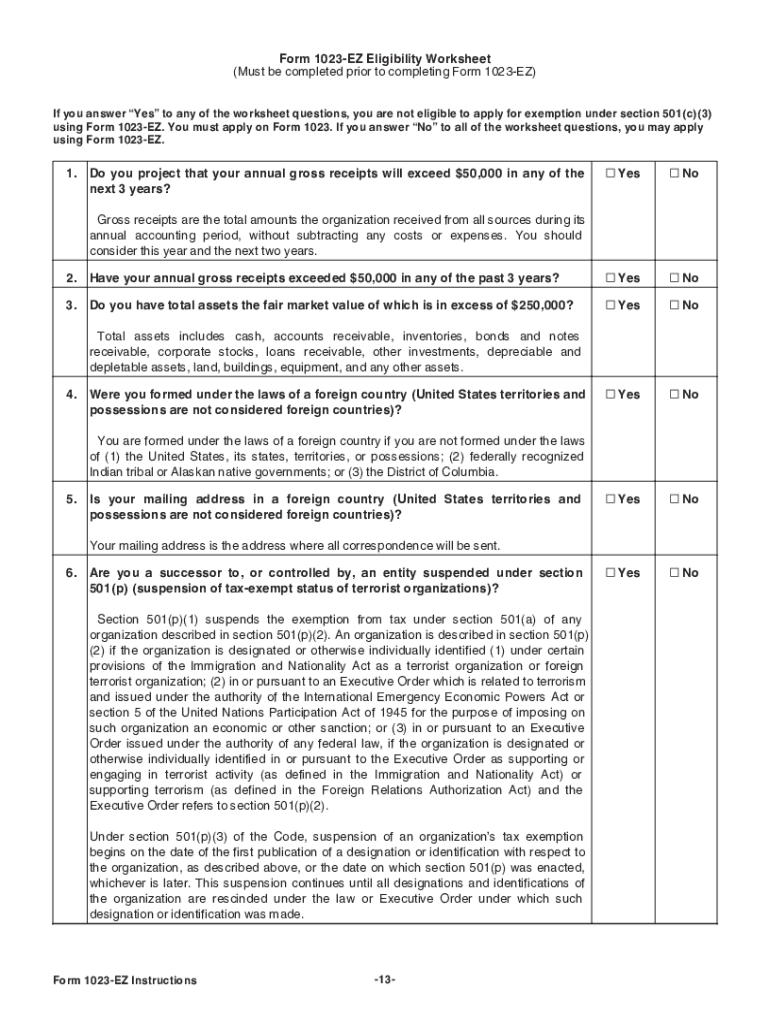
- Fill out the eligibility worksheet to confirm your organization meets the requirements to use Form 1023-EZ. This worksheet is crucial as answering 'Yes' to certain questions means you must file the standard Form 1023 instead.
- Indicate your organization’s structure by selecting the appropriate entity type (e.g., corporation, unincorporated association, or trust) in Part II. Provide the necessary details regarding your formation date and state if required.
- In Part III, describe your organization's specific activities and mission succinctly. Focus on current or planned activities that align with your tax-exempt purposes as defined under section 501(c)(3).
- Complete Part IV to determine your foundation classification. Make sure you check the appropriate box that corresponds to your organization's nature and support base.
- Review the user fee section, ensure the fee is calculated and paid when submitting the application online. Be aware that different fees may apply based on your organization’s classification.
- Sign the application electronically in Part VI. An authorized individual must verify and attest to the truthfulness of the information provided.
- After completing the form, save changes, and review all information for accuracy before submission. You can now download, print, or share your completed form as necessary.
Complete your IRS 1023-EZ form online today to achieve your organization's tax-exempt status.
Experience a faster way to fill out and sign forms on the web. Access the most extensive library of templates available.
Related content
Jan 1, 2025 — Any organization may file Form. 1023 to apply for recognition of exemption...
The information return and exemption application materials must be posted exactly as filed...
Organizations with annual revenues of $50,000 or less and assets of $200,000 or less may...
Get answers to your most pressing questions about US Legal Forms API.
What type of information is required on a 1040EZ form?
The information required on a 1040EZ form includes personal details like your name, address, and Social Security number. Additionally, you will need to report your total income, any tax credits, and the amount you owe or your refund. While this form is no longer used, using IRS 1023-EZ instructions for current forms can guide you through submitting necessary information accurately.
What happens if I use Form 1023-EZ and bring in more than $50,000?
If your organization generates more than $50,000 in revenue after filing Form 1023-EZ, it may need to transition to a different form for tax-exempt status. The IRS will evaluate your situation further based on the new income threshold. Referencing the IRS 1023-EZ instructions will ensure you remain compliant as your income evolves.
How to fill out EZ tax form?
Filling out an EZ tax form involves gathering your income documents and using clear, concise information. The IRS 1023-EZ instructions provide essential steps to ensure that you complete the form without mistakes. Always double-check your entries to confirm accuracy, as this can help prevent future issues.
How long does it take for Form 1023-EZ to be approved?
Typically, the Internal Revenue Service takes about two to four weeks to process Form 1023-EZ. However, this timeline may vary based on demand and your specific submission circumstances. Following the accurate IRS 1023-EZ instructions can help expedite the approval process and reduce delays.
Is 1040EZ the hardest tax form to complete?
The 1040EZ form was designed to simplify the filing process for eligible taxpayers. It was not necessarily the hardest tax form, but it did have limitations. If you find navigating IRS 1023-EZ instructions challenging, platforms like UsLegalForms can provide user-friendly guidance to make the process smoother.
Does the IRS still use the 1040EZ form?
The IRS has discontinued the 1040EZ form starting with the 2020 tax year. Taxpayers now use the redesigned 1040 form, which incorporates the simpler aspects of the 1040EZ. If you're looking for assistance, consider referring to IRS 1023-EZ instructions to understand the current forms available for filing.
How do I fill out a 1040EZ tax return?
To fill out a 1040EZ tax return, you need to gather your income information, such as wages and interest. Then, follow the IRS 1023-EZ instructions to ensure you report your income accurately. Input your filing status and any tax deductions directly on the form. This streamlined approach allows for quicker and more straightforward filing.
What is the difference between 1023 and 1023-EZ?
The main difference between Form 1023 and Form 1023-EZ lies in their complexity and eligibility criteria. Form 1023-EZ is shorter and designed for smaller nonprofits with fewer than $50,000 in gross receipts. In contrast, Form 1023 is a more extensive application requiring detailed financial information. Refer to the IRS 1023-EZ Instructions to determine which form best suits your organization's needs.
How do I get help with Form 1023-EZ?
You can find help with Form 1023-EZ through various resources, including the IRS website, local nonprofits, and consultation services. Many platforms, such as uslegalforms, also offer comprehensive guides that simplify the process. Consider reaching out to professionals who specialize in nonprofit formation. These resources can clarify the IRS 1023-EZ Instructions and ensure your application is correct.
What is the highest compensated employee on Form 1023?
The highest compensated employee must be reported on Form 1023, and this includes any salary exceeding $100,000 annually. This information helps the IRS understand your organization’s financial dynamics. As you complete the form, make sure to accurately list this person's compensation. Refer to the IRS 1023-EZ Instructions for details on how to report this accurately.
Use professional pre-built templates to fill in and sign documents online faster. Get access to thousands of forms.
If you believe that this page should be taken down, please follow our DMCA take down process here.
This form is available in several versions. Select the version you need from the drop-down list below.