Loading
Get Ct Drs Ct-8886 2005
How it works
-

Open form follow the instructions
-

Easily sign the form with your finger
-

Send filled & signed form or save
How to fill out the CT DRS CT-8886 online
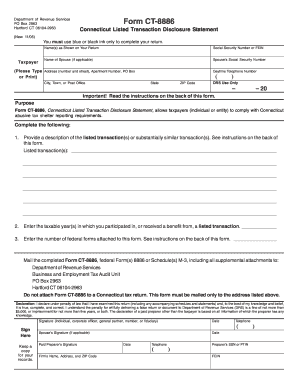
Filling out Form CT-8886, the Connecticut Listed Transaction Disclosure Statement, is essential for taxpayers who have engaged in listed transactions. This guide provides clear instructions to help you navigate the form with ease and ensure compliance with Connecticut's tax regulations.
Follow the steps to successfully complete the CT DRS CT-8886 online.
- Press the ‘Get Form’ button to access the CT-8886 online. This will allow you to fill out the form in an online format.
- Begin by entering the name(s) as shown on your original return. If applicable, include your partner's name as well.
- Input your Social Security Number or Federal Employer Identification Number (FEIN) in the designated field.
- If you have a spouse, enter their name followed by their Social Security Number in the second section provided.
- Type in your current address, including any apartment number or PO Box, and ensure to select your city or town.
- Provide your daytime telephone number for any necessary follow-up communication.
- In the space for listed transactions, describe the details of the transactions you wish to report. Refer to instructions for any necessary identifiers.
- Record the taxable year or years in which you participated in a listed transaction.
- Input the number of federal forms you are attaching to your CT-8886 form.
- After completing the form, review all entries for accuracy and completeness.
- Once verified, save your changes and either print or share the form as needed. Ensure to mail it to the provided Department of Revenue Services address.
Complete your CT DRS CT-8886 form online today to ensure your compliance with Connecticut tax regulations.
Get form
Experience a faster way to fill out and sign forms on the web. Access the most extensive library of templates available.
Form 8886 must be sent to the IRS at the address noted in the form's instructions. If you are submitting any additional state forms, be sure to consult the CT DRS website for any specific mailing instructions related to Connecticut. Using uslegalforms can help clarify where and how to send your forms accurately.
Get This Form Now!
Use professional pre-built templates to fill in and sign documents online faster. Get access to thousands of forms.