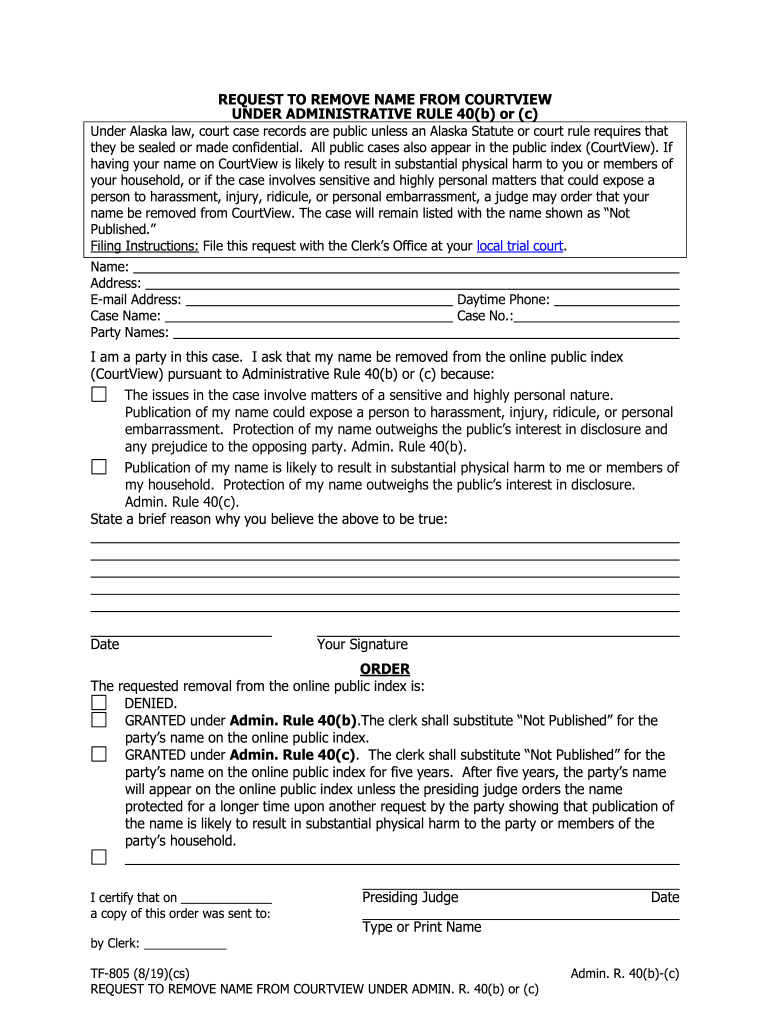
Made confidential. All public cases also appear in the public index (CourtView). If having your name on CourtView is likely to result in substantial physical harm to you or members of your household, or if the case involves sensitive and highly personal matters that could expose a person to harassment, injury, ridicule, or personal embarrassment, a judge may order that your name be removed from CourtView. The case will remain listed with the name shown as Not Published. Filing Instruction.
Loading

Open form follow the instructions

Easily sign the form with your finger

Send filled & signed form or save
How to fill out the AK TF-805 online
The AK TF-805 form is a request to remove a name from CourtView under Administrative Rule 40(b) or (c). This guide aims to assist users in completing the form online efficiently and accurately while ensuring their privacy and safety.
Follow the steps to accurately complete the AK TF-805 form online.
- Click the ‘Get Form’ button to obtain the AK TF-805 and access it in the online editor.
- Begin by filling in your personal information, including your name, address, email address, and daytime phone number. Ensure that all details are accurate to avoid delays.
- Next, provide the case name and case number associated with your request. This information is critical for the court to identify your record.
- In the section that asks if you are a party in this case, confirm your status by checking the appropriate box.
- Indicate your reason for requesting the removal of your name from the online public index. Choose the applicable statements based on your situation regarding sensitive matters or risks of physical harm.
- Briefly state your reason for believing that the release of your name could lead to harassment, injury, or embarrassment. Be concise and clear in your explanation.
- Provide the date of completion, and ensure to include your signature, either digitally if permitted or by printing and signing the document.
- Once you have filled out all required fields, review the form for any errors or incomplete information.
- You can then save changes, download the completed form, or print it for submission at your local trial court's Clerk’s Office.
Take the next step towards protecting your privacy by completing the AK TF-805 online today.
Experience a faster way to fill out and sign forms on the web. Access the most extensive library of templates available.
Related content
TF-805 (5/25). Admin. R. 40(b) & (c). REQUEST TO REMOVE NAME FROM ONLINE ... TrueFiling is...
Courtview Alaska Search By Name. Form TF-805 - Fill Out, Sign Online and Download Fillable...
Use professional pre-built templates to fill in and sign documents online faster. Get access to thousands of forms.
If you believe that this page should be taken down, please follow our DMCA take down process here.