Loading
Get Ct Jd-ap-182 2019-2026
How it works
-

Open form follow the instructions
-

Easily sign the form with your finger
-

Send filled & signed form or save
How to fill out the CT JD-AP-182 online
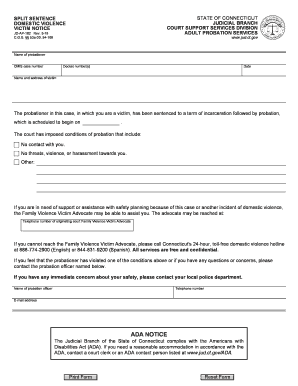
Filling out the CT JD-AP-182 form is essential for ensuring that victims of domestic violence are informed about the conditions imposed on probationers. This guide provides step-by-step instructions for completing the form online to facilitate a smooth process.
Follow the steps to complete the CT JD-AP-182 online form.
- Click ‘Get Form’ button to obtain the form and open it in the editor.
- Enter the name of the probationer in the specified field. This is the individual who has been sentenced and is subject to probation.
- Input the CMIS case number into the designated space. This number is assigned to the case and helps in tracking the probationer's status.
- Fill in the docket number(s) as requested. Docket numbers are unique identifiers for court cases.
- Enter the date the form is being completed. This helps in keeping records current.
- Provide the name and address of the victim in the relevant fields. This information is vital for maintaining communication.
- Review the conditions of probation noted in the form, including no contact with the victim and prohibitions on threats or violence.
- If additional conditions apply, specify them in the designated area.
- If the victim requires assistance, ensure that the contact information for the Family Violence Victim Advocate is correctly filled out.
- For any concerns or reported violations of probation conditions, include the name, telephone number, and email address of the probation officer.
- After reviewing all sections for accuracy, options for saving changes, downloading, printing, or sharing the form will be available.
Complete your documents online to ensure your safety and compliance today.