Loading
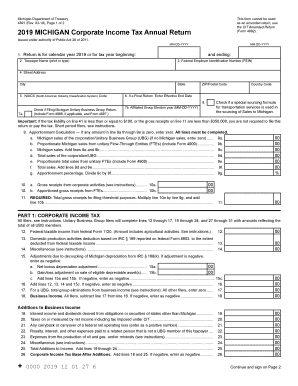
Get Mi Dot 4891 2019
How it works
-

Open form follow the instructions
-

Easily sign the form with your finger
-

Send filled & signed form or save
How to fill out the MI DoT 4891 online
Filling out the MI DoT 4891 online can streamline the process of submitting your corporate income tax return. This guide offers detailed instructions to help users competently navigate the form, ensuring accuracy and compliance.
Follow the steps to successfully complete the MI DoT 4891 form.
- Press the 'Get Form' button to access the MI DoT 4891 and open it in your digital editor.
- Enter the tax year or the beginning and ending dates for your tax period in MM-DD-YYYY format. Ensure this is correctly filled as it is essential for the correct processing of your return.
- Fill in the taxpayer's name and Federal Employer Identification Number (FEIN). Make sure that the name corresponds to the entity filing the tax return.
- Provide the complete street address, including city, state, ZIP code, and relevant country code for accurate mailing and processing.
- Enter the NAICS code relevant to your business activities. This six-digit code categorizes your business operations.
- If applicable, indicate the effective end date for a final return. Check the box if using a special sourcing formula for transportation services.
- Complete the apportionment calculation by filling out lines 9a through 9g, entering values for Michigan sales and total sales as necessary.
- Calculate the gross receipts from corporate activities and apportioned amounts from flow-through entities to reflect on lines 10a and 10b.
- Proceed to fill out the corporate income tax sections, including all necessary declarations and adjustments as prompted by the form.
- Once all fields are accurately filled out, review your entries for accuracy, then save your changes. Options to download, print, or share the completed form will be available.
Complete your MI DoT 4891 form online today to ensure timely filing and compliance with Michigan tax regulations.
Get form
Experience a faster way to fill out and sign forms on the web. Access the most extensive library of templates available.
About the City Partnership Tax Beginning with the 2016 tax year, all annual returns and payments must be sent to the Michigan Department of Treasury. ... Calendar Filers: Due on the 15th day of the 4th month after the tax year ends.
Get This Form Now!
Use professional pre-built templates to fill in and sign documents online faster. Get access to thousands of forms.