Loading
Get Ca De-120 2020-2026
How it works
-

Open form follow the instructions
-

Easily sign the form with your finger
-

Send filled & signed form or save
How to fill out the CA DE-120 online
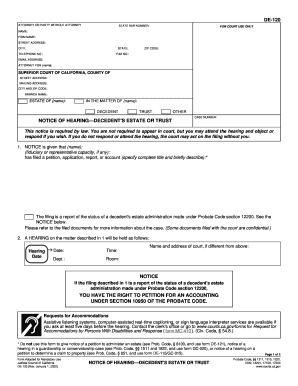
The CA DE-120 form serves as a notice of hearing regarding a decedent's estate or trust in California. This guide provides comprehensive instructions for users to effectively complete the form online, ensuring a smooth and efficient filing process.
Follow the steps to accurately complete the CA DE-120 form online.
- Press the ‘Get Form’ button to access the CA DE-120 and open the document for editing.
- In the top section, fill in your information as the attorney or party without an attorney, including your name, firm name, street address, city, state, telephone number, fax number, and email address. If applicable, indicate the individual you are representing.
- Below, provide details regarding the superior court where your case is filed, including the court's street address, mailing address, city, zip code, and branch name.
- In the 'Estate of' section, enter the name of the decedent. In the 'In the matter of' section, indicate the name of the trust if applicable.
- Specify the case number to identify your matter in the corresponding field.
- In the notice section, state the person’s name who is filing the petition, alongside their fiduciary or representative capacity if any, and include a brief description of the filed document.
- Indicate the date, time, department, and room for the hearing on the matter, as stated in the notice.
- Complete the clerk's certificate of posting if applicable, by entering the posting address and date of posting.
- For the proof of service by mail, complete all required fields, including your address, the date mailed, and any persons served by listing their names and addresses.
- Finally, review the completed form for accuracy, then save any changes made. You can download, print, or share the form as needed.
Take action now to file your CA DE-120 online with confidence.