Loading
Get Hi 2dc05 2020-2026
How it works
-

Open form follow the instructions
-

Easily sign the form with your finger
-

Send filled & signed form or save
How to fill out the HI 2DC05 online
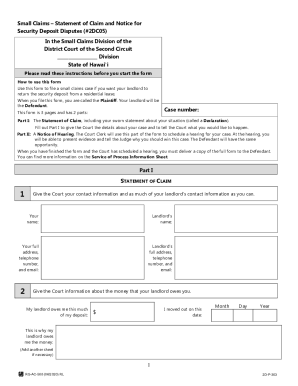
This guide provides clear and supportive instructions for filling out the HI 2DC05 form online, which is used in small claims cases for security deposit disputes in Hawaii. By following these steps, you can effectively prepare your submission and ensure that all required information is accurately included.
Follow the steps to complete your HI 2DC05 form online.
- Click the ‘Get Form’ button to access the HI 2DC05 form and open it in the online editor.
- Begin with Part I: The Statement of Claim. Enter your full name, address, telephone number, and email address in the provided fields.
- Next, fill in your landlord's name and as much of their contact information as possible, including their full address and phone number.
- Provide details about the money owed to you by your landlord. Indicate the exact amount of your security deposit that is owed and the date you moved out.
- State the reasons your landlord owes you this money in the designated field. If needed, add another sheet to further explain your circumstances.
- Review and sign the Declaration, affirming that all information provided is accurate. Include the current date next to your signature.
- Proceed to Part II: Notice of Hearing. Fill in your landlord's name again as required, and leave the remaining sections for court staff to complete.
- Once you have reviewed all fields for accuracy, save your changes. You can then choose to download, print, or share your filled form.
Complete your HI 2DC05 form online today to start your small claims case.
Related links form
Have the exhibit marked. ... Show the exhibit to opposing advocate. ... Ask permission to approach the witness. ... Show the exhibit to the witness. ... Lay the foundation for the exhibit. Move for admission of the exhibit in evidence.