Loading
Get Bankruptcy 16a 2008-2026
How it works
-

Open form follow the instructions
-

Easily sign the form with your finger
-

Send filled & signed form or save
How to fill out the Bankruptcy 16A online
The Bankruptcy 16A form is a crucial document for individuals filing for bankruptcy. This guide provides clear and supportive instructions for completing this form efficiently online.
Follow the steps to fill out the Bankruptcy 16A form correctly
- Click ‘Get Form’ button to obtain the form and open it in the editor.
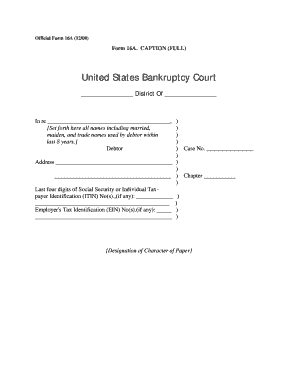
- Fill in the case caption at the top of the form. Include the names you have used over the last eight years, including married names, maiden names, and any trade names.
- Enter the case number assigned to your bankruptcy case in the designated section.
- Provide your address in the specified area, ensuring it is up to date.
- In the section for Social Security or Individual Taxpayer Identification Number, enter the last four digits of your number only.
- If applicable, include your Employer's Tax Identification Number in the relevant section.
- Review all filled sections for accuracy and completeness before proceeding.
- Once satisfied with the form, save your changes, and download a copy for your records. You may also choose to print or share it electronically.
Complete your Bankruptcy 16A form online for a smoother filing process.
To file for Chapter 13 bankruptcy under Bankruptcy 16A, you must have a regular income, unsecured debts below a certain limit, and secured debts within specified parameters. Additionally, you must complete credit counseling before filing. These requirements help in restructuring your debts while allowing you to retain your assets. Consulting with a knowledgeable professional can assist you throughout this process.