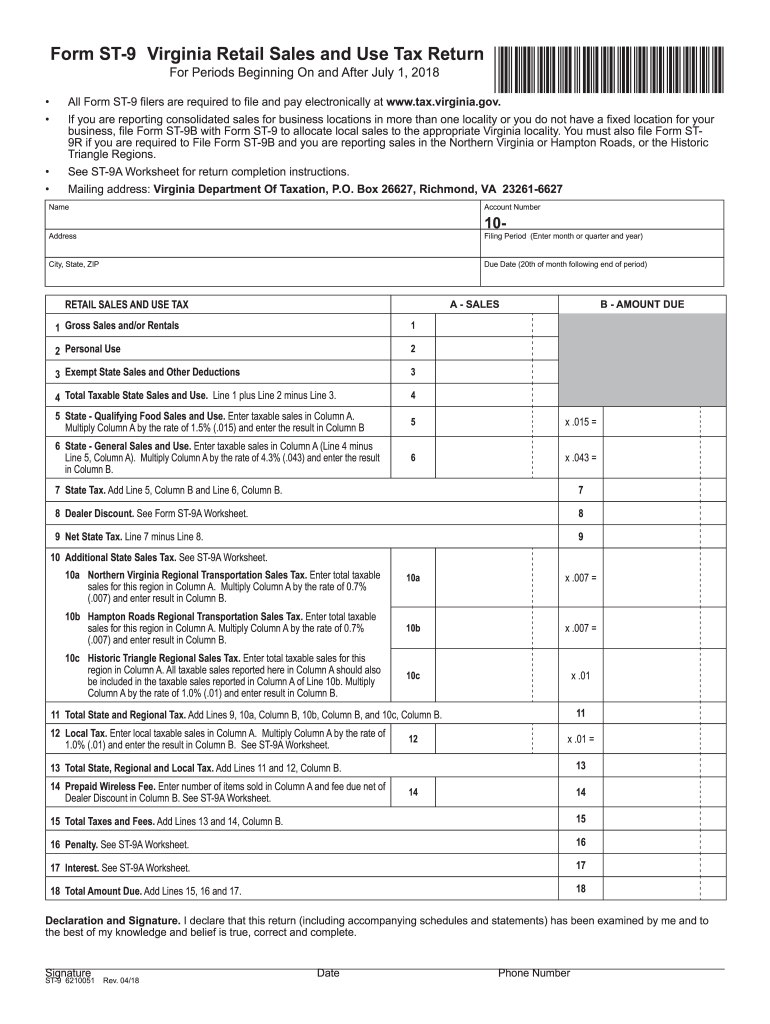
ST-9A Worksheet. 17 18 Total Amount Due. Add Lines 15, 16 and 17. 18 Declaration and Signature. I declare that this return (including accompanying schedules and statements) has been examined by me and to the best of my knowledge and belief is true, correct and complete. Signature ST-9 6210051 Rev. 04/18 Date Phone Number New Tax in Historic Triangle Region Effective July 1, 2018, there is an additional one percent sales and use tax in the Historic Triangle, defined as the City.
Loading

Open form follow the instructions

Easily sign the form with your finger

Send filled & signed form or save
How to fill out the VA DoT ST-9 & ST-9A online
Filling out the Virginia Retail Sales and Use Tax Return (Form ST-9) and its accompanying worksheet (Form ST-9A) can seem daunting, but with clear instructions, this process can be manageable. This guide will help you navigate through each section of the forms, ensuring you provide accurate and complete information.
Follow the steps to successfully fill out the forms online.
- Click ‘Get Form’ button to obtain the form and open it in the editor.
- Enter your name, account number, and address in the designated fields at the beginning of the Form ST-9. Ensure that you include the correct filing period by entering the month or quarter and year of the report.
- Fill out the due date, which is the 20th of the month following the end of the reporting period.
- Proceed to the retail sales and use tax section. Start by entering the 'Gross Sales and/or Rentals' in Line 1, followed by the 'Personal Use' amount in Line 2, if applicable.
- For Line 3, list any 'Exempt State Sales and Other Deductions'. This may include sales that do not incur tax.
- Calculate the 'Total Taxable State Sales and Use' for Line 4 by adding Line 1 and Line 2, then subtracting Line 3.
- Complete Lines 5 and 6 to determine the 'State - Qualifying Food Sales and Use' and 'State - General Sales and Use' respectively by following the multiplication guidelines provided.
- Add the results of Lines 5 and 6 to find the 'State Tax' for Line 7.
- If applicable, deduct any dealer discounts on Line 8 as per the guidelines provided in the ST-9A Worksheet.
- Complete any additional state and local taxes as necessary based on your reporting location.
- Add up all lines for the Total Amount Due in Line 18.
- Finally, declare and sign the form to confirm the accuracy of your information. Record the date and your contact phone number.
- Once all information is complete, you can save your changes, download, print, or share the completed form.
Start filling out your VA DoT ST-9 & ST-9A online today to ensure accurate and timely reporting.
Experience a faster way to fill out and sign forms on the web. Access the most extensive library of templates available.
Related content
noise reduction provided by a dwelling structure it is necessary to measure the noise...
1 Positive Weld Output Receptacle. 2 Negative Weld Output Receptacle. 3 Amperage/Parameter...
Get answers to your most pressing questions about US Legal Forms API.
What is the retail sales and use tax certificate of exemption in Virginia?
The retail sales and use tax certificate of exemption in Virginia allows certain entities, such as nonprofits, to make purchases without paying sales tax. This certificate is crucial for organizations that qualify under the VA DoT ST-9 & ST-9A guidelines. For assistance with applying for this certificate, visit US Legal Forms for detailed resources and templates.
How do I get a tax certificate in Virginia?
In Virginia, you can obtain a tax certificate by contacting your local tax office and providing the necessary details about your tax status. Authorities typically require documentation to verify your claims. The US Legal Forms platform can provide useful templates and guidance on navigating the requirements specific to VA DoT ST-9 & ST-9A.
How do I get a tax certificate from the IRS?
To request a tax certificate from the IRS, you must complete Form 4506-T. This form allows you to access your tax records, including any tax certificates. Look into US Legal Forms for user-friendly resources that can assist you in understanding the VA DoT ST-9 & ST-9A requirements while dealing with the IRS.
How to get a Virginia sales tax ID number?
Getting a Virginia sales tax ID number involves registering your business with the Virginia Department of Taxation. You can do this online or in person, where you will need to provide relevant business details. US Legal Forms can guide you through the required forms and help ensure you meet all criteria related to the VA DoT ST-9 & ST-9A forms.
How do I buy tax delinquent property in Virginia?
To buy tax delinquent property in Virginia, you need to participate in a tax sale auction held by the local government. Be sure to check the available listings, as these properties often have specific conditions attached. Utilizing resources from US Legal Forms can simplify your experience, especially when dealing with VA DoT ST-9 & ST-9A documentation.
How do I get a copy of my tax exempt letter?
To obtain a copy of your tax exempt letter, you need to contact the Virginia Department of Taxation. You may be required to provide specific details like your organization’s information and any identifying numbers related to the VA DoT ST-9 & ST-9A forms. For comprehensive assistance, consider using the US Legal Forms platform, where you can find templates and resources that facilitate the process.
Who qualifies for property tax exemption in Virginia?
Property tax exemption in Virginia typically qualifies organizations and individuals meeting certain criteria, such as non-profits or low-income households. Each type of exemption has its guidelines, and applicants must submit accurate documentation of their eligibility. Understanding the nuances of these exemptions can greatly assist in mitigating tax liabilities. Resources like the VA DoT ST-9 & ST-9A can be beneficial in navigating property tax exemptions.
How to become farm tax exempt in VA?
To become farm tax exempt in Virginia, you must meet specific criteria outlined by the state. Generally, you will need to prove that your property is used for agricultural purposes and submit an application for exemption. Keep thorough records of your agricultural activities as supporting documentation may be required. The VA DoT ST-9 & ST-9A may provide useful insight into the tax exemption process for farms.
What is the ST-9 form?
The ST-9 form is a critical document for claiming exemption from sales and use tax in Virginia. It is primarily used by certain organizations that qualify for tax-exempt status. Ensure that you understand the criteria for eligibility, as submitting an incorrect form can lead to compliance issues. Familiarizing yourself with the VA DoT ST-9 & ST-9A will help clarify the purpose and use of the ST-9 form.
How do I fill out a certificate of exemption?
Filling out a certificate of exemption involves providing accurate information regarding your identity and reason for exemption. You will also need to show proof of eligibility for exemption, such as tax-exempt status. Each section of the certificate must be completed to avoid delays or rejections. For those navigating the VA DoT ST-9 & ST-9A, guidance is readily available through platforms like uslegalforms.
Use professional pre-built templates to fill in and sign documents online faster. Get access to thousands of forms.
If you believe that this page should be taken down, please follow our DMCA take down process here.
This form is available in several versions. Select the version you need from the drop-down list below.