Loading
Get Ia Eform 3.27
How it works
-

Open form follow the instructions
-

Easily sign the form with your finger
-

Send filled & signed form or save
How to fill out the IA eForm 3.27 online
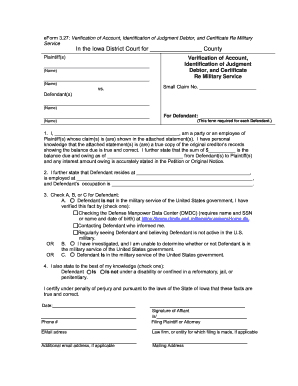
The IA eForm 3.27 is a crucial document for verifying accounts and identifying judgment debtors in Iowa. This guide will provide a step-by-step approach to filling out the form accurately and effectively online.
Follow the steps to complete the IA eForm 3.27.
- Click ‘Get Form’ button to obtain the form and open it in the editor.
- Begin filling out the plaintiff information by entering the names of the plaintiff(s) in the designated fields.
- Next, input the defendant(s) information, including their names, in the appropriate sections.
- In the statement section, provide your name and affirm your position as a party or employee of the plaintiff(s). Include your personal knowledge of the account statements and the true balance due.
- Complete the section detailing the defendant's residence, employment, and occupation by filling in the respective fields.
- Indicate whether the defendant is in military service by checking the relevant box (A, B, or C) and include any verification details as required.
- Specify whether the defendant is under a disability or confined by checking the appropriate option.
- Finally, fill in the date, your contact information, and provide your signature in the designated area.
- Save your changes, and then you may choose to download, print, or share the form as needed.
Complete your IA eForm 3.27 online today and ensure your documentation is accurate.
Related links form
To file an answer with the court in Iowa, complete the IA eForm 3.27 accurately to detail your responses to the claims. After completing the form, submit it to the court clerk where your case is filed. You may also need to serve a copy of your answer to the opposing party, ensuring they are aware of your position. Following these steps diligently can significantly improve your chances of a favorable outcome.