Loading
Get Hi Dot N-848 2012
How it works
-

Open form follow the instructions
-

Easily sign the form with your finger
-

Send filled & signed form or save
How to fill out the HI DoT N-848 online
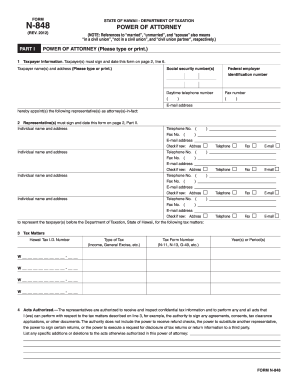
Filling out the HI DoT N-848 form online can simplify the process of granting power of attorney for tax matters in Hawaii. This guide provides a clear and supportive approach to help you complete the form accurately and efficiently.
Follow the steps to successfully complete the form online.
- Click ‘Get Form’ button to access the form and open it in your preferred online editor. This step allows you to start filling out the document as needed.
- In Part I, begin with your taxpayer information. Clearly enter your name(s) and address, as well as your social security number(s) and federal employer identification number. Make sure your contact details, such as your daytime telephone number and email address, are correct as these are essential for communication.
- Continue in Part I by designating your representative(s). Input their names and addresses, along with their telephone numbers, fax numbers, and email addresses. Ensure to check any boxes indicating new contact details, as applicable.
- Specify the tax matters in line 3. Enter your Hawaii tax I.D. number and the type of tax you are addressing (such as income tax or general excise tax). List the appropriate tax form numbers and the relevant years or periods that the power of attorney will cover.
- In line 4, review the acts authorized. Acknowledge the permissions being given to your representative(s) and list any specific additions or limitations you may have regarding their authority.
- For line 5, understand that by submitting this power of attorney, any previous powers of attorney will be revoked unless specified otherwise. Make sure to attach copies of any prior documents you wish to remain effective.
- In the signature section (Part II), ensure all required signatories have signed and dated the form. This includes the taxpayer(s) and any representatives. Confirm that you have the authority to sign if representing a business entity.
- Once everything is accurately filled out, you can save, download, print, or share the form as needed. Make sure to keep a copy for your records.
Start completing your HI DoT N-848 online today for a streamlined tax representation process.
Get form
Experience a faster way to fill out and sign forms on the web. Access the most extensive library of templates available.
Filing an amended Hawaii state tax return requires you to complete the HI DoT N-848 form accurately. Ensure that you include all necessary information, such as the changes you are making to your previous return. It is advisable to monitor your submission to confirm that it is processed timely.
Get This Form Now!
Use professional pre-built templates to fill in and sign documents online faster. Get access to thousands of forms.