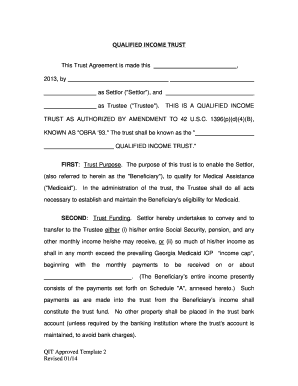
Get Ga Qit Approved Template 2 2014-2026
How it works
-

Open form follow the instructions
-

Easily sign the form with your finger
-

Send filled & signed form or save
How to fill out the GA QIT Approved Template 2 online
Filling out the GA QIT Approved Template 2 is a vital step for individuals seeking to establish a Qualified Income Trust to qualify for Medicaid. This guide provides clear instructions to ensure users can complete the form accurately and efficiently.
Follow the steps to fill out the GA QIT Approved Template 2 online.
- Click ‘Get Form’ button to obtain the form and open it in the online editor.
- Identify the Settlor section, where you will enter the full name of the person establishing the trust. Ensure accuracy in spelling and formatting.
- Locate the Trustee section. Enter the name of the individual or entity that will manage the trust. Confirm that the trustee understands their responsibilities.
- Fill in the Trust Purpose section, clarifying that the trust is to enable the Settlor to qualify for Medical Assistance. Make sure to mention the relevant legal reference, 'OBRA '93.'
- In the Trust Funding section, indicate how the Settlor will contribute income to the trust. Specify monthly income details, including Social Security and pensions, following the income cap regulations.
- Complete the Distributions During Beneficiary's Lifetime section, specifying how the trustee will manage distributions. Be clear about permissible expenses like medical costs and personal needs.
- Review the Irrevocability clause to understand the constraints on amending the trust, detailing any conditions under which amendments may occur.
- Enter the name of the initial Trustee in the appropriate section. If necessary, provide the name of any successor Trustee.
- Complete the Termination section by explaining the conditions under which the trust will end, particularly the distribution process for any remaining assets.
- Fill in the Trustee's Powers section, which outlines the authority granted to the Trustee under the law.
- Review the Law to Govern clause, ensuring it specifies that Georgia law will apply.
- After filling out all necessary fields, save your changes, and prepare to download, print, or share the completed document as required.
Start filling out the GA QIT Approved Template 2 online today to ensure your Medicaid eligibility.
Related links form
QIT funds can be used to cover allowable expenses such as medical costs, housing costs, and necessities deemed appropriate under Medicaid guidelines. This account can also serve as a financial safety net, providing funds for any required out-of-pocket expenses. By leveraging the functionality of the GA QIT Approved Template 2, you can better manage how these funds are utilized, ensuring you maintain compliance while addressing your financial needs. Understanding these options empowers you to make informed financial decisions.