Loading
Form preview
  • US Legal Forms
  • Form Library
  • Tax Forms
  • Connecticut Tax Forms
  • Ct Tpg-138 2018

Get Ct Tpg-138 2018

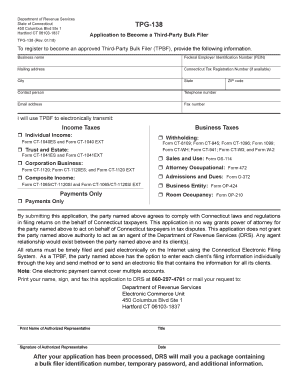
Department of Revenue Services State of Connecticut 450 Columbus Blvd Ste 1 Hartford CT 06103-1837 TPG-138 Rev. 01/18 TPG-138 Application to Become a Third-Party Bulk Filer To register to become an approved Third-Party Bulk Filer TPBF provide the following information. Business name Federal Employer Identification Number FEIN Mailing address Connecticut Tax Registration Number if available City State Contact person Telephone number Email address Fax number ZIP code I will use TPBF to electronica.

How it works

  1. Open form

    Open form follow the instructions

  2. Easily sign form

    Easily sign the form with your finger

  3. Share form

    Send filled & signed form or save

How to fill out the CT TPG-138 online

Filling out the CT TPG-138 form online is essential for those looking to register as a third-party bulk filer in Connecticut. This guide provides clear, step-by-step instructions to help you navigate the form with ease.

Follow the steps to accurately complete the CT TPG-138 application.

  1. Click the ‘Get Form’ button to obtain the form and open it in your preferred editor.
  2. Begin by entering your business name in the designated field. Ensure the name is spelled correctly and matches official documents.
  3. Provide your Federal Employer Identification Number (FEIN) in the next field. This number is crucial for tax purposes.
  4. Next, fill in your mailing address, including the street, city, state, and ZIP code, ensuring all information is accurate.
  5. If you have a Connecticut Tax Registration Number, include it in the specified section. If you do not have one, you may leave this field blank.
  6. Identify the contact person for the application by entering their name and providing their telephone number, email address, and fax number.
  7. Select the categories for which you will use the TPBF to electronically transmit information. You will need to check the appropriate boxes for income taxes, business taxes, and any additional forms as applicable.
  8. Read the agreement statement carefully. By submitting this application, you affirm compliance with Connecticut laws regarding tax filings.
  9. Print your name, sign, and date the document in the respective fields. Ensure the signature is that of the authorized representative.
  10. Finally, fax the completed form to DRS at 860-297-4761 or mail it to the provided address, ensuring you send it to the Department of Revenue Services, Electronic Commerce Unit.

Complete your CT TPG-138 application online today and ensure timely filing for your clients.

Get form

Experience a faster way to fill out and sign forms on the web. Access the most extensive library of templates available.

Related content

FORM TPG-138 is now obsolete.
FORM TPG-138 is now obsolete. The TSC (Taxpayer Service Center) is no longer processing...
Learn more
Private Equity's Overleveraging of Portfolio...
by S Agathis · 2016 · Cited by 5 — According to emails cited by Judge Glenn in his...
Learn more
Service Manual TDS 420A, TDS 430A & TDS 460A ...
Tektronix warrants that the products that it manufactures and sells will be free from...
Learn more

Related links form

OR DoR 40N 2015 OR DoR 40N 2014 OR DoR 40N 2009 OR DoR 41 2015

Questions & Answers

Get answers to your most pressing questions about US Legal Forms API.

Contact support

Any individual or entity earning income in Connecticut must file a CT income tax return, regardless of where they reside. This includes residents, part-year residents, and non-residents who earn income in the state. Understanding your filing requirements is crucial, and you can find more information in CT TPG-138.

To set up tax withholding in Connecticut, you must complete the CT W-4 form and submit it to your employer. This form allows you to specify how much tax will be withheld from your paycheck. It's crucial to periodically review your withholding to avoid any surprises at tax time, as advised in CT TPG-138.

Yes, you can file your CT tax return online through the Connecticut Department of Revenue Services website. Online filing offers a convenient and fast way to submit your tax documents, and it often results in quicker processing times. Be sure to check details provided in CT TPG-138 for any specific electronic filing requirements.

Choosing the correct withholding code in Connecticut depends on your employment status and anticipated income. It's important to review the options provided on the CT W-4 form, which reflects the state tax requirements. For precise information on withholding codes, you can refer to CT TPG-138 or consult with a tax professional.

To obtain a CT state tax ID number, you must first complete the application process through the Connecticut Department of Revenue Services. You can submit your application online or via mail. This number is essential for business activities in the state, as it helps you manage taxes and comply with regulations, aligning with the guidance found in CT TPG-138.

To fill out a joint declaration form successfully, gather all necessary information, such as both partners' names, incomes, and social security numbers. Then, carefully read each section and enter the required data accurately. Make sure to consider any joint deductions or allowances that apply to your situation. For clarification and assistance, refer to the details outlined in CT TPG-138.

Filling out a withholding allowance form begins with verifying your personal details. After that, you'll assess your eligibility for allowances based on factors such as your income, family size, and tax credits. It's essential to be accurate, as this directly impacts your tax withholdings. Utilize CT TPG-138 for detailed instructions to guide you through the form.

To correctly fill out your W4, start by providing basic personal details like your name and Social Security number. Next, evaluate your tax situation, including your marital status and number of dependents, to determine the number of allowances to claim. Resources like CT TPG-138 offer guidelines and examples, making the process easier for you.

Completing the CTW4 form is straightforward when you follow the provided instructions. Begin by entering your personal information, including your name and address. Then, accurately report your allowances based on your situation, such as dependents or deductions. Refer to CT TPG-138 to ensure compliance and maximizing your withholding allowances.

Form CT-W4, Employee's Withholding Certificate, provides your employer with the necessary information to withhold the correct amount of Connecticut income tax from your wages to ensure that you will not be underwithheld or overwithheld.

Get This Form Now!

Use professional pre-built templates to fill in and sign documents online faster. Get access to thousands of forms.
If you believe that this page should be taken down, please follow our DMCA take down processhere.
Get CT TPG-138
  • Adoption
  • Bankruptcy
  • Contractors
  • Divorce
  • Home Sales
  • Employment
  • Identity Theft
  • Incorporation
  • Landlord Tenant
  • Living Trust
  • Name Change
  • Personal Planning
  • Small Business
  • Wills & Estates
  • Packages A-Z
  • Affidavits
  • Bankruptcy
  • Bill of Sale
  • Corporate - LLC
  • Divorce
  • Employment
  • Identity Theft
  • Internet Technology
  • Landlord Tenant
  • Living Wills
  • Name Change
  • Power of Attorney
  • Real Estate
  • Small Estates
  • Wills
  • All Forms
  • Forms A-Z
  • Form Library
  • Legal Hub
  • About Us
  • Help Portal
  • Legal Resources
  • Blog
  • Affiliates
  • Contact Us
  • Delete My Account
  • Site Map
  • Industries
  • Forms in Spanish
  • Localized Forms
  • State-specific Forms
  • Forms Kit
  • Real Estate Handbook
  • All Guides
  • Notarize
  • Incorporation services
  • For Consumers
  • For Small Business
  • For Attorneys
  • USLegal
  • FormsPass
  • pdfFiller
  • signNow
  • altaFlow
  • DocHub
  • Instapage
Form Packages
  • Adoption
  • Bankruptcy
  • Contractors
  • Divorce
  • Home Sales
  • Employment
  • Identity Theft
  • Incorporation
  • Landlord Tenant
  • Living Trust
  • Name Change
  • Personal Planning
  • Small Business
  • Wills & Estates
  • Packages A-Z
Form Categories
  • Affidavits
  • Bankruptcy
  • Bill of Sale
  • Corporate - LLC
  • Divorce
  • Employment
  • Identity Theft
  • Internet Technology
  • Landlord Tenant
  • Living Wills
  • Name Change
  • Power of Attorney
  • Real Estate
  • Small Estates
  • Wills
  • All Forms
  • Forms A-Z
  • Form Library
Customer Service
  • Legal Hub
  • About Us
  • Help Portal
  • Legal Resources
  • Blog
  • Affiliates
  • Contact Us
  • Delete My Account
  • Site Map
  • Industries
  • Forms in Spanish
  • Localized Forms
  • State-specific Forms
  • Forms Kit
Legal Guides
  • Real Estate Handbook
  • All Guides
Prepared for you
  • Notarize
  • Incorporation services
Our Customers
  • For Consumers
  • For Small Business
  • For Attorneys
Our Sites
  • USLegal
  • FormsPass
  • pdfFiller
  • signNow
  • altaFlow
  • DocHub
  • Instapage
Social Media
Call us now toll free:
+1 833 426 79 33
As seen in:
© Copyright 1999-2026 airSlate Legal Forms, Inc. 3720 Flowood Dr, Flowood, Mississippi 39232
  • Your Privacy Choices
  • Terms of Service
  • Privacy Notice
  • Content Takedown Policy
  • Bug Bounty Program
CT TPG-138
This form is available in several versions.
Select the version you need from the drop-down list below.
2020 CT TPG-138
Select form
  • 2020 CT TPG-138
  • 2018 CT TPG-138
  • 2008 Tpg 138 2008 Form
Select form