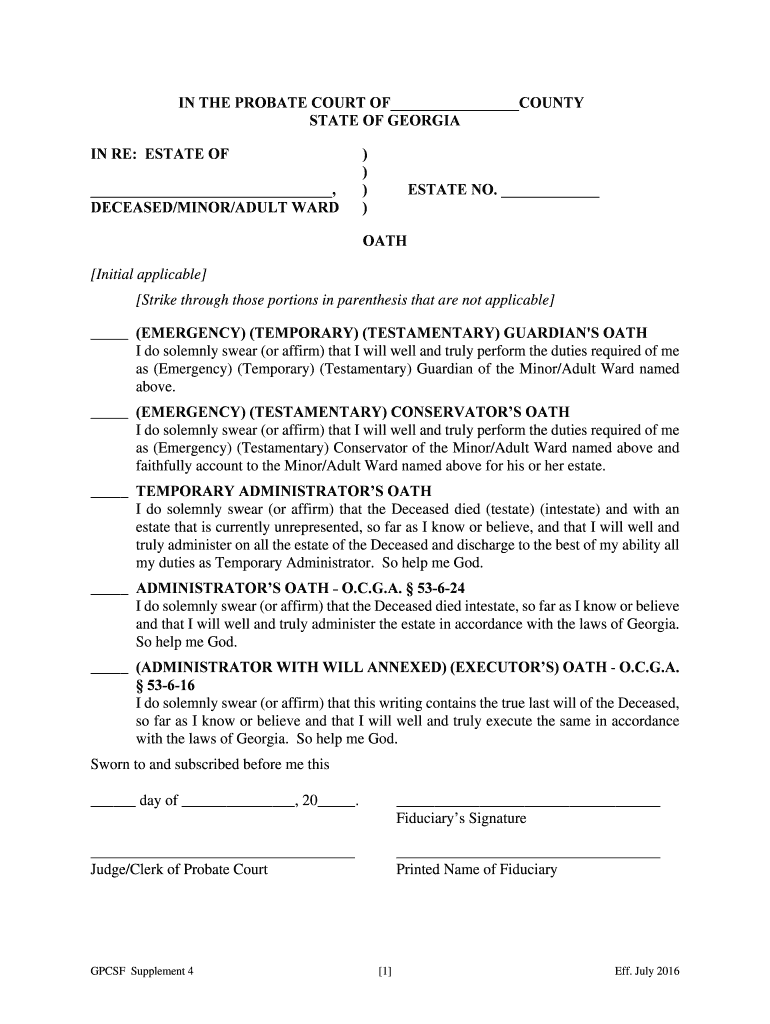
Strike through those portions in parenthesis that are not applicable (EMERGENCY) (TEMPORARY) (TESTAMENTARY) GUARDIAN'S OATH I do solemnly swear (or affirm) that I will well and truly perform the duties required of me as (Emergency) (Temporary) (Testamentary) Guardian of the Minor/Adult Ward named above. (EMERGENCY) (TESTAMENTARY) CONSERVATOR S OATH I do solemnly swear (or affirm) that I will well and truly perform the duties required of me as (Emergency) (Testamentary) Conservator.
Loading

Open form follow the instructions

Easily sign the form with your finger

Send filled & signed form or save
How to fill out the GA GPCSF Supplement 4 online
Filling out the GA GPCSF Supplement 4 is an important step in managing guardianship and conservatorship responsibilities. This guide provides clear, step-by-step instructions to help users complete the form accurately and effectively online.
Follow the steps to complete the GA GPCSF Supplement 4 online
- Click the ‘Get Form’ button to access the GA GPCSF Supplement 4 and open it in your document editor.
- Begin by entering the name of the county in which the probate court is located at the designated area.
- Input the name of the deceased, minor, or adult ward in the specified section of the form.
- Fill in the estate number where indicated. If you do not have one, you may leave this blank or consult the probate court for guidance.
- Select the applicable oath by checking the appropriate box for Emergency, Temporary, or Testamentary Guardian's Oath, Conservator’s Oath, Temporary Administrator’s Oath, Administrator’s Oath, or Executor’s Oath.
- If applicable, strike through any non-relevant options in parentheses that do not apply to your situation.
- Include the date in the provided space when you complete the oath.
- Sign your name as the fiduciary in the designated area.
- Provide the printed name of the fiduciary beneath the signature.
- Lastly, either save your changes, download the completed form, print it for submission, or share it with the appropriate parties as required.
Complete your GA GPCSF Supplement 4 online to efficiently manage your probate process.
Experience a faster way to fill out and sign forms on the web. Access the most extensive library of templates available.
Related content
Page 1. GPCSF Supplement 4. [1]. Eff. July 2021. IN THE PROBATE COURT OF. COUNTY. STATE OF...
At the same time, he strongly urges all Probate Judges to ensure that an Application...
Get answers to your most pressing questions about US Legal Forms API.
What is the purpose of a letter of administration?
A Letter of Administration authorizes an individual to manage and distribute a deceased person's estate. This document is essential for settling debts, paying taxes, and transferring assets according to the law. Understanding the role of this letter is crucial, and the GA GPCSF Supplement 4 can clarify its importance and the legal responsibilities that come with it. Having this documentation ensures proper administration of the estate.
What documents do I need for a letter of administration?
To obtain a Letter of Administration in Georgia, you generally need the decedent's death certificate, a completed petition form, and any relevant wills or trust documents. Additionally, you may need information about the estate's assets and debts. The GA GPCSF Supplement 4 provides comprehensive guidance on gathering and organizing these documents, which simplifies the process. Ensuring you have everything ready helps avoid delays.
How to complete Letters of Administration?
Completing Letters of Administration requires you to fill out specific forms detailing the decedent's assets and your relationship to them. You must submit these forms to the probate court along with any required fees. The GA GPCSF Supplement 4 serves as a valuable resource, offering tips and templates for accurate completion. Following these guidelines ensures your application is processed efficiently.
How to fill out paperwork for probate?
To fill out probate paperwork, start by gathering necessary documents like the will and death certificate. You will need to complete forms, such as the Petition for Probate and the Letters of Administration. The GA GPCSF Supplement 4 can help as it outlines the required documentation and steps, making the process easier for you. Accurate completion of these forms is crucial for a smooth probate process.
How to fill out probate inventory?
Filling out a probate inventory in Georgia involves listing all of the decedent's assets, their estimated values, and any debts owed. You will need to ensure accuracy and completeness within your inventory document. Utilizing resources like the GA GPCSF Supplement 4 can simplify this process by providing clear guidance. It's essential to submit this document to the probate court within the specified timeline.
How much does an estate have to be worth to go to probate in Georgia?
In Georgia, an estate must be valued at more than $10,000 to go through probate. This includes all types of property such as real estate, bank accounts, and personal belongings. If an estate's value is below this threshold, the process may not be necessary. However, understanding the implications of GA GPCSF Supplement 4 can clarify your options.
How to fill out petition for Letters of Administration in Georgia?
To fill out a petition for Letters of Administration in Georgia, you must provide information about the deceased, the heirs, and the asset details. It's essential to follow the correct forms and procedures to ensure the petition is valid. The GA GPCSF Supplement 4 can be an excellent guide to help you through the process effectively.
What is a will without administration?
A will without administration refers to a situation where the will exists but does not require a formal probate process. This often happens when all assets can be directly distributed to heirs without court intervention. For more information on such scenarios, GA GPCSF Supplement 4 serves as a valuable resource.
How to avoid probate in Georgia?
There are several strategies to avoid probate in Georgia, such as establishing a living trust, naming beneficiaries on accounts, and owning property jointly with rights of survivorship. Each approach has its own requirements and implications. The GA GPCSF Supplement 4 offers comprehensive guidance on how to effectively plan to avoid probate.
What is a no administration necessary order in Georgia?
A no administration necessary order allows the estate to be settled without the need for formal estate administration. This is typically granted when the estate's total value falls below certain limits, making full probate unnecessary. For further clarification on the process, the GA GPCSF Supplement 4 provides insights on eligibility and procedures.
Use professional pre-built templates to fill in and sign documents online faster. Get access to thousands of forms.
If you believe that this page should be taken down, please follow our DMCA take down process here.