Loading
Get Ga Gpcsf 1 2016-2026
How it works
-

Open form follow the instructions
-

Easily sign the form with your finger
-

Send filled & signed form or save
How to fill out the GA GPCSF 1 online
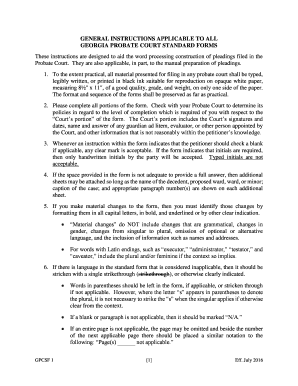
This guide provides clear and comprehensive instructions for filling out the GA GPCSF 1 form online. Whether you are familiar with legal documents or not, our step-by-step approach ensures that you can complete the form accurately and efficiently.
Follow the steps to successfully complete the GA GPCSF 1 form online.
- Press the ‘Get Form’ button to access the GA GPCSF 1 form and open it for editing.
- Begin by filling out your personal information in the respective fields, ensuring all entries are clear and legible.
- Complete all required sections of the form, paying attention to any specific instructions provided. If a section does not apply to your situation, mark it as ‘N/A’.
- If additional space is needed for responses, attach extra sheets with your name, case caption, and paragraph numbers clearly noted.
- If you need to make material changes to the content, clearly indicate these changes using capital letters, bold formatting, and underlining.
- Handwrite your initials in the areas that require them, as typed initials will not be accepted.
- Once all fields are completed, review the form to ensure accuracy, then save your changes.
- You can download, print, or share the completed form as needed for your records or submission.
Complete the GA GPCSF 1 online today to ensure your document is filed properly.
While it is not mandatory to hire an attorney for probate court in Georgia, having legal guidance can simplify the process significantly. An attorney can provide valuable insights, help with complex situations, and ensure all paperwork is completed correctly. If you prefer a more hands-on approach, you may consider using GA GPCSF 1 to assist with your self-representation.