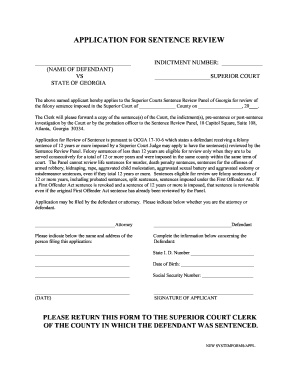
Get Ga Application For Sentence Review
How it works
-

Open form follow the instructions
-

Easily sign the form with your finger
-

Send filled & signed form or save
How to fill out the GA Application for Sentence Review online
The GA Application for Sentence Review is a crucial document for individuals seeking a review of their felony sentence imposed by a Superior Court in Georgia. This guide provides users with clear and detailed instructions for completing the application online, ensuring a smooth process for those with varying levels of legal experience.
Follow the steps to complete the GA Application for Sentence Review online.
- Press the ‘Get Form’ button to access the GA Application for Sentence Review form and open it in your online editor.
- Fill in the name of the defendant at the top of the form.
- Provide the indictment number in the specified field.
- State the name of the Superior Court where the sentence was imposed.
- Indicate the County where the sentence occurred.
- Insert the date when the sentence was imposed.
- Specify whether you are applying for sentence review as the defendant or as their attorney.
- Complete the personal information for the defendant, including State I.D. number, date of birth, and social security number.
- Sign the application to validate your request.
- Submit the completed application by returning it to the Superior Court Clerk of the county where the defendant was sentenced.
Complete your GA Application for Sentence Review online today.
Related links form
Writing a sentence modification letter requires clarity and sincerity. Begin by stating your request and the reasons behind it, focusing on personal growth or changes in circumstances. Be sure to include any supporting documentation, such as character references or proof of rehabilitation, to strengthen your case. Making use of the GA Application for Sentence Review can guide you in crafting a compelling letter that meets court standards.